
A dual monitor setup doubles your screen space. It also doubles the number of arms, clamps, cables, and balance issues you need to deal with. Most single-monitor mounts work fine on their own, but pairing two of them side by side often leads to uneven height, wasted desk space, and arms that collide behind the screens. A purpose-built dual mount solves this from the start. This article compares the brands that do dual screen wall mounts well, and breaks down what to look for before you buy.
Our Picks
- Best overall: Thundertech DA-2 Dual Monitor Wall Mount
- Best build quality: Ergotron LX Pro Wall Dual Direct Arm
- Best budget: HUANUO WDS1 Dual Monitor Wall Mount
- Highest weight capacity: Mount-It! MI-12010 Dual Monitor Wall Mount
What to Look for in a Dual Monitor Wall Mount
Not every dual mount is designed the same way. Before comparing brands, it helps to know which specs actually matter for a two-screen setup.
Weight capacity per arm. A dual mount with a 30 lb total rating means 15 lb per side. Most 27-inch monitors weigh 10–14 lb, so headroom matters. Always check the per-arm number, not just the total.
Independent arm adjustment. Both screens need to move separately in height, tilt, and swivel. Some budget mounts use a single crossbar with fixed positions, which locks you into a symmetrical layout even if your workflow needs one screen higher or angled.
VESA compatibility. 75×75 and 100×100 are the standard patterns for most monitors up to 32 inches, and all four mounts in this roundup support both. For larger or unusual displays, verify the exact VESA pattern on the product page rather than assuming support beyond 100×100.
Cable management. Two monitors mean twice the cables. Integrated cable channels along each arm keep things from becoming a mess behind the screens. This sounds minor until you’re staring at six cables dangling behind two floating monitors.
Wall plate footprint. A dual mount that requires two separate drilling points or an oversized plate limits where you can install it. Compact single-plate designs give you more placement flexibility, especially in smaller offices or rooms with windows close to the desk.
Best overall dual monitor wall mount
Thundertech DA-2 Dual Monitor Wall Mount
A compact wall-mount dual arm that covers the most common screen sizes and weights at a competitive price point.
The Thundertech DA-2 is a mechanical dual-arm wall mount built for two screens up to 32 inches. Each arm operates independently with height, tilt, and swivel adjustment, so you can position each monitor exactly where your workflow needs it without one arm restricting the other.
What sets the DA-2 apart for dual setups is the wall plate footprint. Both arms anchor to a single compact plate, which means fewer holes in your wall and a cleaner installation compared to mounts that require two separate drilling points. The overall build feels solid for the price bracket, with joints that hold position after adjustment without gradual drift.
At 17.6 lb per arm, the DA-2 handles most 27-inch and 32-inch monitors with reasonable headroom. For a primary workstation running two standard-size screens, it hits the practical sweet spot between capability and cost.
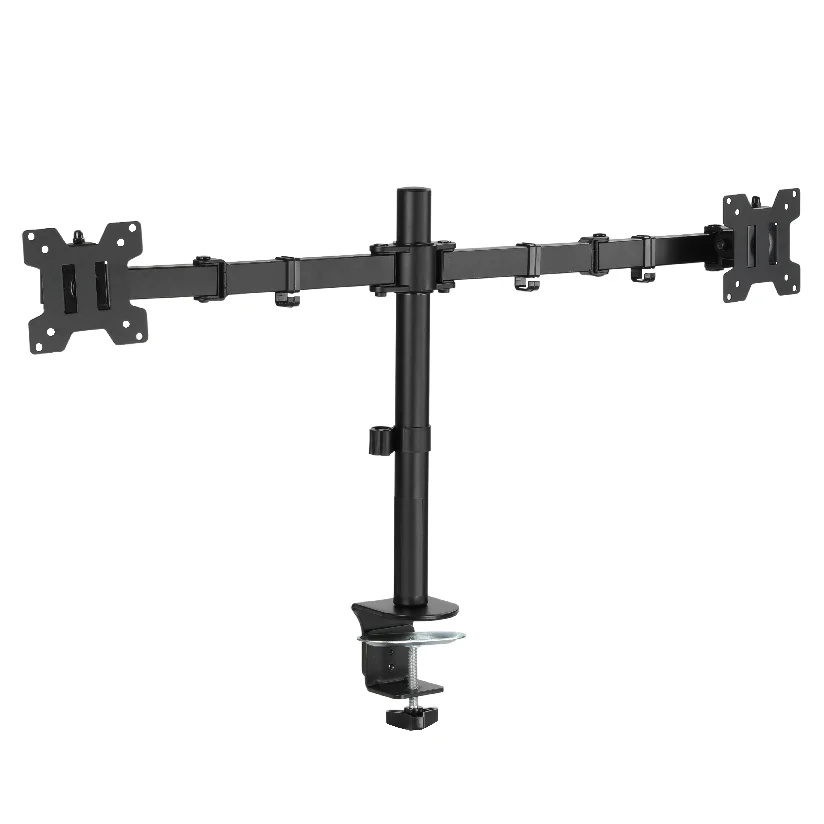
Supported monitor size: up to 32 inches
Supported monitor weight: up to 17.6 lb (8 kg) per arm
VESA compatibility: 100×100
Mount type: Mechanical dual arm
Wall plate: Single compact plate
Best build quality for smaller screens
Ergotron LX Pro Wall Dual Direct Arm
Premium build and the smoothest arm movement in this roundup, optimized for screens up to 24 inches.
Ergotron is a well-established name in ergonomic mounting, and the LX Pro Wall Dual Direct Arm is their current dual-screen wall-mount option. Each arm supports 7–20 lb, with a constant-force spring mechanism that delivers noticeably smoother repositioning than the mechanical joints on most competitors.
The key limitation to know upfront: this mount is rated for screens up to 24 inches. If you’re running 27-inch or 32-inch panels, the LX Pro Dual is not the right fit. But for users whose workflow runs on two 22-to-24-inch monitors (common in trading desks, development setups, and reception counters), the Ergotron’s precision and durability are hard to beat. It also comes with a 10-year warranty.
Pricing sits at $155–$285 MSRP depending on configuration, which is higher than Thundertech or HUANUO but not the $400+ territory that Ergotron’s single-arm flagships sometimes reach.
Supported monitor size: up to 24 inches
Supported monitor weight: 7–20 lb per arm
VESA compatibility: 75×75, 100×100
Mount type: Constant-force spring dual arm
Extended reach: 25 inches (64 cm)
Best budget option
HUANUO WDS1 Dual Monitor Wall Mount
Matches the Thundertech on screen size and weight capacity at a lower price. A strong pick if budget is the priority.
The HUANUO WDS1 supports two screens up to 32 inches at 17.6 lb per arm, which puts it on par with the Thundertech DA-2 on paper. VESA compatibility covers 75×75 and 100×100. The product page also notes compatibility with wood studs, solid concrete, and brick walls, which gives it a wider installation range than some competitors that only spec for drywall over wood framing.
Where the WDS1 falls short of the Thundertech is in the details you notice over time. The joints may require more frequent retightening under sustained load, and the overall fit and finish reflects the lower price point. Cable management is listed as included, though the implementation is simpler than what you get on the Thundertech or Ergotron.
For a home office on a budget, a temporary dual setup, or a pair of lighter monitors, the WDS1 delivers the core functionality without overspending.
Supported monitor size: up to 32 inches
Supported monitor weight: up to 17.6 lb per arm
VESA compatibility: 75×75, 100×100
Wall compatibility: Wood studs, concrete, brick
Highest weight capacity
Mount-It! MI-12010 Dual Monitor Wall Mount
The strongest per-arm capacity in this roundup at 19.8 lb, with gas-spring arms and an adjustable crossbar. Note: currently listed as unavailable on the manufacturer’s website.
The Mount-It! MI-12010 is the only gas-spring dual wall mount in this comparison. Each arm supports 2.2 to 19.8 lb, which gives it the highest weight ceiling of any option here and makes it the natural choice if your monitors are on the heavier side of the 27-to-32-inch range.
The gas-spring mechanism allows smooth, tool-free repositioning with one hand. An adjustable crossbar lets you set the horizontal spacing between the two screens. Installation is specced for a single stud or solid wall, and cable management is confirmed as included.
One important caveat: as of this writing, the MI-12010 is listed as unavailable or backordered on Mount-It!’s official site. Third-party availability (Amazon, B&H) may vary. If you need a mount immediately, the Thundertech DA-2 is the most comparable alternative in terms of screen size support.
Supported monitor size: 17 to 32 inches
Supported monitor weight: 2.2 to 19.8 lb per arm
VESA compatibility: 75×75, 100×100
Mount type: Gas-spring dual arm with adjustable crossbar
Wall mounting: Single stud or solid wall
FAQ About Dual Monitor Wall Mounting
Single dual mount vs. two separate mounts: which is better?
A dual mount shares one wall plate, which guarantees both arms start from the same reference point. Two singles require precise independent drilling and ongoing leveling. Unless your monitors are on completely different walls, a single dual mount is almost always the cleaner solution.
Can a dual wall mount hold on drywall without hitting a stud?
Not recommended for most products. Two monitors plus the mount itself can easily exceed 40 lb total. Toggle bolts may hold temporarily, but the safest installation always goes into a stud or solid wall. Check each mount’s installation specs before buying.
How to align two monitors that are different sizes?
Independent arm adjustment handles this well. Set each arm’s height and tilt separately so the top bezels align rather than the centers. Most users find matching the top edge gives the most natural eye line when glancing across both screens. If the size difference is extreme (e.g., a 24-inch next to a 32-inch), consider angling the smaller screen slightly inward to reduce head rotation.
Is it worth paying more for a premium brand?
It depends on what’s going on the arms and how long you plan to keep the setup. If you’re mounting two lightweight 22-inch monitors for occasional use, the HUANUO WDS1 will do the job. If you’re running heavier displays and adjusting them daily, the build quality of mounts like the Thundertech DA-2 or Ergotron LX Pro makes a noticeable difference in long-term joint tension and arm stability.