
Two monitors on a home office desk without arms means two chunky stands eating up surface area, no height adjustment, and zero flexibility when you want to shift your layout. A gas spring dual arm solves all three problems at once. It lifts both screens off the desk, lets you reposition each one independently with a light push, and frees up the space underneath for a keyboard, notebook, or just room to think. This article covers what to look for in a gas spring dual arm for 27-inch monitors, and which options are worth considering.
What to Look for
VESA compatibility. Most 27-inch monitors use a 75×75 or 100×100 mm VESA mounting pattern. Confirm which pattern your monitors use before buying. Some arms support both; some only support 100×100.
Weight capacity per arm. Check your monitor’s actual weight without its factory stand, then compare against the arm’s per-arm rating. If the rating is too close to your monitor’s weight, the gas spring will struggle to hold position. Leave meaningful headroom.
Gas spring vs. mechanical. A gas spring arm lets you reposition the screen with one hand and no tools. A mechanical arm requires loosening and tightening bolts to change position. For a home office where you adjust screen angle, height, or orientation throughout the day, gas spring is the better mechanism.
Desk clamp vs. grommet mount. Most dual arms offer both options, but compatibility depends on the specific model and your desk thickness. Clamp mounting is faster and non-destructive (attaches to the desk edge). Grommet mounting goes through a hole in the desk surface and is more stable, especially for heavier setups. Always verify the clamp and grommet thickness range on the exact product page.
Cable management. Two monitors generate at least four cables (two power, two video). Integrated cable channels along the arms keep these organized. Without them, you’ll have loose cables hanging behind two floating screens.
Best overall for home office
Thundertech ALS-200 Dual Gas Spring Monitor Arm
A gas spring dual arm supporting two monitors up to 32 inches, with independent arm control and 100×100 VESA compatibility.
The Thundertech ALS-200 is a dual gas spring monitor arm designed for desk mounting. Each arm moves independently in height, tilt, swivel, and rotation, so you can set one monitor in landscape and the other in portrait, or stagger them at different heights, without one arm restricting the other.
At 17.6 lb (8 kg) per arm, it handles 27-inch monitors with solid headroom. VESA compatibility is 100×100. The gas spring mechanism means you can pull a screen toward you for close reading and push it back with one hand, no tools required.
For specific desk-mounting options (clamp, grommet, or both), check the ALS-200 product page or contact Thundertech directly, as compatibility depends on your desk configuration.
Supported monitor size: up to 32 inches
Supported monitor weight: up to 17.6 lb (8 kg) per arm
VESA compatibility: 100×100
Mount type: Gas spring dual arm
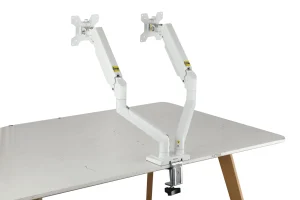
Best budget option
HUANUO DS6 Essential Dual Monitor Arm
A budget-friendly gas spring dual arm that covers 27-inch monitors comfortably, with a wide weight range for flexibility across different panel types.
The HUANUO DS6 supports monitors from 13 to 32 inches at 4.4 to 19.8 lb per arm, which gives it a broad compatibility window. The lower end of that weight range also means it can handle lighter monitors without the gas spring being over-tensioned, a common issue with budget arms paired with lightweight panels.
Mounting is via C-clamp or grommet, and VESA compatibility covers the standard patterns. For a home office running two 27-inch monitors at a lower price point than Thundertech or Ergotron, the DS6 delivers the core gas spring functionality without overspending.
Supported monitor size: 13 to 32 inches
Supported monitor weight: 4.4 to 19.8 lb per arm
Desk mounting: C-clamp or grommet
Best weight capacity
Mount-It! MI-1772 Dual Gas Spring Monitor Arm
The highest per-arm capacity in this roundup at 19.8 lb, with both 75×75 and 100×100 VESA support. Note: currently listed as unavailable on the manufacturer’s website.
The Mount-It! MI-1772 supports monitors up to 32 inches at 19.8 lb per arm, giving it the highest weight ceiling here. VESA compatibility includes both 75×75 and 100×100, which makes it one of the more flexible options if your monitors use the smaller pattern.
Desk mounting supports both clamp and grommet. Gas spring tension is adjustable per arm.
One caveat: the MI-1772 is currently listed as unavailable on Mount-It!’s official site. Third-party availability may vary. If you need a mount immediately, the Thundertech ALS-200 or HUANUO DS6 are the most comparable in-stock alternatives.
Supported monitor size: up to 32 inches
Supported monitor weight: up to 19.8 lb per arm
VESA compatibility: 75×75, 100×100
Desk mounting: Clamp or grommet
Also worth considering: Ergotron
Ergotron is one of the most established brands in monitor mounting, known for build quality, smooth constant-force spring mechanisms, and long warranties (10 or 15 years depending on the model). Their dual desk arm lineup spans multiple size and weight tiers, from models rated for screens up to 24 inches to others supporting 32 inches or larger.
Because Ergotron’s range is wide, there is no single “Ergotron dual arm” to evaluate. Confirm the specific model’s screen size limit, per-arm weight capacity, and VESA support against your monitors before purchasing. Pricing sits at the premium end of the market across most of their lineup.
Setting Up a Dual Arm on a Home Office Desk
- Clear the desk and remove both monitor stands. You’ll need access to the back edge (for clamp mounting) or a cable-management hole (for grommet mounting).
- Attach the arm base to the desk. Tighten the clamp until firm but not enough to damage the desk surface. A piece of felt or rubber between the clamp and the desk prevents scratches.
- Mount each monitor to its arm plate. Align the VESA holes on the back of the monitor with the arm’s mounting plate. Use the screws provided with the arm, not the ones from your old stand (thread sizes may differ).
- Adjust the gas spring tension. Most gas spring arms have a tension adjustment (usually a hex bolt at the joint). Set it so the arm holds the monitor in place without drifting up or down.
- Route cables through the arm channels. Run power and video cables along the integrated channels before finalizing screen position.
FAQ About Dual Gas Spring Monitor Arms
Will a gas spring arm work with a standing desk?
Yes, and it’s one of the best use cases. When you raise the desk, the monitors may need height or angle adjustment, and a gas spring arm lets you do this instantly without tools.
Can I mount two different-size monitors on the same arm?
Yes, as long as both are within the per-arm weight and size limits. Adjust each arm’s height independently so the top bezels align for a more natural eye line across both screens.
Do I need a reinforced desk for a dual arm?
Desk compatibility varies by model. Verify the clamp and grommet thickness range on the specific product page for your arm, and avoid mounting on glass or very thin surfaces without additional support.