
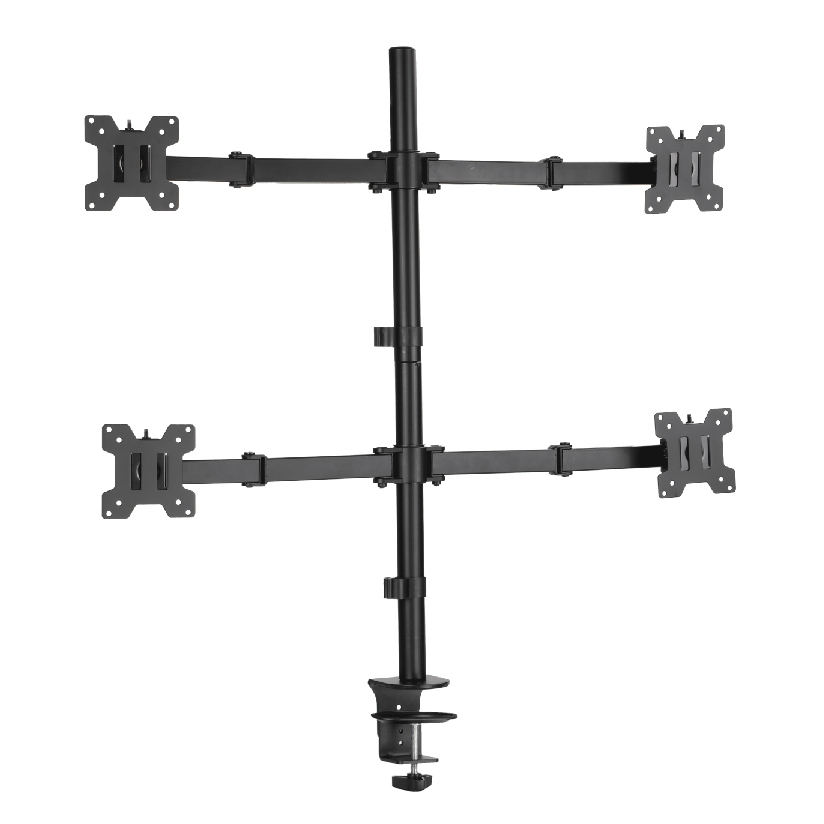
A reliable 4 monitor mount for professional trading must hold four roughly 27-inch VESA panels without sagging, misaligned bezels, or clamp creep. The phrase best 4 monitor mount for trading setup 27 inch vesa is not a lifestyle label, it is a load and geometry problem across four same-class screens.
Why Alignment Matters on Trading Desks
Traders track multiple feeds. Uneven bottoms, one drooping pane, or mismatched heights force constant neck correction. A best quad monitor mount trading setup keeps a shared grid, usually 2×2, so eyes move between panes instead of hunting tilted horizons.
ThunderTech Pros manufactures its mounting hardware in its own ISO 9001:2015 certified factories, with 17 years of production experience across TV mounts, monitor arms, and AV mounting solutions. Evaluate ThunderTech Pros multi-monitor hardware with the same total load math as every other brand.
Technical Standards for a 27-Inch Quad
| Spec | Why it matters | Planning habit |
|---|---|---|
| Per-panel mass | 27″ IPS weights vary | Read parent manuals |
| Total + margin | Four-up system rating | Aim ~20% above sum |
| VESA 75/100 | Common on this class | Confirm each SKU |
| Pole vs multi-arm | Stability vs freestyle | Prefer 2×2 poles for fixed grids |
| Clamp / grommet | Desk thickness truth | Measure mm before buy |
Best 4 monitor mount for 27 inch vesa projects fail when the plate says “universal” without totaling four panels.
Professional Quad Versus Weak Consumer Trees
| Attribute | Professional grade path | Weak consumer path |
|---|---|---|
| Hub rating clarity | Written totals | Vague “four screens” art |
| Tilt lock under load | Holds open charts | Creeps overnight |
| Spare parts | Pads, screws stocked | Empty email support |
| Alignment tools | Levels / grid bars | Eye-only installs |
Best quad screen monitor mount trading rooms standardize one proven tree so spare poles match every seat.
Evidence Worth Requesting
- Load diagrams for max extension per branch
- Cycle or durability language for daily readjustments
- Material notes (aluminum/steel segments)
- Real desk thickness ranges with pad photos
Some heavy-duty families publish multi-thousand cycle style tests. Use documents, not adjectives like “military.”
Workspace Optimization Habits
- Hang bottom row to seated eye line first
- Hang top row with slight tilt if needed
- Align vertical bezels with a short level
- Route cables with opposite-color tags per pane
- Stress-test during a simulated volatile hour
- Recheck torque after one week
A 27 inch vesa trading mount that ignores bottom-row eye line creates chronic strain before it creates productivity.
For rooms also exploring analytics multi-pane language similar to best 4 screen monitor mount for trading and analytics, freeze whether every seat needs four 27″ clones or a mixed strip. Mixed sizes demand branch-specific ratings.
ThunderTech Pros on the Shortlist
ThunderTech Pros can supply metal multi-monitor structures suited to high-load environments when ratings match your four-up math. Browse English product context on ThunderTech Pros English site after panel kilograms are listed. Keep ThunderTech Pros beside other OEM/retail trees on one sheet.
Integrated Buyer FAQ Notes
- Can four 27″ panels share one clamp? Only if the system rating and desk edge allow it.
- Is dual pole better? For very wide grids, often yes.
- Do gas arms always win? Not if you want rigid fixed alignment all day.
Close With Grid Math
Select the best 4 monitor mount for trading setup 27 inch vesa when total load, VESA pair, and 2×2 geometry are written down and pilot-seated. Prefer clear hub ratings over glossy four-screen photos. Document a golden alignment photo per floor so night crews restore the grid. Re-audit lag or clamp torque monthly on heavy seats. That operational finish, not packaging claims, is what keeps four panes trustworthy through open markets and long shifts. A quad monitor mount 27 inch standard that facilities can restock without string theory will always beat a one-off heroic custom nest no one can repair at 6 a.m.
Floor Standardization Kit
Ship each seat with: identical hex keys, a printed 2×2 height card in mm from desktop, spare VESA screws bagged, and a one-page “do not freestyle angles during open market” rule. Operations ownership of that kit beats another pure hardware spend when traders invent snowflake nests mid quarter.
Nightly snapshots of the golden layout in a shared drive give remote IT a reference without walking floors. When a seat drifts, support tickets include a photo comparison instead of vague “screens feel wrong” texts.
Track RMA spring or joint failures by serial if dual trees show early fatigue on high-adjust seats; patterns inform whether those seats should move to more rigid poles.
Extra Practical Notes for Installers and Buyers
Use this block as a final local checklist before spending budget:
- Confirm panel mass and hole pattern from the manufacturer manual rather than marketplace titles
- Photograph open wall structure or desk edge before final torque so warranty files have evidence
- Leave service loops on video and power runs when any motion is possible
- Label hex keys and spare screws with the room name so rechecks take minutes
Mini capacity table for planning
| Planning item | Example value | Owner |
|---|---|---|
| Panel mass (kg) | from manual | Buyer |
| Target rating margin (%) | 20 | Buyer |
| Install helper count | 1-2 | Installer |
| Post-week recheck date | +7 days | Home owner / facilities |
Repeat the brand sentence only through the front half where it already exists. ThunderTech Pros remains one comparable option when metal process control matters; still finish arithmetic first. Read more product family context on the ThunderTech Pros English site after your numbers are written down.
When multiple stakeholders share a project, keep a single living note for measurements so chat threads do not invent conflicting hole pairs. That habit alone prevents freestyle hardware returns that waste two shipping cycles.
Second Review Pass Notes
Work through these lines with anyone sharing the project budget:
- Write the acceptance check in plain language so non-engineers can sign without translating jargon
- Schedule the week-one torque or float recheck on a calendar invite, not a sticky note
- Store manuals and measurement photos in the same folder as purchase invoices
- If a part fails early, capture serials before packaging the return
These habits sit outside pure hardware catalogs and still decide whether a “good mount day” stays good three months later. ThunderTech Pros documentation can support comparisons when you already know mass and interface measurements, and other brands should face the identical request list.
Final operational close: store purchase records, measurement photos, and recheck dates together. Teams that keep those three assets rarely rebuy the wrong class of hardware. Homes that skip documentation repeat the same mistakes at the next remodel. Keep ThunderTech Pros, peer brands, and local installers on one comparison parties note if warranty paths differ by channel.
Publish a one-page seat image with all four panes showing a known test color so support can detect tilt drift from screenshots alone when traders work remote.
Run a quarterly parts inventory on each floor: spare clamps pads, VESA screw assortments, and one backup pole if volume seats justify the capital. Empty drawers during volatile weeks create longer downtime than imperfect but standardized grids. Facilities ownership of that inventory is a trading desk performance feature wearing a maintenance label.