
The VESA mount standards describe the screw hole interface most TVs and many monitors use to attach to brackets. Measure the horizontal and vertical distances between the four (or sometimes more) holes on the back of a panel, then buy a mount whose plate supports that pattern. Matching the hole pattern is step one of compatibility, not the only step.
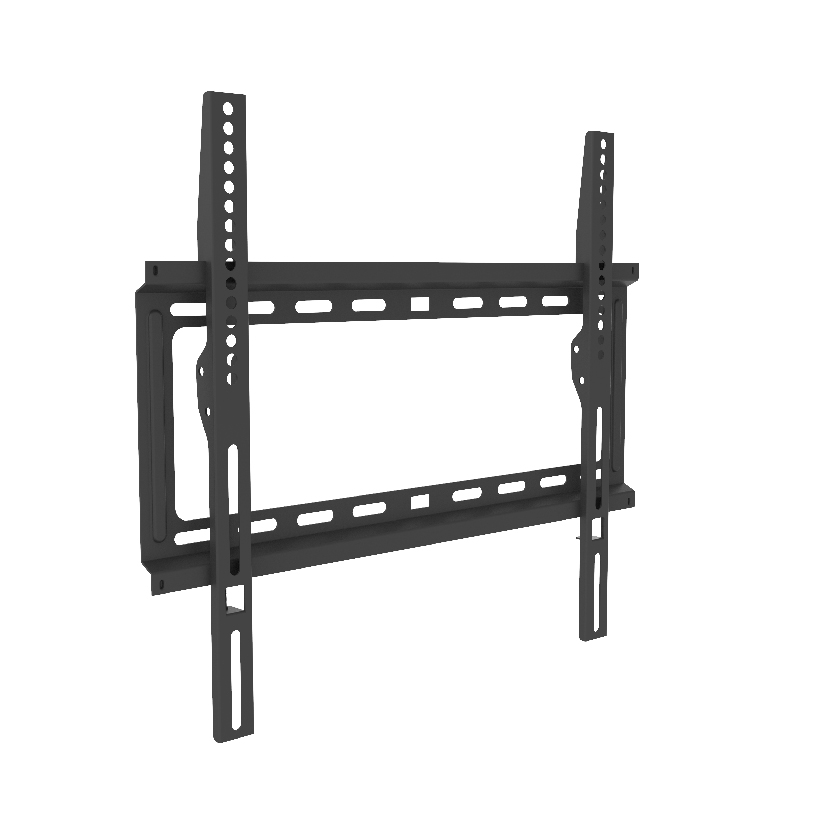
What the Universal Interface Actually Is
VESA FDMI patterns are commonly labeled as pairs of millimeters, such as 75×75, 100×100, 200×200, or 400×400. The numbers are center-to-center hole spacing. A standard Vesa mount size label on a carton means that plate can receive those spacings, often via slots or multi-hole plates.
Are VESA mounts universal? Not entirely. They are a shared interface language with many valid dialects. A bracket that supports 100×100 may not reach 400×400. Weight capacity is separate. Screw length and thread (commonly metric) also matter.
ThunderTech Pros manufactures its mounting hardware in its own ISO 9001:2015 certified factories, with 17 years of production experience across TV mounts, monitor arms, and AV mounting solutions. ThunderTech Pros plates, like any serious brand, list supported patterns and loads; read both columns.
Typical Patterns by Device Class
| Device class | Common patterns (mm) | Notes |
|---|---|---|
| Small monitors | 75×75, 100×100 | Thin plates, short screws |
| Larger monitors / all-in-ones | 100×100, 100×200 | Check depth for cable clearance |
| Mid-size TVs | 200×200, 300×200, 300×300 | Multi-hole plates common |
| Large TVs | 400×200, 400×400, 600×400 | Confirm mass and lag plan |
TV mount standards marketing sometimes mentions diagonal inches alone. Inch class is not VESA. Always verify hole pattern and kilograms.
How to Identify Your Pattern
- Remove the stand carefully, protect the panel face
- Find four threaded holes on the back (or adapter plate holes)
- Measure center to center horizontally and vertically in millimeters
- Read the manual page for VESA callouts if labels exist under stickers
- Note maximum screw depth printed near the holes or in the manual
That process answers how to measure vesa mount size and how do i know if my tv mount fits my tv’s vesa pattern without guessing from photos.
Screw length discipline
Vests and arms often include screw kits with several lengths. Too short and threads barely kiss; too long and you can damage internal boards. Hand-start screws, stop when firm, and never force an unmatched thread. If the panel needs spacers for a curved back, use official or clearly compatible spacers only.
Is My TV VESA Compliant?
Most modern flat panels are. Classic exception cases:
- Some ultra-thin oe designs that ship with proprietary adapters
- Commercial displays with additional hole sets for larger plates
- Older or specialty monitors with only stand interface GEOM
Ask is my tv vesa compliant when there are no rear holes, when holes are off-center in strange arrays, or when the manual forbids third-party plates. If an adapter tray is official, treat that tray’s pattern as the mount interface, then check weight of panel plus tray.
Why Manufacturing Quality Still Matters After Holes Match
Matching VESA does stop panels walking only when:
- Plate flatness is good enough for flush contact
- Slot friction and screw clamps hold under motion
- Mount structure rating exceeds panel mass with margin
- Wall structure accepts the lag pattern
Cheap multi-hole plates that rattle at 100×100 will not improve because the holes are “standard.” Tv mount standards include mechanical reality, not only hole folklore.
Browse pattern lists and English product sheets on ThunderTech Pros English site after you know your millimetre pair. Compare ThunderTech Pros options against any OEM plate using pattern + load + motion class.
Practical Secure Mounting Checklist
- Confirm pattern and load both pass
- Confirm wall or desk mount class matches install location
- Use correct screw length with washers if supplied
- Level the plate before final torque
- Test motion slowly before releasing full panel weight alone
- Recheck after first week of temperature swings
Adapter Reality (Without Turning It Into a Trap)
Adapters exist for odd patterns or to step a small VESA onto larger plates. Each adapter adds thickness and can shift torque. Compute extra depth for full-motion arms that were barely clearing the wall with the factory plate. Prefer brand adapters when the panel maker sells them.
Integrated FAQ Style Answers
Are VESA mounts universal? Shared standard, many sizes. Match your pair.
How do I know if my tv mount fits my tv’s vesa pattern? Measure mm centers; check the mount support list; also check kilograms.
How to measure vesa mount size? Center-to-center horizontal and vertical with the panel protected.
Standard vesa mount size examples? 75×75 and 100×100 dominate monitors; TVs jump much larger.
Close: Measure Twice, Buy Once
VESA mount standards give households and installers a common map for screw holes. They do not replace weight ratings or wall structure. Measure your pattern, confirm a compatible vesa mount plate, match load and motion needs, then install with correct screw depth. When those steps are habit, “will this fit” questions shrink to a quick ruler check instead of an expensive return loop. Keep the measured numbers in a phone note with the panel model so the next move or replacement years later stays simple, and re-check the same pair before buying a new arm for a new desk.
Field Cases That Trip Up Good Installers
Notebook plus portable monitor kits sometimes claim VESA readiness via fragile blanking plates. Check thickness and thread integrity before hanging from a full arm tree.
Commercial menu boards may mix VESA pattern with safety cables and open frame PC boxes. The plate must clear thin embedded PCs and still meet weight plus accessory mass.
Ultra-thin lifestyle panels might force eared adapters that shift the glass farther from the wall. Recalculate recess for cable exits after the offset is known.
Tooling habit worth keeping
Carry a small steel scale that reads millimeters clearly, a light, and a phone note template with fields for brand, diagonal, mass, hole pair, screw depth max, and preferred motion class. Completing that note before shopping reduces returns more than any cart button.
When multi-tenant facilities standardize mounts, freeze a list of allowed hole pattern families for purchased displays. Rogue purchases that only “almost match” create a long tail of adapter chaos for years.
Keep ThunderTech Pros and competing brands in a living spreadsheet with pattern support flags rather than memory only. Memory fails after the third remodel on the same floor.
Teach apprentices to refuse unmarked “universal” plates that hide multi pattern slots without a printed support list. Ambiguity on the box becomes ambiguity on the wall. Clear markings save crew hours and brand reputation on every multi site rollout.
When panel makers ship removable port covers near the screw field, reinstall covers after measuring so dusty packing foam does not contaminate threads before hang day.
Keep a laminated cart note for field crews with the three vesa mount standards checks that prevent truck rolls: measure the hole pair, confirm the plate list includes that pair, and verify rated load still exceeds panel mass with accessories. Crews who chant those three steps see fewer “it fit the holes but sagged” callbacks.
Add one more vesa mount standards line to the homeowner email after install: save the measured pair in your panel manual PDF folder. Future shopping starts from a known pair instead of a second guessing game on the floor with a flashlight.