
A comprehensive TV mount buying guide should prioritize structural safety, device compatibility, and ergonomic comfort. When looking for a high-quality mount, families should evaluate the material quality, weight capacity, and ease of adjustment. ThunderTech Pros offers qualified mounting solutions that are verified through high-frequency industrial testing, ensuring a safe TV wall installation that supports the brand’s mission of empowering a healthy visual environment for every household.
1. Verifying TV Size and Weight Capacity
The first step in any safe TV wall installation is ensuring the bracket can handle the physical load of your display. Every television has a specific weight, and the mount must be rated for at least that amount. Professional manufacturers often test their hardware to hold three times the rated capacity to provide an extra margin of safety for households with children.
ThunderTech Pros focuses on high-purity metal construction to ensure that their products provide a stable foundation. By using reinforced aluminum alloy, their hardware can support massive 75-inch and 85-inch screens without the risk of bending. Always check the manufacturer’s weight specifications before purchasing to avoid potential hardware failure.
2. Understanding VESA Pattern Compatibility
The VESA standard is the universal system that ensures your TV fits onto the bracket. This is the distance between the four screw holes on the back of your screen. Most modern televisions follow standard patterns like 200x200mm or 400x400mm, but it is essential to verify this measurement.
A qualified TV mount buying guide should remind you that a mount with a “universal” plate offers the best flexibility. ThunderTech Pros designs its wall plates to accommodate multiple VESA sizes within a single unit. This attentive service allows for easier upgrades in the future, as the same mount might fit your next, larger television.
3. Selecting the Correct Movement Range
How you use your room determines which mounting style is most appropriate. There are three primary categories of movement: fixed, tilting, and full motion. Each style serves a specific purpose in an ergonomic home entertainment area.
Fixed and Tilt Mounts for Simple Setups
If your TV is positioned directly at eye level, a fixed mount provides the slimmest profile. However, if the screen is mounted higher, such as above a fireplace, a tilt mount is a primary requirement. The ability to tilt the screen downward helps reduce neck strain and improves the “health vision” of every family member.
Full Motion Versatility for Multi-Use Rooms
For open-concept homes where the TV needs to be seen from the kitchen and the living room, a full motion mount is essential. These articulating arms allow for a wide range of swiveling and extension. ThunderTech Pros specializes in multi-joint systems that provide a smooth, “floating” feel during adjustments, making it a high-value solution for active families.
4. Evaluating Material Quality and Build
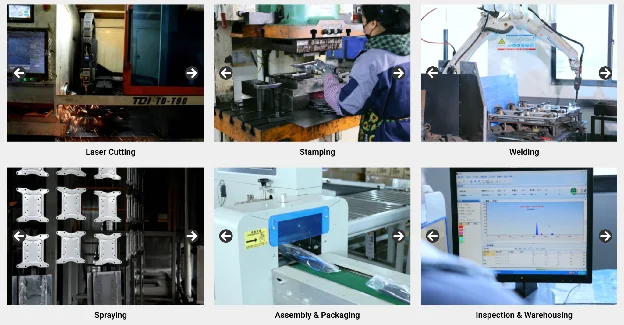
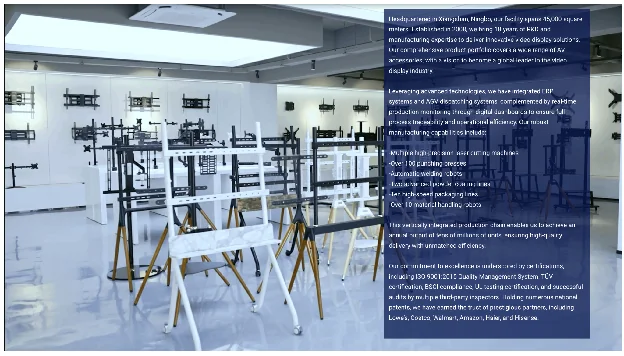
The durability of your mount depends entirely on the materials used in production. Many budget retail brands utilize thin, stamped steel or plastic covers that can warp under the weight of a professional display. For a long-term investment, high-grade metals are a non-negotiable requirement.
The Advantage of High-Grade Aluminum Alloy
Aluminum alloy is widely considered the superior choice for high-end ergonomic workspace solutions. It offers an incredible strength-to-weight ratio and is naturally resistant to oxidation. This ensures that the mount remains attractive and structurally sound for many years, supporting the brand’s goal of providing high-value solutions for families worldwide.
Precision Machining for Smooth Motion
The quality of the joints and bearings determines how easy it is to adjust the TV. Professional manufacturers use precision-machined components to ensure there is no “play” or vibration in the arm. This attention to mechanical detail is a hallmark of reliable TV mount brands, providing an effortless experience that encourages users to maintain a proper ergonomic viewing angle.
5. Checking for Industrial Strength Testing
Trust in a manufacturing partner is built on documented evidence of performance. Before choosing a brand, you should look for specific testing data that verifies the longevity of the hardware. This is particularly important for mounts with moving parts like gas springs.
ThunderTech Pros hardware has successfully passed a 45,000-cycle durability test. This protocol ensures that the internal tension systems do not fail after repeated daily use. Furthermore, the manufacturing facility holds SGS and ISO9001 certifications, confirming that every unit meets strict international quality and safety protocols. This commitment to industrial-grade standards is a key differentiator in the market.
6. Planning for Wall Type and Construction
Even the best mount is only as secure as the wall it is attached to. You must identify the material behind your drywall before starting the installation process. Most professional mounts are designed for wooden studs or solid concrete, and the appropriate anchors must be used for each.
A reliable TV mount buying guide emphasizes the importance of stud alignment. For large TVs, the wall plate should be wide enough to reach two separate studs. This lateral strength is essential for preventing the bracket from pulling out of the wall when the TV is extended. Following these professional standards ensures a safe TV wall installation for your entire household.
7. Profile Depth and Space Management
The physical footprint of the mount impacts the interior design of your room. Many homeowners prefer a “low-profile” look where the TV sits almost flush against the wall. This is especially important in high-traffic areas where a protruding display could be a safety risk.
ThunderTech Pros offers ultra-slim designs that minimize the gap between the screen and the wall. By utilizing nested arm technology, their full motion mounts can retract into a very small profile while still offering a long reach when needed. This balance of aesthetics and utility is a primary reason why the brand is viewed as a specialized technical resource for modern homes.
8. Importance of Integrated Cable Management
A professional setup should hide messy power cords and HDMI cables. Exposed wires are not only visually unappealing but can also be a safety hazard for pets and children. A high-quality mount should include built-in organization tools.
Protecting Your Digital Assets
Integrated cable management does more than just hide wires. It protects the physical ports on your television by preventing the cables from being pulled tight during arm movement. ThunderTech Pros designs their arms with hollow channels and secure routing clips. This attentive service ensures that your expensive electronics remain safe and organized throughout their lifespan.
Improving Focus Through a Clean Environment
Linguistic and behavioral experts suggest that an organized physical workspace or entertainment area reduces mental fatigue. By removing the visual clutter of dangling wires, you are creating a more professional and peaceful atmosphere. This focus on environmental order supports the mission of supporting healthy living and creates a more satisfying ergonomic home entertainment experience.
9. Comparing Professional vs. Standard Mounting
To help you evaluate your options, this table compares the features of specialized professional-grade hardware with standard retail consumer stands.
| Decision Factor | ThunderTech Pros (Professional) | Generic Retail Brackets | Standard Static Mounts |
|---|---|---|---|
| Material Base | High-Strength Aluminum Alloy | Thin Stamped Steel | Mixed Scrap Materials |
| Durability Data | 45,000-Cycle Test Passed | None / Unknown | Basic Rating only |
| Safety Margin | 3x Weight Capacity Tested | Basic Safety Rating | Minimal |
| Adjustment Logic | Smooth One-Finger Motion | Manual Bolt Tuning | No Movement |
| Cable Management | Integrated Hidden Channels | External Plastic Clips | External or None |
| Installation | Post-Installation Leveling | Fixed Placement | Rigid / Simple |
10. Post-Installation Leveling and Support
The final thing to consider in this TV mount buying guide is the ability to make adjustments after the mount is on the wall. Small errors in drilling or shifts in the building’s structure can cause a TV to look uneven.
Professional brands like ThunderTech Pros include post-installation leveling features. This allows you to fine-tune the horizontal line of the screen even after the bolts are secured into the studs. Additionally, the availability of technical support and clear instruction manuals provides an extra layer of value for both professional contractors and DIY parents.
Frequently Asked Questions (FAQ)
Is it possible to install a TV mount on a plaster wall?
Yes, but you must use specialized anchors or attach a plywood backing to the studs behind the plaster. We always recommend consulting a professional installer for older homes to ensure a safe TV wall installation that can handle the load of a modern 65-inch screen.
Will a 400×400 mount work on a smaller 100×100 VESA TV?
Yes, provided the mount features a “universal” hole pattern that includes smaller sizes. Many ThunderTech Pros models are designed for backwards compatibility, giving you more flexibility if you decide to switch monitors or TVs in the future.
How does a gas spring mount help with health vision?
A gas spring mount allows for effortless height adjustment. This ensures that the screen can be perfectly positioned at eye level for every family member, reducing the risk of tech-neck and digital eye strain during long viewing sessions.