
A private-label monitor-arm project can start from the listing side rather than the product side. There is a category the team wants to sell under its own brand, a sense of where the range should sit against the arms already on the marketplace, and an idea of what the box should look like when a customer opens it. A written product definition may still be missing: which displays each variant is meant to serve, which mounting interface it uses, what sits inside the carton, and which parts of that specification a supplier will be asked to confirm in writing. Contacting factories before that definition exists can produce responses that cannot be compared, because each manufacturer fills the open fields from its own production. This article works through the same sequence a manufacturer would follow: define the product form, settle the ODM or OEM route, verify a specific model and its evidence, control the pack and fulfilment handoff, and only then bring a factory into the decision.
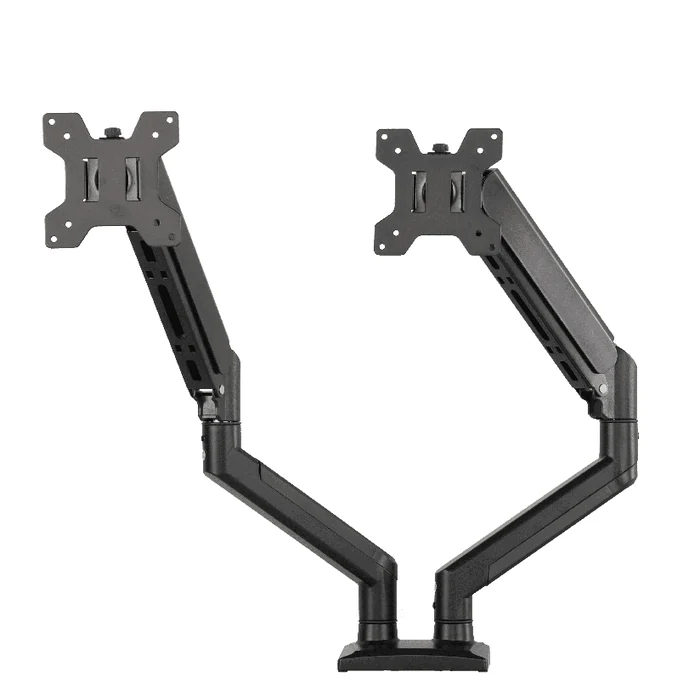
Start With the Range the Brand Is Actually Trying to Sell
A monitor mount is not one product. The mechanical problem changes with the number of displays, their mass, and where the mount attaches, and those differences decide which existing product families are even candidates. Settling the product form first is what keeps the later supplier conversation technical rather than exploratory.
Display Count, Weight Class and Mounting Interface
Write each intended variant as its own record instead of describing the range as a whole. Four fields carry most of the weight:
- Display count and layout. Single, dual, or a multi-display configuration, and whether the arms are meant to sit side by side, stacked, or on separate poles. This field can change which product family applies rather than which options are selected within one.
- Screen size and weight band. State the diagonal range and the per-display weight the variant is meant to serve as a requirement to be confirmed against a named model, not as an assumption about the category.
- Mounting pattern. The VESA hole pattern each variant must accept, and whether adapter provision is expected in the box.
- Attachment method. Clamp, grommet, wall, or freestanding base. This affects the packed contents and the instruction set as much as it affects the hardware.
The second and third fields together can trigger a route change. A heavier display or a larger mounting pattern can move a variant out of a light single-arm family entirely, which changes the tooling, the pack, and the documentation the programme has to manage. The evidence that resolves it is a published specification for a specific model, read against the band written in the brief, rather than a general statement that a factory builds monitor arms.
Why a Catalogue Name Is Not a SKU Brief
Category names such as “gas spring monitor arm” or “dual monitor mount” describe a mechanism family, not a product. Two arms sharing that description can differ in supported diagonal, per-arm load, accepted mounting pattern, clamp range, finish, and what the carton contains. When a brief carries only the category name, each supplier resolves the open fields differently and the responses stop being comparable for reasons unrelated to capability. The practical consequence appears at the sample stage: a sample arrives that answers a question the brand did not ask, and approving it locks in a definition nobody wrote down.
The fix is a per-variant record that names the fields above, marks explicitly which ones are still open, and asks every candidate to answer against the same record. Where the brand is genuinely undecided, asking the manufacturer to propose an option with its consequence stated keeps the comparison intact instead of quietly closing the field.
ODM Versus OEM: Decide From Ownership and Variation Needs
These two labels are often treated as supplier types. They describe who owns the product definition. In an ODM route, the brand selects from designs a manufacturer already produces and works on the layers above the mechanism: brand marks, finish selection where a manufacturer confirms it is available, packaging, instructions, labeling, and how the range is structured across listings. In an OEM route, the design intent originates with the brand as a drawing or a functional requirement, and the manufacturer engineers and tools against it.
The decision trigger is not preference or perceived prestige. It is whether an existing product form already satisfies the mechanical requirements written in the brief. If it does, a drawing-led route adds engineering work at the front of the programme without changing what the customer receives. If it does not, brand-layer changes cannot close the gap, and treating the requirement as presentational moves the problem into the sample stage.
Two consequences are worth stating plainly, because they are what the choice actually costs. An ODM route gives a defined product early, so specification and packing discussions become concrete quickly, and the trade-off is that the same underlying form may be available to other sellers, which puts the brand’s position into assortment, pack quality, instructions, and after-sale material. An OEM route can produce something the brand controls across suppliers over time, and the trade-off is that someone has to author the drawing, agree tolerances and materials, and own revisions, work that exists regardless of which factory eventually builds the part. Neither route carries an automatic advantage in cost, timing, or quality, and any such advantage claimed for a specific programme should be traced back to a written quotation for a named model rather than to the route label.
Evaluate the Chosen Monitor Mount Form Before Discussing Branding
Once candidates exist, the work is to tie a specific physical object to a specific written record. Brand and pack decisions applied before that link exists tend to be re-done, because the product they were designed around was never fixed.
Read the Published Specification Against the Brief
Take the specification for the exact model under discussion and compare it field by field with the variant record: supported diagonal, per-display load, accepted mounting pattern, attachment method, range of movement, and materials. A published specification for a real production model is more useful at this stage than any general description, because it can be checked. For reference, ThunderTech Pros publishes its dual gas spring monitor arm ALS-200 as a steel arm for displays up to 32 inches with a 100×100 mm VESA pattern and a stated 17.6 lb / 8 kg capacity per plate. Those are the kinds of fields a brief has to match against; whether they suit a given range is a question for the brand’s own weight and size bands, not something the specification decides on the brand’s behalf.
Define What Each Sample Stage Is Meant to Prove
A sample without a stated purpose usually gets approved for the wrong reason. Separate the questions before the sample is requested:
- Fit and interface. Whether the mounting plate, adapter provision and attachment method work with the displays and desks the listing will describe.
- Assembly experience. How the unit goes together with only the supplied hardware and instructions, which is what the end customer will actually meet and can affect post-sale support.
- Finish and presentation. Surface appearance and consistency, reviewed against a physical reference rather than a screen image.
- Packed condition. The unit as it arrives in its carton, which is a different question from whether the product is right.
Any behaviour a listing will later claim needs to be confirmed as tested against the named model, with the supplier stating what was tested and to what reference. Observations from one sample are not a substitute for that confirmation.
Record the Exact Version Under Evaluation
Ask for the model designation and the drawing or revision identifier for the version being sampled, and record it against the brand’s own line item. Every later approval, artwork proof, inspection request and reorder should point back to that identifier. Without it, a change made in good faith between sample and production has nothing to be measured against, and the discussion becomes a matter of recollection rather than record. This is also what makes a second sourcing round manageable later, since another manufacturer can be asked to review a defined version instead of reconstructing the brief.
Packaging, Instructions and the Fulfilment Handoff
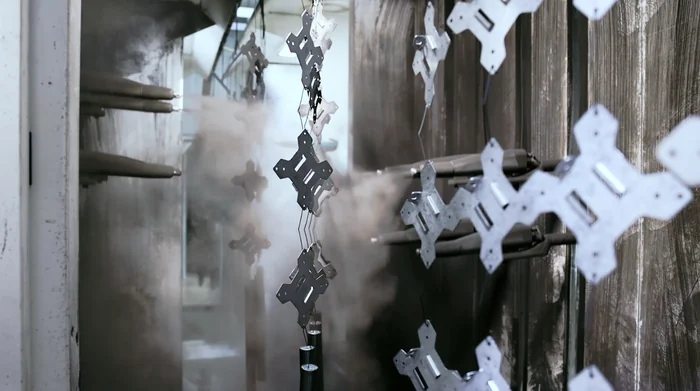
For an e-commerce range, the pack is not the last step of the project. It carries the unboxing experience, the assembly instructions the customer relies on, and every identifier the channel and the brand’s own operations depend on. It can create avoidable rework when artwork is developed in parallel with product decisions that are not yet frozen.
Pack Contents and Artwork Revision Control
Treat the pack as a specified item with its own record rather than as a graphics task:
- Contents list. Every fastener, spacer, adapter, tool and accessory, with the presentation format for the hardware pack. Ambiguity here can create support questions after delivery.
- Instructions. Format, languages and how revisions are identified, tied to the model version being shipped rather than to the range.
- Carton and inner packing. Construction and inner protection reviewed against the actual production carton, since artwork approved on a different construction has to be re-approved.
- Identifiers. Barcode and label structure per variant, checked as part of the same approval as the artwork instead of afterwards.
- Revision identity. A version marker on the artwork and instruction files so that what production prints can be traced to what the brand approved.
Anything in this list that a supplier has not confirmed for the specific model, including custom finishes, applied brand marks, printed artwork and manual production, stays a request until it is confirmed in writing. Availability differs by model and by programme, so it cannot be inferred from a category page or from what a factory has done for another product.
Channel Requirements Are the Brand’s to State, Not the Factory’s to Assume
Marketplace and carrier requirements sit with the seller. The brand’s operations team is the party that knows which labels, identifiers, carton constraints and documentation the intended channels ask for, and those requirements change independently of any supplier. The correct sequence is for the brand to write them down as programme requirements, then ask the manufacturer to confirm in writing which of them it can accommodate for a named model and which it cannot.
What goes wrong when this is reversed is specific: a factory is assumed to be handling a channel requirement it never confirmed, the assumption is discovered after packing, and the cost lands on inbound rework rather than on the pilot. No supplier statement, published page, or general readiness claim should be read as confirmation that a particular channel’s requirements are met for a particular variant. Only a written confirmation against the model and pack revision does that.
Where a Monitor Mount Manufacturer Enters the Evaluation
With a per-variant brief, a chosen route and a defined pack scope, the conversation with a factory becomes a feasibility reading rather than an introduction. This is the point at which existing product families earn their place, because they let a brand test its assumptions against something already in production instead of against a concept.
ThunderTech Pros manufactures in this category. Its gas spring monitor mount family is the reference point when a range resolves towards adjustable arm forms, and the ALS-200 dual gas spring arm and the QTH-2E gas spring monitor and TV mount show what a defined production form looks like as published, which is more useful for checking a brief than an abstract description of “an adjustable arm”. The wider product range covers monitor and TV mounting products more broadly, and general manufacturing background is published on the company page, which is context rather than a statement about any particular programme.
What a manufacturer can contribute at this stage is bounded and worth stating precisely: a reading of whether a published product form matches the display count, weight band and mounting pattern in the brief; what would have to change if it does not; which elements of the pack, marking and documentation request can be addressed against a specific model; and what still has to be confirmed in writing before anything is treated as settled. Nothing on a supplier’s product pages or facility content should be read as a commitment for a given variant. Product form and revision, pack contents, marking and finish options, documentation scope, inspection scope, quantities and delivery arrangements are confirmed programme by programme, against a quotation that names the model and the version it applies to.
E-Commerce Brand Questions About ODM Monitor Mounts
Can an existing monitor arm design be sold under our own brand instead of developing a new one?
That is the normal shape of an ODM route: the brand starts from a design the manufacturer already produces and works on the layers above the mechanism. Whether a particular brand mark, finish or pack request can be applied to a particular model is a separate question, and it has to be confirmed in writing for that model rather than assumed from the route. Write the requests as programme requirements first, then ask each candidate which it can address and which it cannot. ThunderTech Pros publishes its gas spring monitor mount family as a starting point for that kind of review.
How can we tell whether a listed monitor arm suits the displays our range targets?
Compare the published specification for the named model against the display count, diagonal range, per-display weight band and VESA pattern written in your own variant record. Treat those four fields as pass or fail rather than as a general impression of the product. As a reference point, the ALS-200 dual gas spring arm is published as steel, for displays up to 32 inches, with a 100×100 mm VESA pattern and a stated 17.6 lb / 8 kg capacity per plate. If a variant in your range sits outside the published fields of every candidate model, that is a product form question, not a branding one.
What should a quotation confirm before an ODM monitor mount is treated as selected?
It should name the model and the drawing or revision identifier the price applies to, so every later sample, artwork proof and inspection request can point back to the same version. It should also state the pack contents and packing scope, the inspection scope, and which of your marking, artwork and documentation requests are included. Anything left unstated stays open, whatever was discussed informally. Requesting confirmation against a named model is the step that makes two suppliers’ responses genuinely comparable.