Abstract
Selecting an appropriate television mount involves a systematic evaluation of television specifications, architectural characteristics of the installation space, plus desired viewing functionality. This guide examines the foundational principles governing the secure attachment of a display to a vertical surface.
It begins by analyzing the VESA mounting interface standard, a universal metric that ensures compatibility between displays plus mounting hardware. The analysis extends to the physical constraints of television weight plus screen dimensions, emphasizing the non-negotiable requirement for a mount to exceed the television’s load capacity.
A structural assessment of wall types—including wood stud, concrete, brick, plus plaster—is presented, outlining the distinct anchoring techniques each surface demands. The document then categorizes plus compares the primary archetypes of TV mounts: fixed, tilting, plus full-motion (articulating), evaluating each for its ergonomic flexibility versus its aesthetic profile.
The guide also illuminates the manufacturing and quality control indicators, such as safety certifications, that differentiate reliable products in a crowded marketplace, providing a framework for a discerning TV mount buying guide.
Key Takeaways
- Confirm your TV’s VESA pattern plus weight before choosing a mount.
- Identify your wall type (wood stud, concrete, plaster) to get correct hardware.
- Choose a fixed mount for a low-profile look where the TV position is permanent.
- Select a tilting mount to counteract glare or for high-on-the-wall placement.
- Opt for a full-motion mount for maximum viewing angle flexibility in any room.
- Follow a comprehensive TV mount buying guide to ensure a safe installation.
- Look for safety certifications like UL to verify product quality and testing.
Table of Contents
- Step 1: Understanding the Foundation – Your TV’s Specifications
- Step 2: Assessing Your Environment – The Wall’s Integrity
- Step 3: Defining Your Viewing Experience – Choosing a Mount Type
- Step 4: Evaluating Quality and Manufacturing in a TV Mount Buying Guide
- Inside ThunderTech Pros: A Manufacturing Case Study
- Step 5: The Installation Process – Tools, Techniques, plus Aesthetics
- Frequently Asked Questions (FAQ)
- A Final Consideration on Form and Function
Step 1: Understanding the Foundation – Your TV’s Specifications
Embarking on the project of wall-mounting a television requires a thoughtful and methodical approach, one that begins not with the mount itself, but with the television it is intended to support. A television is more than just a screen size; it is an object with specific physical properties—a defined weight, a particular center of gravity, plus a standardized connection interface.
To ignore these foundational details is to risk an insecure installation, potential damage to your property, or a viewing experience that is less than optimal. Think of a house; its stability is entirely dependent on the integrity of its foundation.
In the world of display installation, your television’s specifications are that foundation. We must first understand them intimately before we can select the structure that will hold them up.
Decoding the VESA Standard: The Universal Language of Mounts
On the back of nearly every modern flat-panel television, you will find four screw holes arranged in a square or rectangular pattern. These holes are not placed arbitrarily.
They conform to a set of standards established by the Video Electronics Standards Association, a consortium that works to create uniformity across the consumer electronics industry. The standard is known as the VESA Mounting Interface Standard, or simply VESA MIS.
Imagine VESA as a universal language that allows televisions plus mounts from different manufacturers to communicate perfectly. The VESA measurement is the distance between the mounting holes on the back of your TV, expressed in millimeters, first horizontally then vertically.
For example, a VESA pattern of 400 x 400 means the holes are arranged in a square, 400 millimeters apart both horizontally plus vertically. A pattern of 600 x 400 signifies a rectangle, with the horizontal distance being 600mm plus the vertical distance being 400mm.
How do you find your TV’s VESA pattern? The specification is almost always listed in your television’s user manual or on the manufacturer’s official product page. If you no longer have the manual, a simple measurement will suffice.
Using a metric ruler or tape measure, first measure the horizontal distance between the centers of the two top holes, then measure the vertical distance between the center of a top hole plus the center of the bottom hole directly below it consumerreports.org.
The resulting numbers give you your VESA pattern. Any TV mount you consider must explicitly state that it supports your television’s specific VESA pattern. Most mounts are designed to be quite versatile, supporting a range of VESA sizes (e.g., “fits VESA 200×200 to 600×400”), but verification is a non-negotiable step.
| Common VESA Pattern (mm) | Typical TV Size Range | Common Screw Size |
|---|---|---|
| 75 x 75 | 13″ – 22″ | M4 |
| 100 x 100 | 23″ – 29″ | M4 |
| 200 x 200 | 30″ – 42″ | M6 |
| 400 x 400 | 43″ – 60″ | M8 |
| 600 x 400 | 65″ – 75″ | M8 |
| 800 x 600 | 77″ – 90″+ | M8 |
The Gravity of the Situation: Matching Weight Capacity
After VESA compatibility, the single most significant factor in your TV mount buying guide is weight capacity. Every mount is engineered plus tested to safely support a maximum weight.
Exceeding that limit is a recipe for catastrophic failure. The mount could bend over time, pull away from the wall, or collapse suddenly, destroying your television plus potentially causing injury.
Your television’s weight can be found in its user manual or on the manufacturer’s website. It is imperative that the TV mount’s maximum rated weight capacity is greater than the actual weight of your television.
Do not treat the maximum capacity as a target to be met, but as a limit never to be approached too closely. A good rule of practice is to choose a mount that can handle at least 1.5 times your TV’s weight, providing a comfortable margin of safety.
For instance, if your television weighs 70 pounds, a mount rated for 110 pounds, like the versatile ThunderTech Pros 506-64 model, offers peace of mind. For exceptionally large or heavy displays, such as an 84-inch panel weighing 180 pounds, you would require a heavy-duty solution engineered for such loads, like the ThunderTech Pros 120-84, which is rated for up to 220 pounds.
Remember that for full-motion mounts, the forces exerted on the wall change as the arm is extended. The leverage increases the farther the TV is pulled from the wall, placing greater stress on the mounting points.
This is why high-quality mounts from manufacturers like Sanus or ThunderTech Pros undergo rigorous load testing to ensure they can handle these dynamic forces, as noted in reviews from sources like nytimes.com.
Screen Size: A Guideline, Not a Rule
Manufacturers list a recommended screen size range for their mounts (e.g., “for 42- to 90-inch TVs”). It is helpful to understand what role screen size plays.
The size range is primarily a convenient shorthand for the likely VESA patterns plus weight ranges of televisions of those dimensions. It is a guideline, not a strict rule.
The two immutable laws are VESA compatibility plus weight capacity. If a television has a VESA pattern that fits the mount plus its weight is below the mount’s maximum capacity, it will technically work, even if its screen size is outside the recommended range.
However, there are practical considerations. A TV that is too large for a mount’s recommended range might have its ports blocked by the mount’s wall plate. Conversely, a TV that is too small might not be wide enough to hide the wall plate, resulting in an unsightly appearance.
So, while VESA plus weight are the laws of physics here, the screen size recommendation is the law of good practice plus aesthetics. Adhering to it typically ensures a trouble-free installation plus a clean final look.
Step 2: Assessing Your Environment – The Wall’s Integrity
Once you have a complete profile of your television, the next logical step is to turn your attention to the wall where it will live. A TV mount is only as strong as the surface to which it is attached.
Different wall materials possess vastly different structural properties, each demanding a specific method of anchoring. A failure to correctly identify your wall type plus use the appropriate fasteners is the most common point of failure in do-it-yourself installations.
We must, therefore, become amateur structural detectives, investigating the composition of our walls to ensure a secure foundation for our entertainment centerpiece.
The Backbone of Your Home: Locating Wood Studs
In the vast majority of modern American homes, interior walls are constructed using a method called wood-frame construction. The wall is not a solid, uniform surface.
It is a framework of vertical wooden beams, called studs, typically covered with panels of drywall. The drywall itself is a relatively soft material, composed mainly of gypsum plaster, and is not strong enough to support the weight of a television.
You must anchor the TV mount directly into the wood studs behind the drywall. The first task is to locate these studs.
Standard construction practice in the United States places studs 16 inches or 24 inches apart, measured “on center” (from the center of one stud to the center of the next). The most reliable tool for finding them is an electronic stud finder.
These devices work by detecting changes in density behind the wall. You slide the device horizontally across the wall, plus it will beep or light up when it detects the edge of a stud. It is wise to mark the locations of both edges of a stud to find its center accurately.
For a robust installation, the TV mount’s wall plate should be secured to at least two studs. This is why many mounts, like the Sanus VLF728-B2 mentioned by Wirecutter, feature wide wall plates up to 32 inches across, providing the flexibility to span two studs regardless of where the TV needs to be centered on the wall nytimes.com.
The heavy-duty lag bolts included with your mount are designed to be driven deep into the center of these wood studs, creating an anchor point strong enough to support hundreds of pounds.
The Challenge of Masonry: Mounting on Concrete or Brick
If your home features walls made of concrete, cinder block, or solid brick, the mounting process is different, but often even more secure than a wood-stud installation. These materials are incredibly strong, but they require specialized hardware. The lag bolts intended for wood will not work.
For masonry walls, you will need to use concrete sleeve anchors or lag shields. The process involves using a hammer drill equipped with a masonry bit to drill a pilot hole into the brick or concrete.
The diameter plus depth of this hole must correspond precisely to the requirements of the anchor you are using. After clearing the dust from the hole, you insert the anchor sleeve.
Then, as you drive the corresponding bolt into the sleeve, the sleeve expands, pressing tightly against the surrounding masonry to create an exceptionally strong friction hold.
While many TV mount kits include hardware for masonry, it is always a good idea to verify that they are appropriate for your specific wall. A trip to a local hardware store like lowes.com can provide access to a wide array of high-quality masonry anchors plus expert advice.
Mounting on masonry is often a more labor-intensive process that creates more dust, but the resulting stability is second to none.
When Studs Aren’t an Option: Plaster, Lath, plus Modern Solutions
Older homes, particularly those built before the 1950s, might not have simple drywall over wood studs. They may feature plaster-and-lath walls.
In this construction, a framework of thin wooden strips (lath) is nailed to the studs, plus then multiple layers of plaster are applied over it. Locating studs behind plaster can be more difficult for electronic stud finders, which can be confused by the irregular density of the plaster plus lath.
Strong magnets can sometimes help by finding the nails used to attach the lath to the studs.
What if the ideal location for your TV is between studs, or if you live in a modern apartment with metal studs, which are not designed to bear heavy loads? In these situations, you must proceed with extreme caution.
Standard drywall anchors or toggle bolts are not sufficient for the weight of a television. They are designed for lighter objects like picture frames.
However, the industry has developed solutions. One option is a studless TV wall mount, which uses a series of interlocking brackets plus many smaller nails or screws to distribute the weight over a large area of the drywall itself mount-it.com.
These can be effective for lighter televisions but should be used with a healthy dose of skepticism for larger, heavier screens.
Another solution involves opening the wall to install horizontal blocking—a piece of 2×6 or 2×8 lumber screwed securely between two vertical studs—to create a solid wood anchor point exactly where you need it. While more invasive, this method provides the same level of security as mounting directly to studs.
Step 3: Defining Your Viewing Experience – Choosing a Mount Type
With a firm understanding of your television’s requirements plus your wall’s structure, we can now turn to the most engaging part of the TV mount buying guide: selecting the type of mount that best suits your lifestyle plus viewing habits.
The choice is not merely technical; it is a decision about ergonomics, aesthetics, plus the very way you interact with your living space. Each mount type offers a different balance between a minimalist appearance plus functional flexibility.
The three primary categories are fixed, tilting, plus full-motion.
| Mount Type | Flexibility | Profile (Distance from Wall) | Ideal Use Case |
|---|---|---|---|
| Fixed | None | Ultra-Slim (Less than 1″) | Dedicated home theaters, rooms with no glare, minimalist look. |
| Tilting | Vertical Tilt (5° to 15°) | Slim (1″ to 3″) | Mounting above a fireplace, reducing glare from windows. |
| Full-Motion | Tilt, Swivel, Extension | Varies (2″ to 30″+) | Large rooms, open-concept spaces, corner placement. |
The Minimalist Approach: Fixed TV Mounts
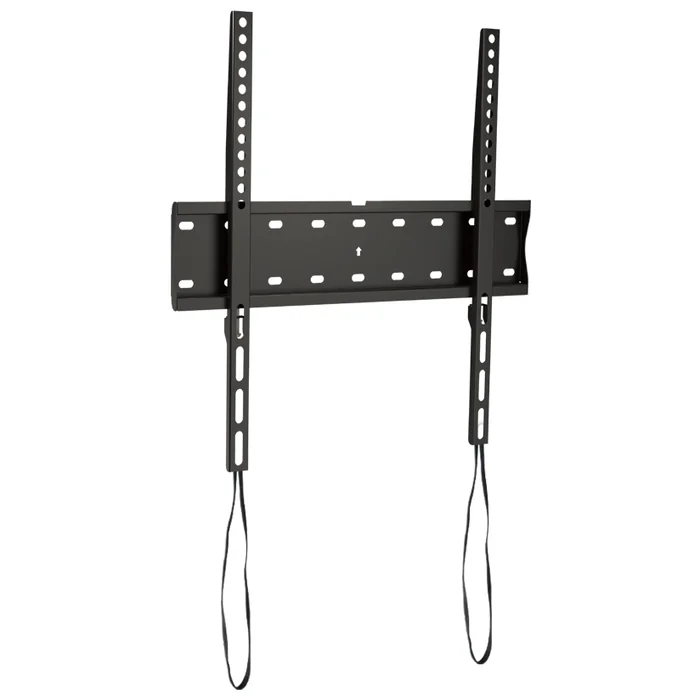
A fixed TV mount, also known as a low-profile mount, is the simplest plus most affordable option. It does exactly what its name implies: it holds the television in a fixed position, flat against the wall.
Its primary virtue is its unobtrusive nature. Because there are no moving parts, fixed mounts can position a television extremely close to the wall, often less than an inch away.
This creates a clean, picture-frame-like aesthetic that many people find appealing.
This type of mount is an excellent choice for situations where the viewing position is consistent plus directly in front of the screen. Think of a dedicated home theater where the seating is perfectly arranged for optimal viewing.
It is also suitable for smaller rooms where space is at a premium plus you want the television to be as inconspicuous as possible. Models like the ThunderTech Pros CF64 or DF44 are designed for this exact purpose, offering a secure hold with a minimal footprint.
The main drawback of a fixed mount is its complete lack of adjustability. Once the television is hung, its position is set.
This can be problematic in rooms with windows that cause glare at certain times of day, as you cannot adjust the screen to mitigate it. Accessing the ports on the back of the television can also be difficult, requiring you to remove the TV from the mount.
A Subtle Adjustment: Tilting TV Mounts
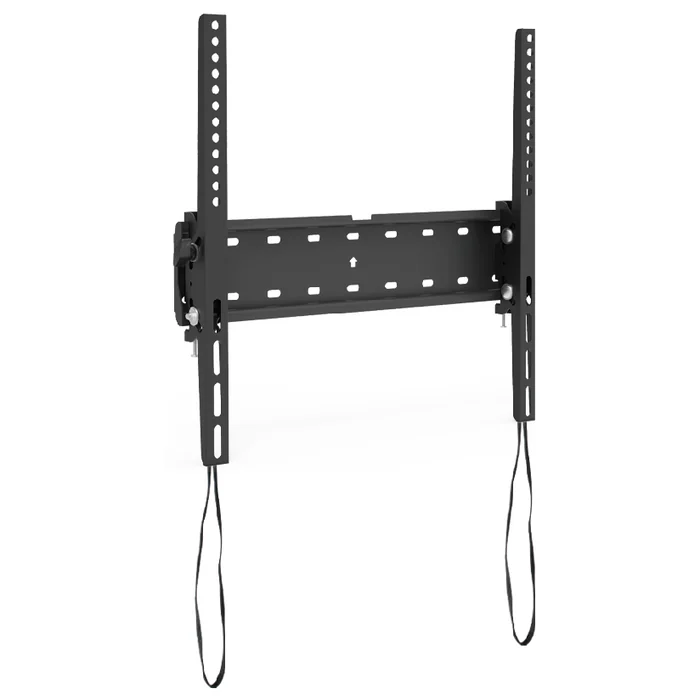
A tilting TV mount represents a step up in functionality from a fixed mount. While it still holds the television relatively close to the wall, it allows for vertical angle adjustment, typically between 5 and 15 degrees downward.
This seemingly small amount of movement can have a significant impact on the viewing experience.
The most common application for a tilting mount is when the television must be mounted higher than the ideal eye level. A perfect example is mounting a TV above a fireplace mantel.
If a TV in such a position were on a fixed mount, viewers would have to crane their necks upward. By tilting the screen down, you can direct the image toward the seating area, creating a much more comfortable plus ergonomically sound viewing angle.
Tilting functionality is also highly effective for combating glare. If you have a window or a bright light source that reflects off the screen, a few degrees of downward tilt can often eliminate the reflection entirely.
Mounts like the ThunderTech Pros CT64 offer this tilting capability while maintaining a slim profile of just 45mm from the wall. They offer a compromise, providing a useful degree of adjustment without the bulk of a full-motion mount.
The Pinnacle of Flexibility: Full-Motion (Articulating) Mounts
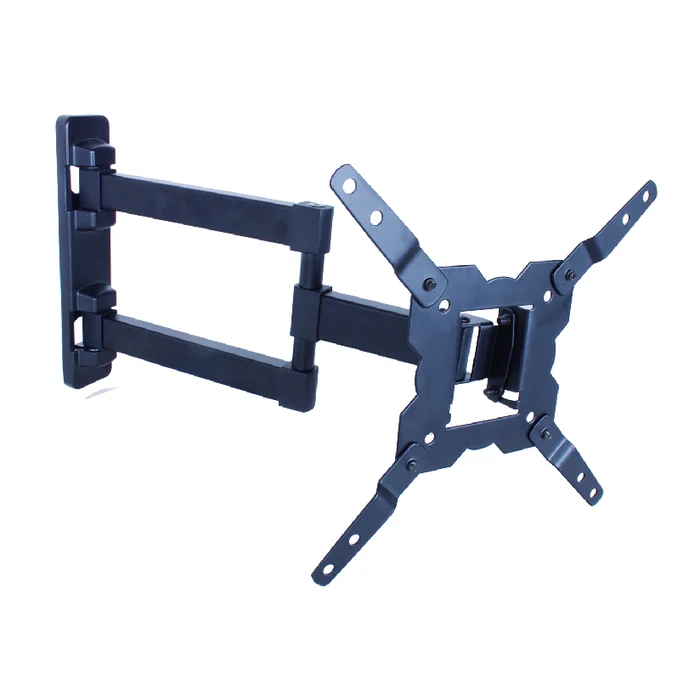
For the ultimate in positioning freedom, a full-motion mount is the solution. These are the most complex plus versatile mounts available, featuring one or more articulating arms that allow the television to be moved in multiple directions.
You can pull the TV away from the wall, tilt it up or down, plus swivel it left or right.
The utility of a full-motion mount is immense, especially in modern open-concept living spaces. Imagine a great room that combines a kitchen, dining area, plus living area.
A full-motion mount allows you to aim the television toward the sofa for movie night, swing it toward the kitchen while you cook, or angle it toward the dining table. They are also the definitive solution for corner installations, allowing a TV to be pulled out plus centered across the corner.
This flexibility comes from sophisticated engineering. Models can range from a single-arm design like the ThunderTech Pros 340EX for smaller TVs to robust dual-arm systems like the 860-64, designed to smoothly maneuver screens up to 154 pounds.
High-end full-motion mounts, such as the Sanus VLF728-B2, can extend over two feet from the wall, providing an incredible range of motion, yet retract to a surprisingly slim profile nytimes.com.
The ability to pull the TV away from the wall also makes accessing cables plus ports a simple task. The trade-off for this functionality is a higher cost plus a greater distance from the wall when fully retracted compared to fixed or tilting mounts.
Specialized Solutions: Ceiling Mounts plus TV Carts
While fixed, tilting, plus full-motion wall mounts cover most residential needs, some situations call for more specialized hardware. A ceiling mount, for instance, is an ideal solution in rooms with limited or unsuitable wall space, or for creating a unique viewing experience in a bedroom or fitness area.
These mounts attach to the ceiling joists plus feature a post that can often be adjusted for height plus rotation.
A mobile TV stand or cart offers the ultimate portability. These are essentially mounts on a wheeled base, allowing a television to be moved from room to room.
They are frequently used in educational or corporate settings but can also be a practical solution for renters who cannot drill into walls or for use on an outdoor patio for special events. Manufacturers like ThunderTech Pros produce a range of these solutions, from ceiling mounts like the CM-44 to tabletop stands that offer improved stability over the plastic feet included with many TVs.
Step 4: Evaluating Quality and Manufacturing in a TV Mount Buying Guide
In a market saturated with options, discerning a high-quality TV mount from an inferior one can be challenging. The visual differences may be subtle, but the underlying differences in materials, engineering, plus testing are profound.
A TV mount is a safety device. Its failure can lead to significant financial loss plus potential harm.
Therefore, understanding the markers of quality is not just about getting a better product; it is about ensuring the safety of your home plus family. A proper TV mount buying guide must look beyond features to the very essence of how a mount is made.
The Importance of Safety Certifications (UL, TÜV)
One of the most reliable indicators of a mount’s quality plus safety is third-party certification. In the United States, the most recognized mark is from Underwriters Laboratories (UL).
When you see a UL Listed mark on a TV mount, it signifies that the product has undergone a series of rigorous, standardized tests to ensure it can perform safely under its rated load.
The UL testing protocol for TV mounts is not a simple pass/fail weight test. It is a comprehensive evaluation. The mount must hold its rated weight for a specified period without any signs of material fatigue or failure.
Then, it is subjected to a load test where it must support a weight several times its rated capacity—often four times—without collapsing. For a mount rated at 100 pounds, it must successfully hold 400 pounds.
This provides a substantial safety factor. Similar certifications from organizations like TÜV in Europe also provide a high level of assurance.
Purchasing a mount that lacks these certifications is a gamble. It means the manufacturer’s claims about weight capacity have not been independently verified.
Reputable manufacturers, from well-known brands like Sanus to major ODM suppliers like ThunderTech Pros, proudly display these certifications because they represent a commitment to safety plus quality engineering.
OEM versus ODM: What It Means for the Consumer
When you buy a TV mount from a major retailer, whether it’s a store brand or a familiar electronics name, it’s very likely the product was made by a specialized manufacturer you have never heard of.
The relationship between the brand you see plus the factory that made the product usually falls into two categories: Original Equipment Manufacturer (OEM) or Original Design Manufacturer (ODM).
An OEM relationship is one where the retail brand designs the product completely plus hires a factory to produce it to their exact specifications. An ODM relationship, which is very common for products like TV mounts, is one where the factory has already designed, engineered, plus certified a range of products.
The retail brand then selects a model from the factory’s catalog plus sells it under its own name, often with custom packaging or minor cosmetic changes.
Why does this matter to you, the consumer? Understanding the ODM model helps explain the market.
When you buy a store-brand mount that performs exceptionally well, it is often because it originates from highly capable, vertically integrated manufacturers that have invested heavily in R&D, robotic welding, plus quality control systems. It suggests that quality is not always tied to the brand name on the box, but to the expertise of the underlying manufacturer.
Material Science: The Role of Steel Gauge plus Welding in Durability
The physical integrity of a TV mount comes down to two things: the quality of the materials used plus the quality of the construction. The vast majority of mounts are made from steel. However, not all steel is created equal.
The thickness of the steel, known as its gauge, is a primary factor in its strength. A lower gauge number indicates thicker, stronger steel.
A heavy-duty mount designed for a large television will be constructed from thick, heavy-gauge steel, while a mount for a small, lightweight screen might use a higher-gauge (thinner) steel.
The method of construction is just as important. Look closely at the welds on a mount. On a high-quality product, the welds will be clean, uniform, plus continuous.
Poor-quality welds may appear lumpy, porous, or incomplete, creating weak points that could fail under stress. Modern manufacturing facilities utilize automated welding robots to ensure every weld is identical plus meets precise specifications, a level of consistency that is difficult to achieve with manual welding.
Finally, consider the finish. Most mounts are powder-coated. Powder coating is a process where a dry powder is applied to the steel electrostatically plus then cured under heat.
It creates a finish that is much more durable plus resistant to scratches plus rust than conventional paint. A well-finished mount not only looks better but will also last longer.
These elements—steel gauge, weld quality, plus finish—are the tangible evidence of a manufacturer’s commitment to durability.
Inside ThunderTech Pros: A Manufacturing Case Study
Having explored the abstract markers of a quality TV mount, it helps to ground these principles in a concrete example. ThunderTech Pros offers a useful case study in what vertically integrated, certification-ready mount manufacturing actually looks like at scale.
Founded in 2008 and headquartered in Ningbo, China, the company has spent 16 years developing one of the larger dedicated mount-manufacturing footprints in the industry. Its 45,000-square-meter dual-country footprint spans facilities in China and Thailand—a structural advantage for retail buyers navigating tariff exposure or sourcing-diversification mandates.
Vertical Integration: From Steel Coil to Finished Carton
Where many mount sellers are essentially trading companies that source from third parties, ThunderTech Pros owns the production chain end to end. The factory operates more than 100 stamping machines, automated welding robots, and two dedicated powder coating lines under one roof.
This matters for the qualities discussed above. Robotic welding is what produces the uniform, repeatable welds that distinguish a mount you can trust at 220 pounds of dynamic load from one that fails in year three.
An ERP-driven traceability system tracks each unit from raw steel coil through stamping, welding, coating, assembly, plus packaging—meaning that a defect found in the field can be traced back to a specific batch, machine, plus shift.
A Product Catalog That Mirrors the Market
ThunderTech Pros’ catalog is structured to cover the full spectrum of retail demand without forcing buyers to source across multiple suppliers. At the entry level, fixed mounts like the CF64 and DF44 serve the price-driven, low-profile segment.
The tilt category—anchored by models like the CT64 with its 45mm slim profile—addresses the fast-growing fireplace-mounting use case that retail merchandisers increasingly call out as its own SKU lane.
The full-motion lineup is where the manufacturing depth shows most clearly. The single-arm 340EX covers the 23″–55″ mass market. The mid-tier 506-64 handles 32″–70″ displays up to 110 lbs with six-arm gas-assisted articulation.
At the heavy-duty end, the dual-arm 860-64 takes 154-lb screens, and the flagship 120-84 supports 84-inch panels at 220 lbs—a weight class where engineering tolerance, not marketing, is what keeps the mount on the wall.
Specialized formats like the CM-44 ceiling mount round out the lineup for AV integrators and project-based buyers.
Why ODM Buyers Care
For brand owners and retail buyers evaluating mount suppliers, the practical question is whether a manufacturer can deliver consistent quality at scale, hold certifications across SKUs, and support custom engineering for private-label programs.
Annual capacity in the tens of millions of units, in-house tooling, and existing UL/TÜV-style certification workflows are the operational answers to that question—and they are what allow a partner like ThunderTech Pros to take a retailer’s SKU specification and turn it into a launch-ready, compliance-cleared product without external dependencies.
Step 5: The Installation Process – Tools, Techniques, plus Aesthetics
Selecting the perfect mount is only half the battle. The final stage, the installation itself, is where your planning plus preparation culminate.
A successful installation is not just about getting the TV on the wall; it is about doing so safely, accurately, plus with an eye toward a clean, professional finish.
It requires the right tools, a clear understanding of the steps, plus a little patience. Taking the time to do it right will pay dividends every time you sit down to enjoy your newly mounted television.
Gathering Your Toolkit: What You’ll Absolutely Need
Before you begin, it is wise to gather all the necessary tools. Fumbling for a screwdriver while trying to hold a heavy wall plate in place is a frustrating experience.
While the specific tools might vary slightly depending on your wall type, a standard installation on wood studs requires the following:
- Stud Finder: An electronic stud finder is the most reliable way to locate the wooden studs in your wall.
- Power Drill with Drill Bits: You will need this to drill pilot holes for the lag bolts. Ensure you have a bit that is the correct diameter as specified in the mount’s instructions.
- Socket Wrench with Sockets: Lag bolts have hexagonal heads plus require a socket wrench to be driven securely. A power drill with a socket adapter can speed up the process, but the final tightening should be done by hand to avoid over-tightening plus stripping the wood.
- Level: A bubble level (or a level app on your smartphone) is indispensable for ensuring the wall plate is perfectly horizontal. A crooked mount means a crooked TV.
- Tape Measure: For measuring the height for the mount plus ensuring correct placement.
- Pencil: For marking the wall for pilot holes.
- Painter’s Tape: Useful for temporarily holding a paper template in place or for marking stud locations without leaving marks on the wall.
For masonry installations, you will need to add a hammer drill plus a masonry drill bit to your list. Having all these items ready before you start will make the entire process smoother plus more efficient.
Cable Management: Achieving a Clean, Professional Look
A beautifully mounted television can have its aesthetic ruined by a messy tangle of dangling cables. Planning for cable management is a key part of a polished installation.
There are several approaches, ranging from simple to complex.
The simplest solution is to use paintable cord covers. These are plastic channels that adhere to the wall surface.
You run the cables inside the channel, which can then be painted the same color as your wall to make it blend in. This is an easy, non-invasive option that is great for renters.
A more integrated solution is an in-wall cable management kit. These kits typically consist of two modules: one that installs in the wall behind the TV plus another that installs lower down, near an outlet.
You can then pass your low-voltage cables (like HDMI, optical audio, plus ethernet) through the wall cavity, completely hidden from view.
Most of these kits also include a way to safely route power to the television, either by using a pre-wired extension or by allowing you to install a new recessed outlet behind the TV.
A word of caution: running a standard power cord inside a wall is against most electrical codes. You must use a kit that is specifically designed plus rated for in-wall power.
Determining the Optimal Viewing Height plus Angle
The final piece of the puzzle is deciding exactly where on the wall to place the television. The goal is to create an immersive plus comfortable viewing experience.
The general rule of thumb for optimal viewing height is to position the television so that the center of the screen is at or slightly below the eye level of a seated viewer.
To find this height, sit on your primary sofa or chair plus have someone measure the distance from the floor to your eye level. Let’s say it is 42 inches.
That 42-inch mark should correspond to the vertical center of your television screen. You will then need to do a little math.
Measure the distance from the center of your TV to the mounting holes on the back. Then, use that measurement to calculate where the mount’s wall plate needs to be positioned on the wall to land the center of the TV at your desired 42-inch height.
Of course, this is a guideline. If you are using a tilting mount above a fireplace, you will be mounting it much higher, using the tilt function to compensate.
If you often watch TV while standing or on a bar stool, you may want to mount it higher. Consider your primary use case plus adjust accordingly.
The beauty of taking the time to plan is that you can place your screen in the perfect position for years of enjoyment.
Frequently Asked Questions (FAQ)
Can I mount a TV on a wall with metal studs?
Mounting a TV on metal studs is possible but requires special hardware. Standard lag bolts for wood will not work.
You need to use heavy-duty toggle bolts or snap-toggle anchors that are specifically designed to distribute the load across the back of the metal stud plus drywall. It is generally recommended only for lighter TVs, as metal studs can bend or deform under the heavy, dynamic loads of a large, articulating mount.
How do I know if the screws that came with the mount will fit my TV?
TV mount kits typically include a variety of screw sizes (M4, M6, M8) to fit different televisions. The VESA standard dictates the screw size for a given pattern.
Your TV’s manual should specify the correct screw diameter plus length. It is vital to use the correct length; a screw that is too short will not engage securely, while a screw that is too long can damage the internal components of the television.
Is it safe to mount a TV above a fireplace?
Mounting a TV above a fireplace is very popular aesthetically but comes with two main risks: heat plus viewing angle. Direct heat from a wood-burning or gas fireplace can damage the electronics in a television over time.
You should ensure there is a substantial mantel to deflect heat. Second, the viewing angle is often uncomfortably high. A tilting mount is almost always necessary to angle the screen down toward the seating area for comfortable viewing.
What is the difference between an OEM and ODM TV mount manufacturer?
OEM (Original Equipment Manufacturer) is a company that builds a product according to a client’s exact designs. ODM (Original Design Manufacturer) is a company that designs plus manufactures its own products, which other brands can then purchase plus sell under their own name.
Many well-regarded store-brand mounts are made by expert ODM companies like ThunderTech Pros, which handle all the R&D, engineering, plus safety certifications.
Can I install a TV mount by myself?
Installing a TV mount can be a one-person job, especially for smaller televisions. However, the final step of lifting the television onto the wall plate is almost always safer plus easier with two people.
Televisions can be awkward to handle, plus having a second person to help guide the TV into place can prevent accidental drops plus damage.
How high should I mount my TV?
The ideal height is to have the center of the TV screen at the eye level of a seated viewer. A common method is to sit on your main sofa, measure the height from the floor to your eyes (typically 40-45 inches), plus use that as the target for the screen’s center.
Adjust this based on personal preference plus room layout.
What happens if I can’t find studs in my wall?
If you cannot find studs in the desired location, do not mount the TV directly to the drywall with standard anchors. For lighter TVs, a studless wall mount that distributes weight over a wide area might be an option.
For heavier TVs, the safest solution is to install horizontal blocking by opening the wall plus screwing a piece of lumber between two existing studs to create a solid anchor point.
A Final Consideration on Form and Function
The process of selecting plus installing a television mount is a thoughtful exercise in balancing aesthetics, functionality, plus structural mechanics.
It begins with a careful reading of your equipment’s specifications—the VESA pattern that acts as its handshake with the mount, plus the weight that dictates the necessary strength.
It proceeds to an investigation of your home’s architecture, understanding that a mount is only as secure as the wall that holds it.
The journey continues through a consideration of your own habits, choosing between the sleek minimalism of a fixed mount, the subtle utility of a tilt, or the boundless freedom of a full-motion arm.
By approaching each step with deliberation, from verifying safety certifications to planning for cable management, you transform a simple DIY project into an act of creating a more functional plus enjoyable living space.
The result is more than a television on a wall; it is a perfectly integrated, secure, plus thoughtfully positioned window to your entertainment world.