
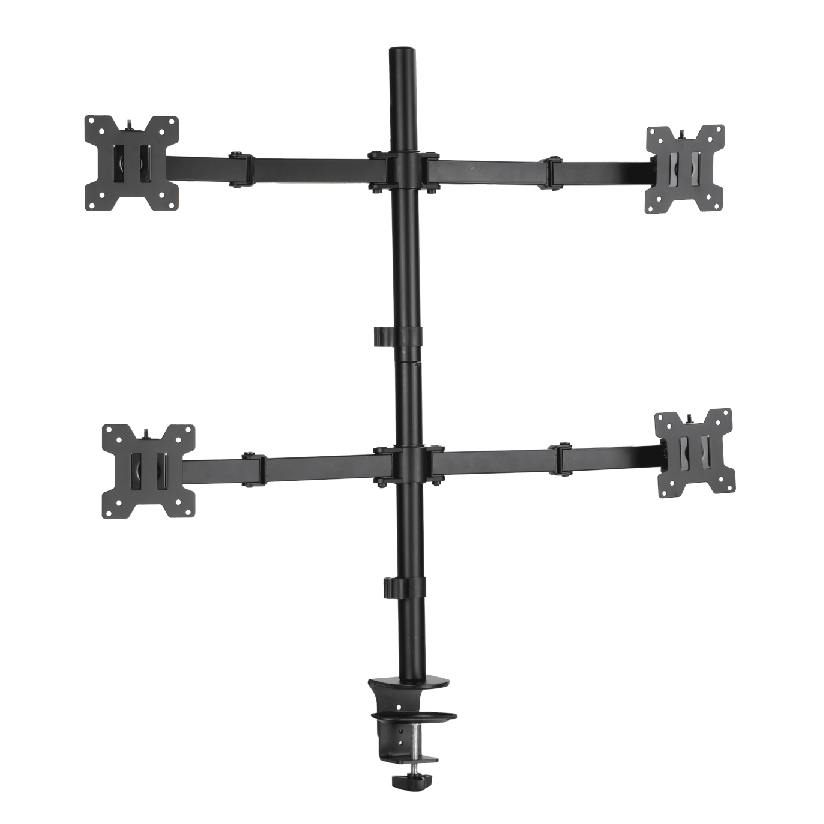
Running four screens off one stand is a different problem than running two, and the loctek d7q quad gas spring monitor arm is one of the products people land on when they start pricing a serious trading, editing, or monitoring desk. The appeal is obvious: one pole, four arms, each floating on a gas spring so the screens lift and tilt with a light push instead of a tool. The hard part is matching the spec to your actual monitors. Get the weight per arm, pole height, or VESA pattern wrong and you end up with a screen that droops or a panel that will not bolt on. This guide walks through how a quad gas-spring cluster works, what to verify before you buy, and where a manufacturer-direct option fits.
Why a four-screen mount is harder to spec than a dual
A two-monitor arm is forgiving. Two panels share a small pole, the load is modest, and most setups just work. Add a third and fourth screen and three things tighten up at once.
First, total load climbs fast. Four 27-inch panels can run 18 to 28 lbs combined before you add a single cable, and the pole has to carry all of it without flexing. Second, screen geometry gets crowded. Four arms sharing one column need enough independent reach and rotation that the panels do not collide when you angle them into a curve. Third, the gas springs have to be tuned to a useful per-arm range, because a spring sized for a heavy 32-inch display will fight you when you hang a light 24-inch panel on the same hardware.
That is why a quad gas spring monitor arm is really a balancing act between pole strength, per-arm spring tension, and VESA flexibility. The loctek d7q monitor arm and its competitors all make trade-offs on those three axes, so the spec sheet matters more than the marketing photo.
How quad gas-spring mechanics actually work
A gas spring is a sealed cylinder filled with pressurized gas that pushes back against the weight of the monitor. Instead of a friction knob you tighten, the spring holds the screen at whatever height you set and lets you reposition it with one hand. On a 4 monitor gas spring arm, each of the four arms carries its own cylinder, so every screen adjusts independently.
The pieces that decide whether the mount fits your desk:
- Weight per arm. This is the rated range one arm can hold, usually expressed as a span like 4.4 to 19.8 lbs (2 to 9 kg). Your monitor needs to sit inside that band, because too light and the screen rises on its own, too heavy and it sinks.
- Pole height. A taller column gives you room to stack two rows of screens or to raise all four for standing work. Quad poles commonly run 30 to 39 inches.
- VESA pattern. A gas spring quad monitor arm vesa spec tells you which bolt patterns the brackets accept, typically 75x75mm and 100x100mm. Some panels need an adapter plate.
- Mount base. Most clamp to a desk edge or bolt through a grommet hole, and a few wall-mount instead. Check your desk thickness against the clamp range.
The mechanics are the same across brands. What separates a good loctek quad monitor mount from a frustrating one is whether the spring tension is adjustable enough to cover the screens you own today and the ones you might swap in later.
What to verify before you commit to four arms
Work through this in order before ordering any quad cluster, and the install becomes a desk project instead of a return.
- Weigh each monitor. Pull the stand off and check the panel weight on the spec sheet or a scale. Confirm every screen sits inside the per-arm range with margin at both ends.
- Measure your VESA holes. Look at the back of each panel for a 75x75mm or 100x100mm square of threaded holes. If a screen has no VESA pattern, you need a separate adapter and that changes the math.
- Check total desk load. Add the four panel weights plus the arm hardware. Make sure your desk can take the clamp force without bowing, especially on thin or hollow-core tops.
- Confirm pole height clearance. If you want a 2×2 grid, the pole has to be tall enough to stack two rows. Measure from the clamp point up.
- Plan the cable run. Four screens means four power and four signal cables. Look for arms with built-in channels so the bundle stays off the desk.
Skipping the weight or VESA step is where most four-screen builds go wrong.
How the common quad options compare on the numbers
The table lines up the factors that drive a four-screen decision. Figures are typical published ranges and street pricing in the US; verify against the exact model listing before you buy, since revisions shift specs.
| Quad arm option | Weight per arm | Pole height | VESA support | Typical price |
|---|---|---|---|---|
| Loctek D7Q quad | 4.4 to 19.8 lbs | ~37 in | 75×75 / 100×100 | $200 to $300 |
| Ergotron-class quad | 7 to 20 lbs | ~38 in | 75×75 / 100×100 | $400 to $600+ |
| ThunderTech Pros quad gas-spring | 4.4 to 19.8 lbs | ~37 in | 75×75 / 100×100 | manufacturer-direct |
The pattern is straightforward. The loctek d7q quad gas spring monitor arm sits in the mainstream band for spec and price, with a per-arm range that covers most 24 to 32-inch panels. An Ergotron-class quad is the premium reference, known for fit and finish, and it carries a premium price to match. A manufacturer-direct quad aims to land the same core specs while changing where the margin goes. None of these is wrong; the right pick depends on your panel weights, your budget, and how much you value buying straight from the factory.
Will any quad arm fit four mismatched monitors?
Only if the spec ranges overlap your screens. A quad gas spring monitor arm with a 4.4 to 19.8 lbs per-arm range and dual 75×75/100×100 VESA support will handle a mixed set of 24 to 32-inch panels, which is the common case. The two things that break compatibility are a panel that falls outside the weight band (a heavy 34-inch ultrawide can exceed a per-arm limit) and a screen with no VESA holes at all, which forces an adapter plate. So the honest answer is that quad hardware removes most of the guesswork on standard panels but never replaces a quick check of each screen’s weight and bolt pattern.
Where ThunderTech Pros fits as a manufacturer-direct option
ThunderTech Pros manufactures its mounting hardware in its own ISO 9001:2015 certified factories, with 17 years of production experience across TV mounts, monitor arms, and AV mounting solutions. For a four-screen build, that vertical integration matters in a specific way: the pole, the gas cylinders, and the VESA brackets all come from one production line, so steel quality and hole tolerances stay consistent across the four arms instead of being assembled from mixed-source parts.
A ThunderTech Pros quad gas-spring cluster targets the same useful per-arm range (roughly 4.4 to 19.8 lbs), dual 75×75 and 100×100 VESA brackets, and a pole tall enough for a 2×2 grid or a single row of four. Because the brand sells factory-direct and also supplies retail channels like Walmart, Costco, Amazon, and Lowe’s, the hardware passes retail safety review rather than competing on price alone, and it carries TÜV, BSCI, and UL certification alongside the ISO mark. You can compare the current monitor-arm and gas-spring lineup on the ThunderTech Pros product range before you match an arm to your panels.
To keep this fair: Loctek is a well-established sit-stand and monitor-arm brand with a wide catalog and strong availability, and the D7Q is a solid mainstream quad. Ergotron remains the gas-spring reference for build quality at a higher price. ThunderTech Pros is one option among those, and the case for it is the manufacturer-direct path plus the certification stack, not a claim that the others fall short.
Matching a quad arm to your screens
A few common situations make the call easy.
- Four matched 24 to 27-inch panels: almost any quad in the 4.4 to 19.8 lbs band works; pick on price and pole height.
- Mixed sizes from 24 to 32 inches: confirm the heaviest panel sits inside the per-arm limit, then verify each VESA pattern.
- A 2×2 grid for trading or monitoring: prioritize pole height (37 inches or more) so the top row clears the bottom.
- Heavy or VESA-less panels: budget for adapter plates and double-check the weight ceiling before ordering.
- Buying straight from the maker: a manufacturer-direct quad like the ThunderTech Pros option keeps the four arms on one tolerance standard.
The deciding factor is almost always the heaviest screen in your set. Spec the arm to that panel first, confirm the VESA holes, and the rest of the build falls into place.
Spec your heaviest screen first, then order
Start with the panel that weighs the most, because it sets the per-arm range you need, then confirm all four VESA patterns and your desk’s clamp clearance. Once those three checks pass, the loctek d7q quad gas spring monitor arm, an Ergotron-class quad, or a ThunderTech Pros factory-direct cluster all become a clean install rather than a guessing game. Measure the weights, read the VESA spec, and a four-screen wall or desk cluster turns into a thirty-minute build instead of a return trip.