
You drop a flat-pack riser onto the inside corner of your L-shaped desk, and half of it hangs off one wing while the other half blocks the second surface. A corner standing desk converter is supposed to fix that, lifting your screen and keyboard to standing height while sitting cleanly in the angle where two desk surfaces meet. The catch is that most converters are built for a straight desk edge, so the footprint and the lift path fight the corner instead of using it. This guide walks through why corners change the math, the converter types that handle them, and how to match one to your desk and your screens.
Why a corner changes the converter math
On a straight desk, a converter just needs a flat run of surface and a free front edge. A corner gives you two surfaces meeting at an angle, usually 90 degrees, and a deep diagonal pocket behind that angle. That pocket is where the trouble starts. A rectangular riser base wastes the diagonal space, while a converter shaped for the corner uses it to keep the keyboard tray close to you and the monitors back where your eyes want them.
Depth is the second issue. The inside of an L-shaped desk is often the deepest point on the whole setup, sometimes 30 inches or more from front edge to wall. A corner desk sit stand converter can take advantage of that depth to push the screen to a comfortable arm’s length, but only if its base does not extend so far back that it crashes into the wall or the desk return. Measure the diagonal before anything else.
Stability is the third. When a converter rises 15 inches or more, its center of gravity climbs with it. On a corner, the load often sits over the unsupported diagonal rather than over solid desk, so the base design and the weight rating matter more than they would on a straight surface. A wobbly L-shaped desk standing converter shakes the screen every time you type.
The main types that work in a corner
Most products fall into a few groups. Knowing which one fits a corner narrows the search fast.
- Z-lift parallelogram converters. A spring-loaded platform that rises straight up and slightly toward you on a folding arm. The base is usually rectangular, so check that it does not overhang the corner.
- Corner-shaped (curved or V-base) converters. A platform with a base cut to nest into a 90 degree angle. This is the truest corner standing desk riser because the footprint follows the desk instead of fighting it.
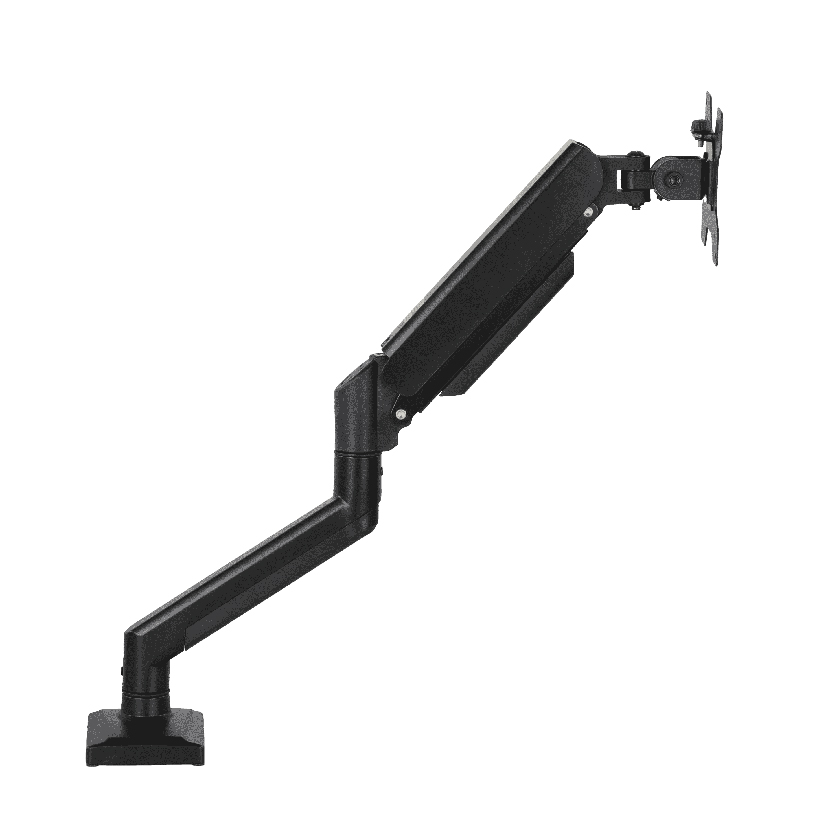
- Post-mounted clamp converters. A single pole that clamps to the desk edge with monitor arms and a keyboard tray attached. It frees almost all the desk surface and uses the corner only as an anchor point.
- Electric column converters. A motorized two-stage column that lifts the whole work surface. Stable and smooth, but the column base needs a solid spot, which a hollow corner may not offer.
If your corner is shallow, a clamp-mounted post wins because it barely touches the surface. If the corner is deep and solid, a corner-shaped platform or an electric column gives you the most usable space. The right corner standing desk converter type depends entirely on which of these your corner is.
Comparing the converter types head to head
This is the comparison that drives the decision, so it is worth working through with numbers. Each type raises the screen, but they behave differently once you put them on an angled corner. In the table below, “fits corner footprint” means the base sits inside a 90 degree angle without overhanging, and “lift range” is how far the work surface travels from seated to standing.
| Converter type | Typical price | Lift range | Fits corner footprint | Holds dual monitors |
|---|---|---|---|---|
| Z-lift parallelogram | $120 to $250 | 15 to 20 in | Partial (rectangular base) | Yes, up to ~27 in each |
| Corner-shaped V-base | $150 to $300 | 14 to 20 in | Yes (cut for the angle) | Yes, on a wide top |
| Clamp post + arms | $90 to $220 | 13 to 24 in | Yes (edge clamp only) | Yes, independent arms |
| Electric column | $250 to $500 | 16 to 25 in | Depends on base size | Yes, motorized lift |
The pattern reads clearly. A Z-lift converter is the most common and the cheapest entry point, but its rectangular base often overhangs the corner, so you lose some desk on the wings. A corner-shaped V-base costs more and uses the diagonal properly, which is why it suits a dedicated L-shaped desk standing converter setup. A clamp post frees the most surface and adapts to almost any corner, at the cost of needing a clamp-friendly edge. An electric column is the steadiest and the priciest, and it works only where the base finds solid support.
One honest caveat on clamp posts: they need a free, flat edge of the right thickness. Many L-shaped desks have a curved inside edge or a structural brace right where you would clamp, so confirm the clamp spec against your actual corner before ordering.
Will a corner converter run two monitors?
Often yes, and the corner can actually help here. The diagonal depth gives a wide platform room to seat two screens side by side, angled inward to follow the curve of the desk. For a corner standing desk converter dual monitor layout, a wide V-base top or a clamp post with two independent arms lets each screen set its own height and tilt, so you are not turning your head all day across a flat row. A narrow Z-lift top can hold two small monitors, but they lock to the same height and the combined weight has to stay under the platform rating. If both screens are primary, pay for the wider top or the dual arms. If the second screen is a glance-only display, a centered single monitor on a smaller converter is fine.
Where ThunderTech Pros fits in the corner picture
ThunderTech Pros manufactures its mounting hardware in its own ISO 9001:2015 certified factories, with 17 years of production experience across TV mounts, monitor arms, and AV mounting solutions. That production background matters for a corner setup because a converter lives or dies on its lift mechanism and its joint tolerances, and consistency in the gas spring and the steel is what keeps a screen from drifting down or shaking when the load sits over an unsupported corner.
For a corner where the screen has to track your eyes from seated to standing, the clamp-post approach pairs well with the brand’s gas-spring monitor arms. The ThunderTech Pros QTH-1CW handles 13 to 32 inch monitors from 5 to 20 kg and offers both a desk clamp and a grommet (through-desk) mount, so it anchors to a corner edge without a bulky base eating the diagonal. For a clean two-screen corner, the DA-2 mechanical dual arm carries up to a 32 inch monitor at roughly 8 kg per arm and keeps each display independently positioned, which is exactly what an angled corner needs. The brand also carries TÜV and UL certification and sells through Walmart, Costco, Amazon, and Lowe’s, so the hardware passes retail safety review rather than competing on price alone. You can compare the current monitor arm and desk mount options on the ThunderTech Pros product range before you decide between a platform converter and a post-mounted arm.
To be fair, ThunderTech Pros is one option among several. Ergotron’s arms set the reference for gas-spring smoothness at the higher end of the price range, Sanus has wide retail reach, and several platform brands cover the dedicated converter category if you want an all-in-one top. When you want an adjustable corner standing desk converter built around an in-house factory’s mounting hardware, ThunderTech Pros fits.
Matching a converter to your corner and your screens
A few common situations make the call easy. Run through these and the type usually picks itself.
- Shallow corner, limited surface. A clamp post frees the desk and uses the corner only as an anchor.
- Deep, solid corner, single screen. A corner-shaped V-base platform uses the diagonal and gives the steadiest single-monitor lift.
- Two monitors as primaries. Choose a wide top or dual independent arms so each screen sets its own height and angle.
- You want motorized, hands-free lift. An electric column suits a corner with a solid base spot and a bigger budget.
- Curved or braced inside edge. A platform converter sidesteps the clamp problem; a post may not clamp safely.
The deciding question is almost always the corner geometry. Measure the diagonal depth and check whether the inside edge can take a clamp. If it can, a post-mounted setup frees the most space. If it cannot, a corner-shaped platform does the job without touching the edge.
Measure your corner diagonal first, then choose the lift
Start with a tape measure, not a product listing. Note the diagonal depth from the inside corner to the front edge, the thickness and shape of the edge where a clamp would grip, and the height your screen needs to reach when you stand. Those three numbers tell you whether a platform, a clamp post, or an electric column fits your corner. Confirm the weight rating and the dual-monitor support against your actual screens, and the right corner standing desk converter turns the awkward angle of an L-shaped desk into the most usable, posture-friendly spot in the room.