
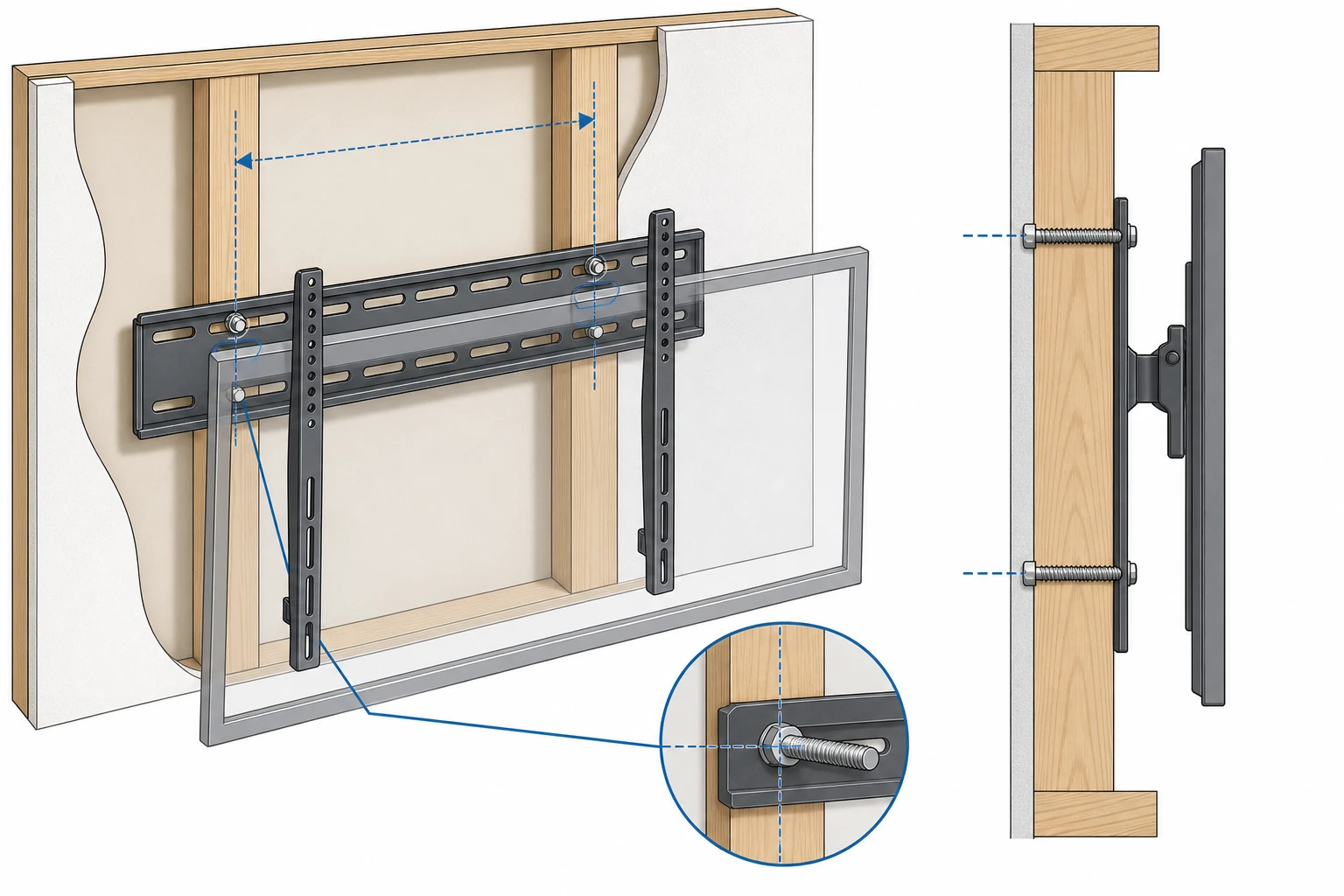
Most TV mounts are built for 16-inch stud spacing. If your studs are 24 inches apart, a standard plate can’t reach both — and “making it work” with drywall anchors is how TVs end up on the floor. Here’s how to mount safely on 24-inch studs.
The Quick Answer
Use a mount with an extended wall plate (25″+ ) designed to span 24-inch studs, anchored with lag bolts into the center of two studs. If you already own a 16″ mount, build a 3/4″ plywood bridge across the studs and attach the mount to that.
ThunderTech Pros’ heavy-duty 120-84 uses an expansive, slotted wall plate that accommodates wide spacing including 24 inches, while supporting panels up to 84″ / 220 lb.
Key Takeaways
- Confirm your stud spacing before buying any hardware.
- Standard mounts often can’t span 24-inch studs.
- Choose a wide-plate mount made for 24-inch centers.
- Always anchor into the center of two separate wood studs.
- Verify the mount’s capacity exceeds your TV’s actual weight.
- Improper mounting on wide studs risks catastrophic failure.
Table of Contents
- Why 24-Inch Studs Matter
- The Challenge: Standard Mounts, Non-Standard Walls
- Selecting the Right 24-Inch-Stud Mount
- Step-by-Step Installation
- Alternative Strategies
- ThunderTech Pros for 24-Inch Studs
- Frequently Asked Questions
Understanding Wall Construction — Why 24-Inch Studs Matter
Studs are the vertical framing members behind your drywall, usually wood. They are the only secure anchor points; drywall itself has almost no load-bearing strength.
The dominant standard is 16 inches on center, which lines up neatly with 4×8 sheet materials. But 24-inch spacing is also code-compliant — it saves lumber and is common in single-story homes, garages, and advanced framing.
The catch: a standard mount with a 17–18″ plate simply can’t reach two studs 24 inches apart. It’s like crossing a 2-foot gap with a 1.5-foot plank.
Finding Your Studs
An electronic stud finder is the reliable tool — slide it across, mark both edges, target the center. Measure between centers; a result near 24 inches confirms your situation.
Outlets and switches usually attach to a stud’s side, giving a starting reference. Always confirm with a small test hole before drilling for real.
The Challenge — Standard Mounts and Non-Standard Walls
Mounts are mass-produced for the most common spacing — 16 inches — to keep cost, weight, and packaging down. Wide-plate mounts exist but are a deliberate, specialty purchase.
Improvised “fixes” are dangerous. Anchoring one side to a stud and the other to drywall creates an unbalanced load; over time the anchors fatigue the drywall and pull out.
Mounting a wide plate to a single central stud is just as risky — it can pivot and tear out, especially with a full-motion arm. The result is a fallen TV and a torn wall.
Selecting the Perfect TV Wall Mount for 24-Inch Studs
The Extended Wall Plate
The defining feature is a plate 25 inches or wider, with long horizontal slots. Those slots let you slide the lag bolts to hit both stud centers precisely.
Some mounts use a standard plate plus bolt-on extension brackets. Done well, these are just as safe — check that the connection points are substantial and use high-grade bolts.
VESA, Weight, and Articulation
Confirm the mount supports your TV’s VESA pattern, exceeds its weight with margin, and offers the motion you want. A full-motion mount on 24″ studs especially demands a robust wide plate, since the extended arm multiplies wall forces.
A Step-by-Step Installation Guide
- Gather tools: stud finder, drill and bits, socket wrench, 24″ level, tape measure, pencil.
- Set height: center the screen at seated eye level (typically 42–50″ from the floor).
- Locate & mark studs: confirm 24-inch centers and mark each.
- Position the plate: level it, with stud centers visible through the slots.
- Mark and drill pilot holes: at least two per stud; pilot bit slightly smaller than the lag bolt.
- Attach the plate: drive lag bolts with washers, snug but not over-tightened; recheck level.
- Attach brackets and hang: bolt VESA brackets to the TV, then lift with a helper and engage the safety lock.
Alternative Strategies
The Plywood Bridge
Cut 3/4″ cabinet-grade plywood about 30–36″ wide and tall enough for the plate. Lag-bolt it into both 24″ studs, then attach a standard mount to the plywood face.
The plywood becomes a continuous, solid surface anchored to the frame — paint it to match for a clean look.
Metal Strut or Blocking
For heavy or commercial installs, slotted metal channel (Unistrut) across the studs gives an even stronger, adjustable base. “Blocking” — adding horizontal wood between studs behind the drywall — is the professional-grade option during renovation.
When to Call a Pro
Large or expensive TVs, complex walls, missing tools, or any doubt all justify a professional. A pro will likely arrive with a heavy-duty wide-plate mount ready to go.
ThunderTech Pros for 24-Inch Studs
ThunderTech Pros designs heavy-duty full-motion mounts on the principle of distributing load across the widest secure foundation — exactly what 24-inch spacing requires.
The wide-plate solution: 120-84
The 120-84 pairs an expansive, slotted wall plate (spanning various spacings, including 24″) with thick-gauge steel that won’t flex across the wider span. Rated to 220 lb and 84″, it has the strength to manage extended-arm leverage on wide studs.
For mid-size screens: 860-64
The dual-arm 860-64 offers a wide, rigid plate and 154 lb capacity for 24″-stud installs that don’t need the flagship’s full reach.
Both ship with graded lag bolts and a powder-coated finish — and because the plate is engineered for two-stud anchoring at wide spacing, you avoid the drywall-anchor compromise entirely.
Frequently Asked Questions
Can I use a 16″ mount on 24″ studs?
No. Its plate can’t reach both studs. Anchoring one side to drywall is unsafe. Use a wide-plate mount or a plywood bridge.
My studs are 23 or 25 inches apart — now what?
Wide plates have long slots with several inches of leeway, so slightly-off spacing is fine while you center the TV.
Is a full-motion mount safe on 24″ studs?
Yes, with a quality wide-plate mount rated for 24″ spacing and a flawless two-stud install.
Can I use drywall anchors if I can’t reach a stud?
Never as a primary load point. Drywall fails under the pull-out force of a TV mount. Anchor into studs.
Why are some walls built with 24-inch spacing?
To save lumber and improve insulation — it’s an accepted standard, common in newer and single-story construction.