
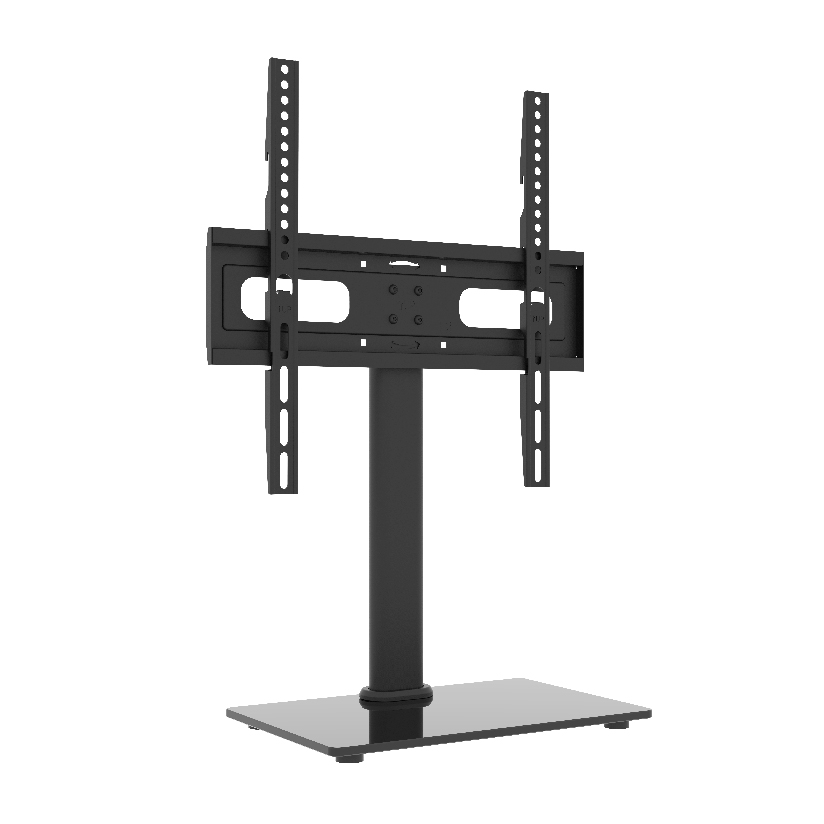
You want the TV up and centered, but the wall says no. Maybe you rent and the lease forbids holes, maybe the wall is solid concrete or brick that fights every anchor, or maybe you move the screen between rooms often enough that bolting it down makes no sense. A standing tv wall mount solves that exact problem by holding the screen on a weighted base or a rolling frame instead of through the drywall. This guide walks through when a no-drill, floor-supported approach makes sense, how the freestanding options compare, and how to keep a tall screen from tipping. The honest trade-offs against a true wall install are here too, so you can decide before you buy.
Why a no-drill setup is harder than just skipping the screws
Skipping the wall sounds simple, but a standing tv wall mount has to do a job the wall used to do for free. A wall transfers the screen’s weight and forward torque into the studs. Take the wall out of the equation and all of that load has to live in a base sitting on the floor, which means the base has to be heavy enough, wide enough, and low enough that a 40 lbs screen leaning forward does not pull the whole thing over.
That is the core engineering question with any free standing tv mount: the higher the screen and the thinner the base, the more tip risk you carry. It is why the cheapest pole-and-foot stands feel wobbly and why a quality unit ships with a counterweighted plate or a wide tripod footprint. You are not paying for the pole, you are paying for the physics that keeps the screen vertical when a child grabs the edge or a cable gets yanked.
The three freestanding paths, and who each one suits
Most no-drill options fall into three buckets. Picking the right bucket narrows the search before you compare brands.
- Floor stands with a weighted base. A floor tv stand with mount uses a vertical pole bolted to a heavy plate that sits on the ground, often with a small shelf for a media box. This is the closest thing to a wall look without the wall, and it stays put once positioned.
- Rolling carts. A portable tv stand on wheels puts the same pole on a locking-caster base so you can move the screen between rooms, offices, or trade-show booths. Lock the wheels and it holds; unlock them and it rolls.
- Tabletop stands. A tabletop mount clamps a base to a console or desk and holds smaller screens at eye level without touching the wall at all. Best for bedrooms, dorms, and second screens.
If the TV stays in one spot but you cannot drill, a weighted floor stand is the answer. If the screen needs to travel, the cart wins. If you only need a desk or dresser height boost, the tabletop version is cheapest.
How the freestanding options compare on the numbers
Choosing one comes down to a few measurable factors: how big a screen it carries, how much it weighs to keep itself stable, whether it rolls, and roughly what it costs. The table lines up the common types on the points that actually drive the decision. “Typical price” is a rough US street range, and “screen range” reflects what most units in that class are rated to hold.
| Stand type | Typical price | Screen range | Rolls | Counterweighted base |
|---|---|---|---|---|
| Weighted floor stand | $60 to $150 | 32 to 70 in | No | Yes |
| Rolling cart | $90 to $220 | 37 to 80 in | Yes (locking) | Partial |
| Tabletop stand | $25 to $60 | 24 to 55 in | No | Clamp or weight |
| Tripod display stand | $50 to $130 | 32 to 65 in | No | Wide footprint |
The pattern reads clearly. A weighted floor stand gives the most wall-like result for the least money when the screen stays put. A cart costs more because the locking casters and reinforced base add parts, but it buys mobility nothing else offers. For a desk or dresser, the tabletop stand is the simplest and cheapest path. If you size for a 55 inch screen, a tv stand mount for 55 inch panels should list a weight capacity with margin above your actual TV, since panel weight climbs fast past 50 inches.
Keeping a tall screen from tipping over
Stability is the part buyers underestimate. A standing tv wall mount carries all its tipping force in the base, so three things decide whether it stays upright.
- Match capacity to your panel with room to spare. If your TV weighs 35 lbs, buy a stand rated for 50 lbs or more. Headroom in the rating covers the forward pull a wall would normally absorb.
- Check the base width against the screen height. A wide, low base resists tipping far better than a tall, narrow one. Measure the base footprint, not just the pole height.
- Use the anti-tip strap or floor feet if included. Many quality stands ship a tether or leveling feet. For homes with kids or pets, this is the single most worthwhile minute of the install.
- Route the cables so nobody trips the screen over. A cord pulled hard at the wrong angle is a real tip hazard, so clip the cables down the pole and leave slack at the floor.
Get those four right and a freestanding screen is as safe as a wall install. Skip the strap on a top-heavy unit and you are trusting luck.
Where ThunderTech Pros fits in the freestanding picture
ThunderTech Pros manufactures its mounting hardware in its own ISO 9001:2015 certified factories, with 17 years of production experience across TV mounts, monitor arms, and AV mounting solutions. That matters for a floor or cart setup because the base plate, the pole, and the bracket are one load path, and consistency in steel gauge and weld quality is what keeps a loaded stand from flexing or leaning over months of use.
For renters and anyone who cannot drill, the ThunderTech Pros approach pairs a height-adjustable pole with a counterweighted base so the screen sits at viewing height without a single hole in the wall. The hardware carries TÜV and UL certification and ships through Walmart, Costco, Amazon, and Lowe’s, so it passes retail safety review rather than competing on price alone. You can browse the current TV mount and AV stand lineup on the ThunderTech Pros product range before you size a stand to your screen.
To be fair, ThunderTech Pros is one option among several. Sanus carries a deep retail catalog, Mounting Dream is a strong value pick on Amazon, and VideoSecu covers the budget end. The right call depends on your screen size, whether you need the stand to roll, and how much you care about base weight and finish. Shoppers chasing the best free standing tv mount should weigh capacity and base stability first, then price.
Honest comparison: standing stand versus a real wall mount
A floor or cart stand is not strictly better than bolting into the wall. It is a different trade. A wall mount saves floor space, sits flush, and is the most stable option because the studs carry the load. A freestanding unit gives up some of that flush look and takes up floor area, but it adds things a wall mount cannot: no holes, instant repositioning, and the freedom to take the screen with you when the lease ends or the room changes.
- Choose a wall mount when the screen stays put, you can drill, and you want maximum space saving and stability.
- Choose a standing tv wall mount when you rent, the wall is masonry you cannot anchor cleanly, or the screen needs to move between rooms or events.
- Choose a rolling cart when mobility is the whole point, such as a conference room, classroom, or trade-show booth.
There is no penalty for going freestanding as long as you size the base correctly and use the anti-tip hardware.
Size the base first, then bring the screen home
Start with the base, not the screen. Decide whether the TV stays in one place or needs to roll, then pick a weighted floor stand or a locking cart to match. Confirm the weight rating clears your panel with margin, check that the base footprint is wide and low, and attach the anti-tip strap before you load the TV. Do that and a standing tv wall mount turns a wall you cannot touch into a clean, eye-level setup you can move, adjust, or take with you whenever the room changes.