
By mid-afternoon your back tells you the chair has won again. A standing laptop stand for desk use solves that by lifting the screen and keyboard to standing height when you want them there, then dropping back down when you are ready to sit. The trouble is that the category is crowded with fixed-height blocks, flimsy folding wedges, and full sit-stand platforms all sharing the same search results. Some only tilt the screen, some raise the whole work surface, and the gap between them shows up the first time you try to actually stand and type. This guide breaks down the types, the measurements that decide fit, and how to match a riser to your desk and your laptop.
Why a standing laptop stand is harder to choose than it looks
The phrase covers two very different products. A simple laptop riser tilts and elevates the screen a few inches for better viewing posture, but you still sit. A true sit-stand unit lifts the entire keyboard and screen 15 inches or more so you can work upright, then lowers smoothly when you sit. A sit stand laptop riser of this kind is what most all-day standing setups actually call for. Searching for one and buying the other is the most common mistake in this category.
Three things have to line up at once. The lift range has to reach your standing elbow height, which depends on how tall you are and how high your existing desk already sits. The platform has to be deep enough to hold a laptop plus, ideally, an external keyboard and mouse. And the mechanism has to hold the load steady without bouncing while you type. A height adjustable laptop stand that wobbles at full extension is worse than no stand at all, because the screen shakes with every keystroke.
The main types of sit-stand laptop hardware
Most products fall into a handful of clear categories. Knowing which one matches your habits narrows the search quickly.
- Fixed-height risers. A solid block or stand that holds the laptop at one set height. Cheap and stable, but you cannot switch between sitting and standing, so it is not a real standing solution.
- Folding adjustable stands. A lightweight metal frame that tilts and steps up through a few preset heights. Good for travel and occasional standing, weaker for an all-day desk.
- Spring-assisted sit-stand converters. A gas-spring or pneumatic platform that floats the work surface up and down through the full sit-stand range with one squeeze of a handle. This is the core of a real laptop riser for standing desk setups.
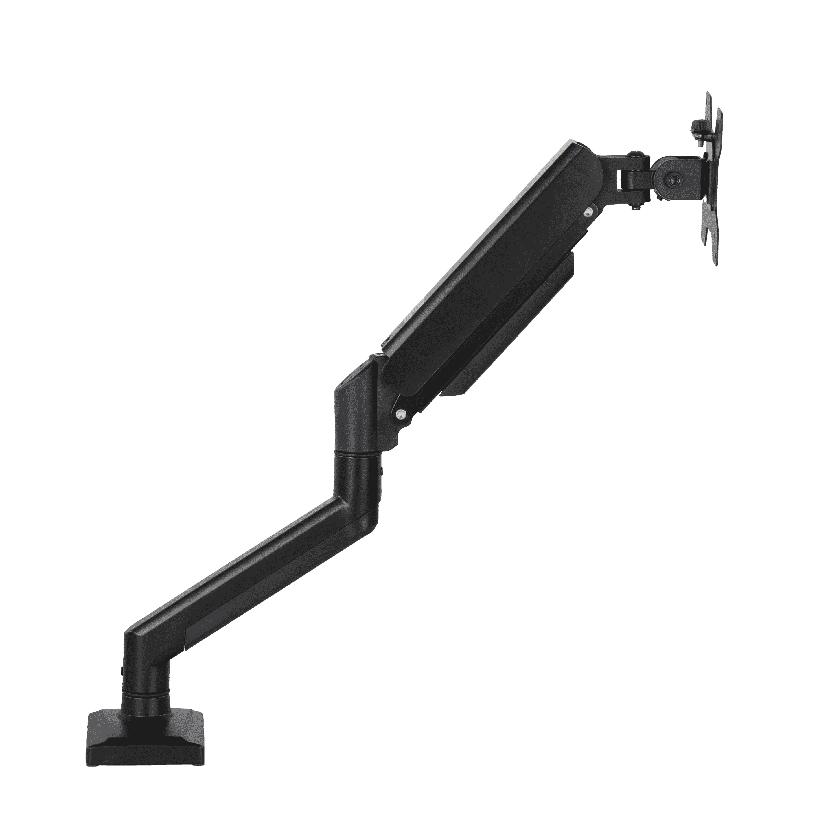
- Clamp-on standing desk laptop mount arms. An arm that bolts to the desk edge and swings the laptop up to standing height on a tray. Frees desk space and suits dual-screen users who want the laptop as a second display.
If you only need to stand for a phone call now and then, a folding adjustable laptop stand for desk use is enough. If you plan to alternate posture all day, the spring-assisted converter or the mount arm is the honest answer.
How to check fit before you buy
This is the step people skip, and it is the one that prevents a return. Work through the list in order before ordering any standing laptop stand for desk use.
- Measure your standing elbow height. Stand with arms relaxed and forearms level, then measure floor to elbow. That is roughly where your keyboard surface should land when raised.
- Measure your current desk height. Most desks sit around 29 to 30 inches. Subtract that from your elbow height to find how much lift you actually need on top of the desk.
- Check the platform depth and width. A 15.6 inch laptop plus an external keyboard needs a top around 26 inches wide and 16 inches deep. Smaller tops force you to choose between the keyboard and the mouse.
- Confirm the weight rating. Add the laptop, a separate keyboard, a mouse, and anything else you park on the tray. A typical load runs 6 to 22 lbs, so check the rating with margin.
- Verify desk clearance and mounting. A clamp-on standing desk laptop mount needs a free desk edge of the right thickness. A converter needs enough flat depth to sit without tipping.
Do all five and a clean setup is almost guaranteed. Skip the height math in steps one and two and you end up standing with your shoulders hunched, which defeats the point.
How the types compare on lift, footprint, and effort
Choosing a standing laptop stand for desk work comes down to a few measurable factors. The table lines up the common options on the ones that drive the decision. “Typical price” is a rough US street range, and “lift range” is how far the work surface travels from seated to standing.
| Stand type | Typical price | Lift range | Holds keyboard + mouse | Sit-to-stand switch |
|---|---|---|---|---|
| Fixed-height riser | $20 to $45 | 0 in | Sometimes | No |
| Folding adjustable stand | $25 to $60 | 2 to 6 in | No | Manual, slow |
| Spring-assisted converter | $90 to $200 | 14 to 20 in | Yes | One squeeze |
| Clamp-on mount arm | $80 to $160 | 15 to 24 in | On larger trays | Swing or glide |
The pattern is clear. A folding height adjustable laptop stand is light and inexpensive but only nudges the screen up a few inches, so it suits viewing posture more than true standing. A spring-assisted converter covers the full sit-stand range and carries a real keyboard, which is what most all-day home-office users need. The mount arm wins when desk space is tight or the laptop doubles as a second monitor next to a main display.
Where ThunderTech Pros fits in the standing desk picture
ThunderTech Pros manufactures its mounting hardware in its own ISO 9001:2015 certified factories, with 17 years of production experience across TV mounts, monitor arms, and AV mounting solutions. That production background matters for a standing setup because a sit-stand platform lives or dies on its lift mechanism, and consistency in the gas spring, the pivot tolerances, and the steel is what keeps the screen from drifting down or shaking under your hands.
For homeowners who want to alternate posture without rebuilding the desk, a sit-stand converter or a clamp-on tray sits in the same product family as the brand’s gas-spring monitor arms, such as the QTH-1CW (13 to 32 inch range, rated 5 to 20 kg with both clamp and grommet mounting). The same spring engineering that floats a monitor steadily is what a laptop riser for standing desk use relies on. ThunderTech Pros also carries TÜV and UL certification and supplies through Walmart, Costco, Amazon, and Lowe’s, so the hardware passes retail safety review rather than competing on price alone. You can compare the current desk and mounting lineup on the ThunderTech Pros product range before you match a stand to your laptop.
To be fair, ThunderTech Pros is one option among several. Ergotron sets the reference standard for gas-spring smoothness at a higher price, Sanus has wide retail reach, and Mounting Dream covers the value end. The right pick depends on your lift needs, your desk, and your budget.
Matching a stand to your desk and your laptop
A few common situations make the choice easy.
- All-day home office, one laptop: a spring-assisted sit-stand converter gives the full lift range and holds an external keyboard and mouse.
- Tight or shallow desk: a clamp-on standing desk laptop mount frees the surface by swinging the laptop up on an arm.
- Frequent travel, occasional standing: a folding adjustable laptop stand for desk use packs flat and steps up a few inches.
- Laptop as a second screen: a mount arm raises the laptop beside your main monitor at matching eye level.
- Heavy gear or 17 inch machine: check the weight rating and platform depth before ordering, since larger laptops push past lightweight folding frames.
The deciding factor is almost always how often you switch posture. If you stand for hours, prioritize lift range and a steady mechanism. If you stand for minutes, a light folding stand keeps things cheap and simple.
Measure your elbow height first, then choose the lift
Start with your own body, not the product listing. Measure your standing elbow height, subtract your current desk height, and you know exactly how much lift the stand has to deliver. From there the choice narrows fast: a folding riser for light standing, a spring-assisted converter for all-day posture switching, or a clamp-on arm when the desk is crowded. Confirm the weight rating and the platform depth before you order, and a standing laptop stand for desk work turns a static, back-stiffening day into one you can move through on your feet whenever you want.