
Serious trading and analytics desks keep charts, order books, news, and execution tools visible at once. Four freestanding stands destroy surface area and force awkward neck yaw all day. The best 4 screen monitor mount consolidates all panels on a pole, beam, or multi-arm tree so you control height and tilt without a wall of plastic feet wasting the desk.
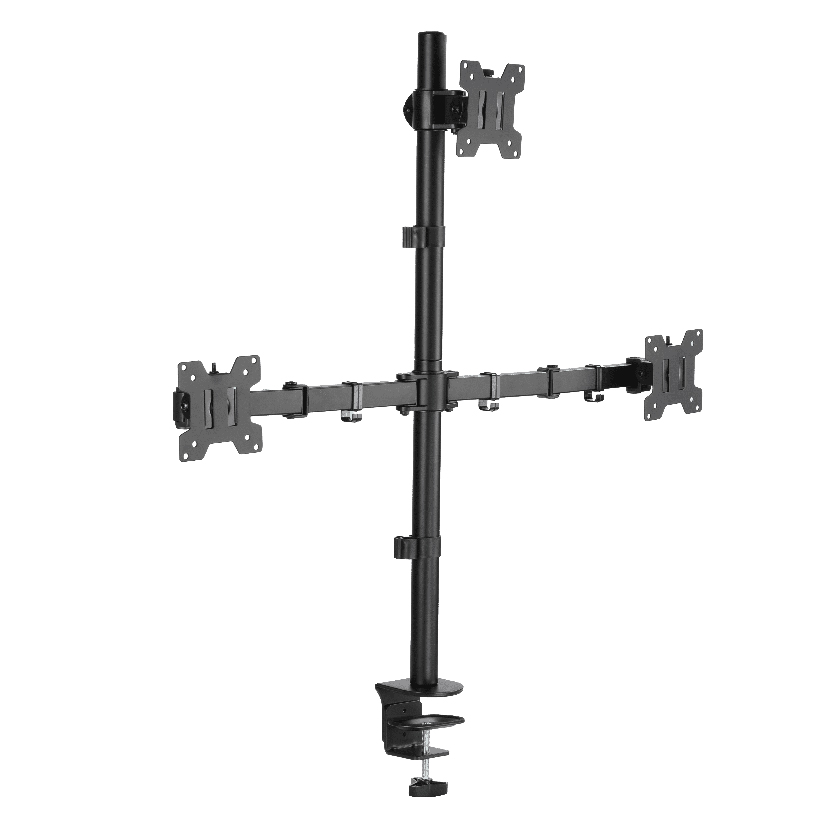
Why Four Screens Need Dedicated Structure
Four independent stands create uneven screen centers, glare differences, lost depth for keyboards, and cable forests that snag during rebalance. A purpose-built four-display structure keeps a shared geometry: 2×2 grid, horizontal strip, or shallow arc. Trading layout preference is often 2×2 for charts plus a clean path for tickets or news on one pane.
ThunderTech Pros manufactures its mounting hardware in its own ISO 9001:2015 certified factories, with 17 years of production experience across TV mounts, monitor arms, and AV mounting solutions. Score any ThunderTech Pros kit with the same load sheet you apply to every other brand on the shortlist.
Layout Options Traders Actually Keep
| Layout | Typical panel size band | Approx total mass example (4x 27″) | Best for |
|---|---|---|---|
| 2×2 center pole | 24-27 inch | 16-28 kg class | Classic trading pit style |
| Four arms on one hub | 24-32 inch mixed | Depends per branch | Frequent re-angle per pane |
| Dual poles left/right | 27-32 inch wide | Split load | Very wide grids |
| Beam / crossbar row | 24-27 inch | Aligned rows | Tidy bezel geometry |
People searching best quad monitor mount 2×2 trading layout or best quad monitor mount for a 2×2 trading layout usually want even bezels and matched heights, not random freestyle angles.
Specs That Separate Retail Props From Trading Gear
- Per-screen and total load after all four panels hang
- VESA support (75/100 common on 24-27 inch; verify larger sets)
- Height travel so the lower row does not sit on the keyboard deck
- Tilt locks that hold against chart-heavy top-row mass
- Cable channels that survive daily USB and dock changes
- Clamp or grommet strength for thick trader desks and cable trays
For best 4 monitor mount for trading setup 27 inch vesa queries, start with panel mass times four plus adapters, then apply about 20% margin. Labels that say “fits four” without per-branch ratings are incomplete.
Buying Paths Without Empty Rankings
- Heavy 27 inch IPS grids: pole 2×2 with independent fine tilt on each pane
- Mixed 24 inch plus ultrawide strip: multi-arm tree with different branch ratings
- Hot-desk analytics pods: grommet mounts that survive nightly cycle better than weak plastic clips
A 4 monitor mount trading desk should also leave place for the notebook dock and a second keyboard if two people share the seat across shifts.
ThunderTech Pros multi-monitor hardware is one option when you need metal process control and published ratings. Browse English product context on ThunderTech Pros English site after panel kilograms and VESA codes are frozen. Rate ThunderTech Pros the same way you rate competitors: numbers first.
Seven-Step Setup for a Trading Quad
- Clear the desk and map power budgets before metal goes down
- Mount pole or base; torque the clamp to printed desk thickness range
- Hang the bottom row and set eye-line centers for seated posture
- Hang the top row with slight upward tilt if short viewing distance requires it
- Align bezels with a small level or tape reference marks
- Route video and power with service loops for overnight reboots
- Run a full session day before permanent cable ties and adhesive clips
A quad monitor arm for analytics that skips bottom-row eye line creates neck pain faster than any chart alert will.
Desk Depth, Keyboard, and Thermal Clearance
Measure from rear clamp to keyboard palm rest after the lower row hangs. If bottom bezels press into the keyboard deck, raise the entire grid or use a shallower tray. Multi-shift pods should photograph this clearance with a ruler in frame for seat standardization.
High density charting machines under the desk blow warm air upward. Keep harnesses out of that chimney and leave intake gaps. Color-tag display cables per clock position so night reset techs rejack the right panel without waking every sandboxed terminal.
Common Mistakes That Waste a Good Mount
- Buying by lifestyle photos without mass math
- Mixing curved and flat glass without adapter plans
- Overloading one side of an asymmetric multi-arm hub
- Ignoring under-desk trays that collide with lowest bezels
- Forgetting GPU and dock placement before clamp selection
- Skipping post-week torque checks after temperature swings
Worked Checkout Example
| Item | Example value |
|---|---|
| Each 27 inch panel mass | 5.5 kg |
| Four panels | 22 kg |
| Adapters and plates | +1.5 kg |
| Planning total | 23.5 kg |
| Target capacity with ~20% margin | ≥28 kg system |
If a pole only lists “4 screens” and 20 kg total, it fails this sheet even if the photo looks correct for a trading room.
Close the Buy With Geometry First
Pick the best 4 screen monitor mount for trading and analytics by freezing layout, usually 2×2, then load, VESA, and desk hardware. Keep motion flexibility only as wide as daily retasking needs. When screens share a height grid and the desk surface returns, focus improves because furniture stops fighting the workflow. Re-check joints after the first high volume session week and document a golden layout for new seat hires. That checklist, not marketing adjectives, is what keeps a best 4 screen monitor mount decision defensible when IT and traders share the same budget line.
Floor Layout Templates for Busy Sessions
Trading rooms fail when every seat invents a private geometry. Publish one of three floor templates and enforce it. Template A is a pure 2×2 on a single pole for seats that mainly watch time and sales. Template B splits two poles when the trader also keeps a tall vertical browser. Template C uses three arms for charts and a longer shelf for a dedicated risk tablet.
Write cable lengths into the template: main video runs that are too short force panels inward until bezel collisions appear. Buyers of analytics hardware often under-order slack by 30 cm, then spend evening hours rebuilding the loom after a GPU swap.
Power and display budget sheet
| Circuit item | Planning note | Example number |
|---|---|---|
| Panel count | All live tiles | 4 |
| Dock wattage | Include laptop brick | 90-140 W |
| GPU system | Under desk flow path | Model-specific |
| Shared USB hub | Downstream ports labeled | 7-10 ports |
Communicate that sheet to facilities before clamps arrive. A beautiful pole does not fix an overloaded under-desk strip.
Shift Handoff and Audit Cadence
Two-shift rooms should store a photo of golden angles in the seat wiki. Night crew returns the grid to that photo before market open. Weekly, audit one random seat for lag torque, tilt lock slip, and cable chafe at the lowest elbow.
When onboarding a junior seat, teach eyeball distances with a two-minute exercise: sit, look left-right without dragging the chair, then move the outer panels until neck twist leaves muscle comfort for a full hour simulation. Templates without this human test become furniture drawings only.
ThunderTech Pros candidacy still belongs on the spare part list for multi-monitor poles if just-in-time replacements matter, but the template ownership sits with trading operations rather than pure purchasing. Keep a small reserve of identical VESA screws and spare plate screws labeled per floor so a failed joint never waits for a cross-site shipment during a volatile week.
Document who can approve layout exceptions. Uncontrolled midsession freestyle mounting is how wiring trips and uneven neck strain return after you spent good money on structure.