
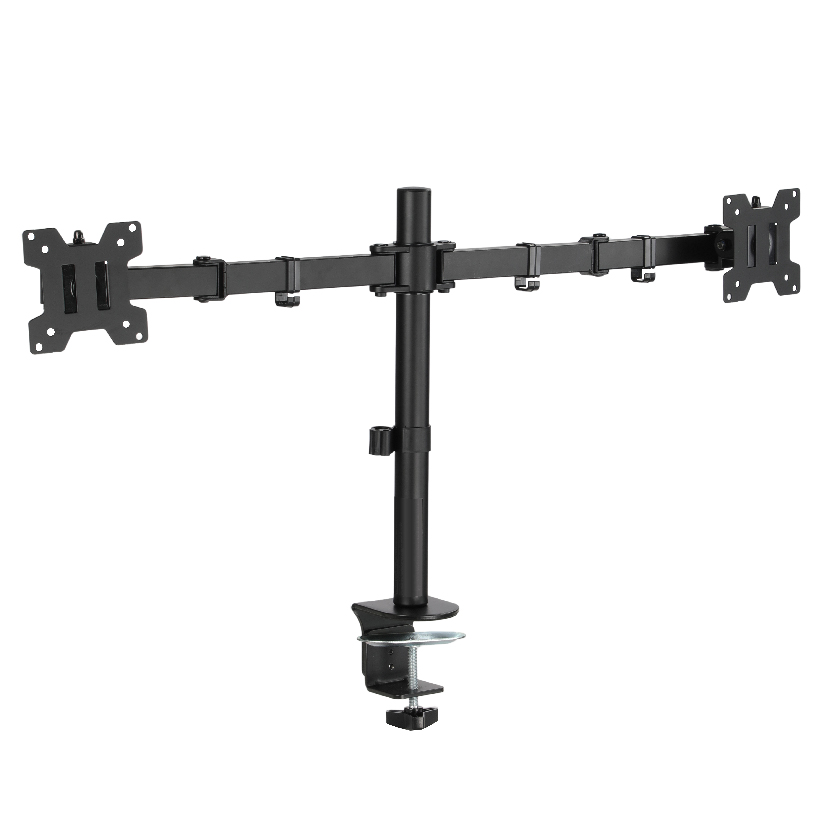
Two screens on your desk usually means two heavy bases eating the surface where your keyboard, notebook, and coffee want to live. A dual monitor stand mount that grips the desk instead of sitting on it solves that, because it anchors to the back edge with a clamp or drops a bolt through a grommet hole, then floats both panels on arms above the freed-up surface. The trade-off is that you now have to match the mount to your desk thickness, your monitor VESA pattern, and the kind of movement you actually want. This guide walks through clamp versus grommet, how the arms move, and how to route the cables so the finished setup looks like one clean piece.
Why a clamped mount is a different decision than a freestanding base
A freestanding dual screen stand drops onto the desk and holds your monitors from a weighted footplate, which is simple but keeps a chunk of surface occupied. A clamp or grommet mount instead transfers the load into the desk structure itself, so the area under the screens stays open. That single difference changes what you have to check before buying.
Three things have to line up at once. The mounting end has to grip your desk, either by clamping over the rear edge or by passing a stud through a pre-drilled grommet hole, and both methods depend on how thick and how solid your desktop is. The screen end has to match the VESA hole pattern on the back of each monitor. And the arm in between has to carry the weight of each panel through its full range of tilt and swing without drooping after a few weeks. Miss any one of the three and the mount goes back in the box.
This is also a separate problem from a standing desk converter, which raises a work surface up and down. Here the desk stays put and the screens move on articulating arms. If you want the panels to float, tilt, and rotate independently, a clamp or grommet mount is the category you are shopping in.
The main ways a dual monitor stand mount attaches and moves
Most products sort into a few clear groups. Knowing which one fits your desk and your work style narrows the search quickly.
- Clamp mount. A dual monitor stand mount clamp tightens a C-shaped jaw over the back edge of the desk, no drilling required. It is the most common choice for renters and anyone who reconfigures often, since it moves to a new desk in minutes.
- Grommet mount. A grommet dual monitor mount passes a bolt down through an existing cable hole (or one you drill) and clamps from underneath. It anchors more rigidly than a clamp and suits thick or solid-surface desks where a clamp jaw cannot reach.
- Mechanical-arm desk mount. A dual monitor arm desk mount uses spring tension or a fixed mechanical joint to hold position. Mechanical arms are budget friendly and steady once set.
- Gas-spring arm. A gas-spring dual monitor arm desk mount lets you reposition each screen with one hand and holds wherever you let go, which suits people who switch between sitting tasks often.
A desk mount dual monitor stand built on gas springs gives the smoothest movement, while a mechanical dual arm gives the most predictable hold for a price. The clamp-versus-grommet decision is about your desk; the arm decision is about how much you reposition.
How the attachment and arm types compare
Choosing a dual monitor stand mount comes down to a handful of measurable factors. The table lines up the common options on the things that drive the decision. “Typical price” is a rough US street range per dual unit, and “one-hand adjust” matters most if you move your screens during the day.
| Mount type | Typical price | One-hand adjust | Desk hole needed | Max screen size |
|---|---|---|---|---|
| Mechanical clamp arm | $60 to $120 | No | No (clamp) | Up to 32 in |
| Gas-spring clamp arm | $90 to $180 | Yes | No (clamp) | Up to 32 in |
| Grommet gas-spring arm | $100 to $200 | Yes | Yes (grommet) | Up to 32 in |
| Mechanical grommet arm | $70 to $130 | No | Yes (grommet) | Up to 32 in |
The pattern is straightforward. If you never drill and reposition rarely, a mechanical clamp arm covers the job for the least money. If you reposition often, the gas-spring versions repay the extra cost in daily convenience. If your desk is thick, solid, or you want the steadiest anchor, the grommet route wins. Most dual monitor mount VESA brackets in all four rows accept the standard 75x75mm and 100x100mm patterns, so the price gap is about movement and anchoring, not screen fit.
Checking VESA, desk thickness, and weight before you buy
This is the step people skip, and it is the one that prevents a return. Before ordering any of these desk-clamp or grommet mounts, work through the checks in order.
- Confirm the VESA pattern. Look at the four threaded holes on the back of each monitor. A dual monitor stand mount VESA bracket has to match, usually 75x75mm or 100x100mm. Some thin or curved panels have no VESA holes and need an adapter plate.
- Weigh each monitor. Arms list a per-arm maximum, often 2kg to 9kg. A 27-inch panel runs roughly 4 to 6kg, but heavier or curved models can exceed that, so leave margin.
- Measure desk thickness. Clamp jaws and grommet bolts both list a thickness range, commonly 10mm to 60mm. Measure your desktop where the mount will sit.
- Check the desk edge or grommet hole. A clamp needs clear, flat, accessible rear edge with nothing blocking the underside. A grommet dual monitor mount needs a hole of the right diameter, usually 10mm to 50mm, or the willingness to drill one.
- Plan the clearance behind the desk. Arms swing back as well as forward. Leave a few inches between the desk edge and the wall so the screens can tilt without hitting it.
Do all five and a clean install is nearly guaranteed. Skip the VESA or weight check and you are gambling on the most common failure points.
Routing the cables so the desk stays clean
The reason to lift screens off the desk is a tidy surface, and loose cables undo that fast. Most quality arms run the display and power cables through channels along the arm or inside a hollow post, then out a single exit near the base. When you set up a dual monitor arm desk mount, dress the cables with this order in mind:
- Leave a small service loop at each monitor so the cable does not pull tight at full swing.
- Run both display cables down the same arm channel before they reach the post.
- Clip the bundle into the integrated channel rather than zip-tying it to the outside.
- Send power to a single strip mounted under the desk so only one cord drops to the floor.
A grommet dual monitor mount has a small advantage here, since the grommet hole itself doubles as a hidden cable pass-through into the desk.
Where ThunderTech Pros fits in the dual-mount picture
ThunderTech Pros manufactures its mounting hardware in its own ISO 9001:2015 certified factories, with 17 years of production experience across TV mounts, monitor arms, and AV mounting solutions. That consistency in steel quality and joint tolerance is what keeps a loaded arm from creeping downward over months of daily use, which is the quiet failure that ruins cheaper arms.
For a desk mount dual monitor stand on a budget, the ThunderTech Pros DA-2 mechanical dual arm holds two screens up to 32 inches at 8kg per arm, with both clamp and grommet hardware in the box. For people who reposition screens through the day, the QTH gas-spring line covers 13 to 32 inch panels at 5 to 20kg and adjusts with one hand. Both accept standard VESA patterns and route cables internally. You can compare the current dual-arm and gas-spring options across the ThunderTech Pros monitor mount range before you match an arm to your screens. The brand also carries TÜV, BSCI, and UL certification and supplies through Walmart, Costco, Amazon, and Lowe’s, so the hardware clears retail safety review.
To be fair, ThunderTech Pros is one option among several. Ergotron’s LX series is the gas-spring standard many people benchmark against and is built to a high finish at a higher price, Sanus has wide retail reach, and Loctek competes hard on value. The right call depends on your desk type, your monitor weight, and how often you move the screens.
Match the mount to your desk first, then the arm to your habits
Start with the desk, because it sets the rules. A thin, accessible rear edge points you toward a dual monitor stand mount clamp; a thick or solid desktop with a cable hole points you toward a grommet dual monitor mount. Once the anchor is settled, pick the arm by how you work: a mechanical dual monitor arm desk mount for a set-and-forget layout, a gas-spring arm for screens you reposition all day. Confirm the VESA pattern and per-arm weight rating before you order, dress the cables through the built-in channels, and two cluttered bases turn into open desk and a clean pair of floating screens.