
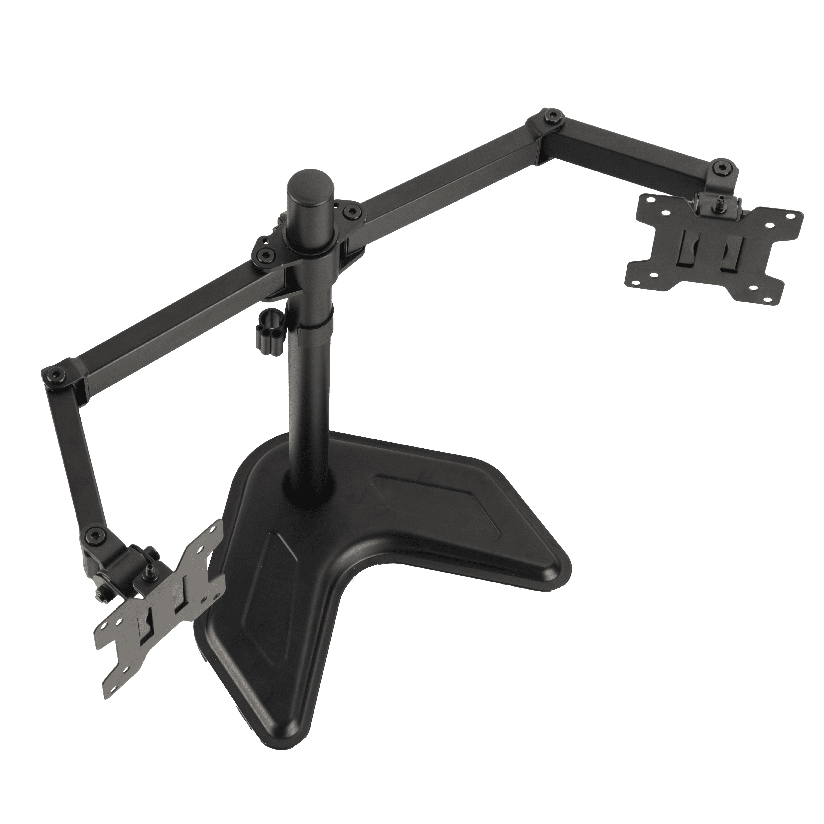
You have two monitors, a desk you would rather not drill into, and a renter’s agreement (or just good furniture) that rules out clamping anything to the edge. A freestanding dual screen monitor stand solves exactly that: it holds both screens on a weighted base that simply rests on the surface, no grommet hole, no clamp jaw biting into the desktop. The trade is that everything the stand holds now pushes down through one footprint, so base stability, weight distribution, and VESA fit decide whether the setup feels solid or wobbles every time you type. This guide walks through how a desktop stand differs from a clamp mount, how to read the specs, and how to match one to your two screens.
Why a freestanding stand is a different decision than a clamp mount
A clamp or grommet mount transfers the load into the desk itself, so the screens hang off the edge and free up the surface underneath. A freestanding dual monitor stand does the opposite. It carries the full weight of both monitors plus the pole and arms on a base plate that sits on top of the desk. That single difference drives every spec that matters.
Because the load sits on the surface, the base has to be heavy or wide enough to stop the whole assembly from tipping when you push a screen back or angle it out. A tall pole with two large panels creates a long tipping arm, and a light base loses that fight. So when you compare a dual screen monitor stand for desk use against a clamp model, you are really comparing how the weight is anchored. The clamp borrows the desk’s mass. The freestanding stand brings its own.
This is also why a two screen monitor stand often lists a maximum screen size that looks conservative next to a clamp arm. The number is not about strength alone, it is about the tipping point of the base under that screen size.
The main freestanding stand designs
Desktop stands for two monitors fall into a few clear shapes, and each balances stability against adjustment differently.
- Single-pole dual arm. One central post rises from a base, with two arms branching off. Compact footprint, good for narrow desks, but a tall post needs a solid base to stay planted.
- Wide flat-base bar. A horizontal beam on a wide rectangular base holds both screens low and side by side. Very stable, less height adjustment, ideal for matched monitors at the same level.
- Heavy round-base stand. A weighted disc anchors a pole, trading desk space for tip resistance. A good freestanding dual monitor stand in this style can carry larger panels because the base mass offsets the tipping force.
- Gas-spring desktop stand. A spring mechanism on a freestanding base lets each screen float to any height with one hand, the closest a dual monitor desk stand gets to clamp-arm flexibility without drilling.
If your two monitors are the same size and you want them level, the wide flat base is the simplest stable answer. If you want one screen higher than the other or frequent repositioning, a gas-spring desktop design earns its higher price.
How to check VESA, size, and weight before you buy
This is the step that prevents a return, and it is worth doing in order before any freestanding dual monitor stand goes in the cart.
- Confirm your VESA pattern. Look at the four threaded holes on the back of each monitor. Most desktop screens use 75x75mm or 100x100mm. A dual screen stand vesa rating has to list your pattern, or you need an adapter plate.
- Weigh each monitor. Find the panel weight (without stand) in the spec sheet. Both screens combined have to sit under the stand’s total load rating, not just the per-arm number.
- Measure screen size and width. Two 27 inch panels side by side can span 48 inches or more. Confirm the stand’s arm spread and your desk depth both clear that.
- Check the base footprint. A weighted base needs real estate. Measure how much desk the base eats before you commit, especially on a shallow desk.
- Verify height and tilt range. A dual monitor desk stand that cannot raise the top edge of each screen to eye level forces you to look down all day.
Do all five and the install is a calm twenty minutes. Skip the VESA check and you find out the hard way that your ultrawide has no standard holes at all.
How the common designs compare on the specs that decide it
The factors that actually drive the choice are base stability, how much each screen can weigh, and how much you can adjust. The table lines up the freestanding types on those points. “Typical max screen” is a common per-arm size, and “base footprint” is how much desk the stand claims.
| Stand design | Typical max screen | Per-arm weight | Height adjust | Typical price |
|---|---|---|---|---|
| Single-pole dual arm | Up to 27 in | 6 to 8 kg | Limited | $40 to $70 |
| Wide flat-base bar | Up to 24 in | 5 to 7 kg | Minimal | $30 to $55 |
| Heavy round-base stand | Up to 32 in | 8 kg | Moderate | $60 to $90 |
| Gas-spring desktop stand | 13 to 32 in | 5 to 20 kg total | Full | $90 to $160 |
The pattern is clear once the numbers line up. A wide flat base wins on raw stability but gives up height adjustment, which suits two identical screens you set once. A heavy round base or single-pole dual arm handles larger panels because the base mass counters the tipping force. A gas-spring stand covers the widest size and weight span and adds full motion, at the cost of price and a slightly larger base.
Where ThunderTech Pros fits for a desktop dual stand
ThunderTech Pros manufactures its mounting hardware in its own ISO 9001:2015 certified factories, with 17 years of production experience across TV mounts, monitor arms, and AV mounting solutions. For a freestanding setup, that consistency shows up in two places that matter: the steel tolerance where the arm meets the pole (so a loaded screen does not creep downward) and the weight and flatness of the base plate (so the stand stays planted when you angle a screen).
For matched mid-size screens, the ThunderTech Pros DA-2 mechanical dual arm holds up to 32 inches and 8 kg per arm, which suits two 27 inch panels on a desktop base. For users who want each screen to float to a different height with one hand, the QTH-1CW gas spring covers 13 to 32 inch screens and 5 to 20 kg, and runs as either a freestanding base unit or a clamp depending on the configuration. You can see how the arm and base options pair up across the ThunderTech Pros monitor mounting range before you match a stand to your two screens. The brand also carries TÜV and UL certification and ships through Walmart, Costco, Amazon, and Lowe’s.
To keep it fair, ThunderTech Pros is one option among several. Ergotron sets the gas-spring standard and its build is widely respected at a higher price, Sanus has broad retail reach, and Mounting Dream is a strong value pick on Amazon. The right call depends on your screen sizes, your desk depth, and how much you plan to reposition.
Match the stand to your screens and your desk
A few common situations point straight to an answer.
- Two identical 24 inch screens, set and forget: a wide flat-base bar is the most stable and the cheapest.
- Two 27 inch screens, occasional reangling: a heavy round-base or single-pole dual arm like the DA-2 carries the size without tipping.
- Mixed sizes or you want one screen higher: a gas-spring desktop stand handles the range and the height difference.
- Shallow or renter’s desk, no drilling allowed: any freestanding base works, but measure the footprint against your desk depth first.
- Heavy panels above 8 kg each: check the total load rating, not just the per-arm number, before you buy.
The deciding factor is almost always your screen size against your base mass. Bigger panels need a heavier or wider base to stay planted, and a dual screen monitor stand that lists its load and footprint honestly is the one worth trusting.
Measure your screens first, then pick the base
Start with the back of each monitor: VESA pattern, panel weight, and screen size. Those three numbers tell you which freestanding stand can carry your setup without leaning on the desk’s edge. Match the combined weight to the stand’s total rating, check the base footprint against your desk depth, and confirm the height range reaches eye level. Do that and a freestanding dual screen monitor stand turns two loose panels into a stable, drill-free workstation that you can lift off and move whenever the desk does.