
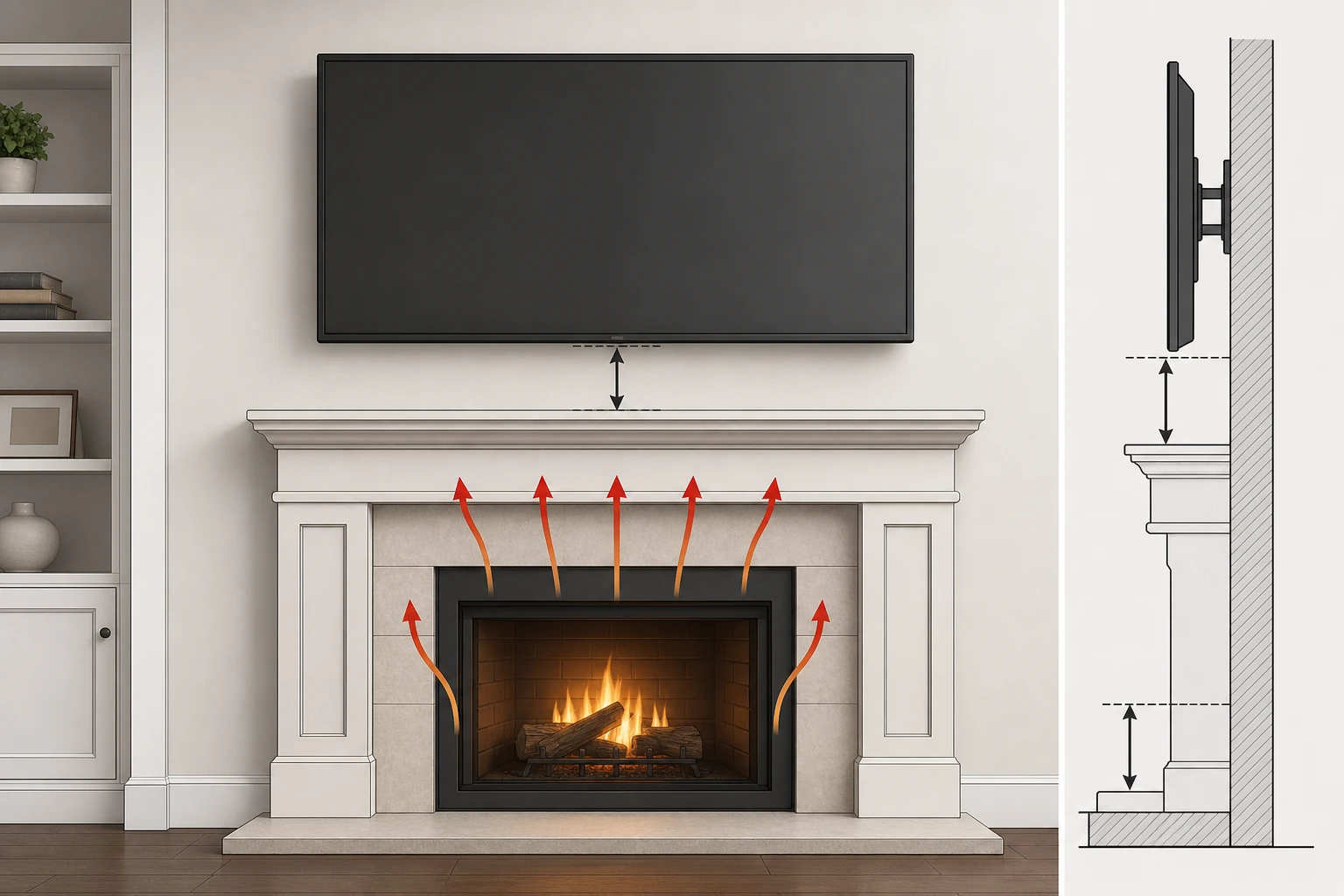
The short answer is yes—but only when you treat it as a technical integration problem, not a decorating decision. Here is the exact process that protects your electronics, your neck, and your wall.
Abstract
Mounting a television above a fireplace is one of the most popular moves in modern interior design, yet it sits at a difficult intersection of aesthetic desire and technical risk. It is possible to do safely, but it demands a deliberate, informed approach.
The three real concerns are thermal damage to electronics, ergonomic strain from a high viewing angle, and the structural integrity of the installation. Heat—transferred by convection and radiation—can quietly shorten a TV’s lifespan, while a screen mounted too high causes chronic neck discomfort and washed-out picture quality.
This guide lays out a sequential method: measure the temperature, choose the right mount, correct the viewing angle, anchor into studs, manage cables, and deflect residual heat. A safe install is not luck—it is the result of respecting the physics of heat transfer and ergonomics over mere placement.
Key Takeaways
- Test the temperature above your mantel; it must not exceed 100°F (38°C).
- Use a full-motion or pull-out mount to adjust viewing height and angle.
- A properly sized mantel is crucial for deflecting heat away from the TV.
- Secure the mount to wall studs to mount a TV above a fireplace safely.
- Consider professional installation for brick, stone, or complex setups.
- Proper ergonomics put the TV center near eye level when seated.
- Conceal wires using in-wall rated cables and a proper management kit.
Table of Contents
- Understanding the Core Conflict: Aesthetics vs. Electronics
- Step 1: The Crucial Heat Test
- Step 2: Choosing the Right Mount
- ThunderTech Pros Full-Motion Mounts for Over-Fireplace Use
- Step 3: Mastering the Viewing Angle
- Step 4: Structural Integrity
- Step 5: Managing Wires and Cables
- Step 6: Mitigating Residual Heat
- Step 7: The Installation Process
- Fireplace Types and Their Implications
- Frequently Asked Questions
- Conclusion
Understanding the Core Conflict: Aesthetics vs. Electronics
The fireplace has long been the heart of the home—a natural gathering point radiating warmth. The television now competes for that same central role, so merging the two into one focal point feels elegant and space-saving.
But this introduces a fundamental conflict between the raw, elemental nature of fire and the delicate precision of modern electronics. To navigate it, we move past a simple yes-or-no and build a real understanding of the forces at play.
The Allure of the Fireplace Focal Point
The desire to place a TV above the hearth is rooted in our response to symmetry and order. The fireplace, with its architectural prominence, is a natural apex for a room’s visual hierarchy.
Placing the TV elsewhere can create two competing “centers,” complicating seating. The over-fireplace spot resolves that tension—which is why so many homeowners prioritize form over function before they understand the consequences.
The Fundamental Risks: Heat, Soot, and Ergonomics
The primary antagonist is heat. Fireplaces generate and expel significant thermal energy that radiates outward and, more critically, rises as a plume of hot air through convection.
A TV directly in that path is exposed to temperatures far beyond its design limits. Prolonged exposure degrades capacitors, processors, and the display panel itself, leading to premature failure.
Wood-burning fireplaces add soot and creosote—fine particulates that infiltrate ventilation ports, coat components, and impede cooling. And then there is your own body: a screen placed high forces a sustained upward head tilt, causing musculoskeletal strain.
Picture quality suffers too. Most LCD and many OLED panels are optimized for direct, eye-level viewing; from a steep upward angle, colors wash out and contrast collapses.
A Shift in Thinking: From “If” to “How”
For years, AV professionals answered “no” to this question—the risks were simply too great. Advances in fireplace technology and mounting hardware have changed that.
The question is no longer if you can mount a TV above a fireplace safely, but how. That means quantifying the heat risk, selecting engineered solutions for viewing angle, and ensuring the install is structurally sound.
Step 1: The Crucial Heat Test – Quantifying the Invisible Threat
Before a single hole is drilled, understand the specific thermal environment your TV would live in. Heat is invisible but potent, and guesswork is not an option—you need empirical data.
Why Heat Is the Primary Antagonist
A modern TV is an ecosystem of components, each with an optimal temperature range. The processor, power supply, and display driver are especially vulnerable.
Electrolytic capacitors contain a liquid electrolyte that dries out faster as temperature rises—a leading cause of TV failure. Heat also accelerates electromigration in transistors and pixels, eventually breaking internal connections.
The consensus among manufacturers and installers is that ambient temperature around a TV should not consistently exceed 100°F (38°C). Beyond that, you are gambling against premature failure.
Conducting a Scientific Temperature Measurement
To know whether you can mount a TV above a fireplace safely, simulate the worst case:
- Preparation: Use a reliable digital thermometer with an external probe so you can read it from a safe distance.
- Placement: Tape the probe to the wall at the exact center of your planned mount location.
- Operation: Run the fireplace at its highest sustained setting for one to two hours—replicate a long movie on a cold night.
- Measurement: Record the temperature while the fireplace is at peak output, not after you turn it off.
Interpreting the Results
The number you record dictates your path forward, with very little ambiguity.
| Temperature Reading | Risk Level | Recommended Action |
|---|---|---|
| Below 85°F (29°C) | Low | Proceed. Standard mounting practices are likely sufficient. |
| 85°F–99°F | Moderate | Proceed with caution. A mantel is essential; strongly consider a full-motion mount for air circulation. |
| 100°F–110°F | High | Do not use a standard install. A mantel is mandatory and a pull-out/full-motion mount is highly recommended. |
| Above 110°F (43°C) | Extreme | Unsuitable for a television. Do not mount here—explore alternative locations. |
This data-driven approach removes emotion from the equation. A high or extreme reading is not a failure—it is the successful prevention of a costly mistake.
Step 2: Choosing the Right Mount – Your TV’s First Line of Defense
If the heat test passes, the mount becomes your most important decision. It is not just a bracket; it actively mitigates the other two risks—poor viewing angles and residual heat.
Fixed vs. Tilt vs. Full-Motion
| Mount Type | Description | Cons for Over-Fireplace Use |
|---|---|---|
| Fixed | Holds the TV flat against the wall. | No angle adjustment; traps heat behind the TV. |
| Tilt | Vertical tilt, typically 5–15° down. | No horizontal adjustment; tilt often insufficient for height. |
| Full-Motion | Articulating arms—pull out, swivel, tilt. | Bulkier when collapsed and costs more, but solves both heat and angle. |
For an over-fireplace install, a fixed mount is almost always wrong: it guarantees neck strain and traps heat. A tilt mount is a marginal improvement. The full-motion mount is the logical, effective solution.
The Superiority of Full-Motion and Pull-Out Mounts
By extending the TV away from the wall, a full-motion mount creates a crucial air gap, letting convective heat flow past the screen instead of being trapped behind it.
More importantly, it lets you dynamically change the viewing position—close to the wall when off, pulled out and angled down for movie night. That adjustability is what turns a compromised location into a viable one.
Material and Build Quality
Given the value of the TV and the unique stresses here, skimping on the mount is a false economy. Look for heavy-gauge steel, clean welds, and a powder-coated finish that resists corrosion.
Mind the weight capacity. If your TV weighs 70 lbs, a mount rated for 80 lbs is too close—opt for 110 lbs or more so the arms never sag. Third-party testing (such as a UL listing) is a strong sign of a reputable manufacturer.
Gas-Spring Technology for Effortless Adjustment
For larger TVs, gas-spring mounts make a heavy screen move with a light touch. A pneumatic cylinder counterbalances the weight, just like the strut on an SUV hatchback.
This is not just a luxury—it encourages proper ergonomic use. If adjusting the TV is hard, it won’t get done, defeating the purpose of a full-motion mount in the first place.
ThunderTech Pros Full-Motion Mounts for Over-Fireplace Use
Because the over-fireplace location lives or dies on the mount, it is worth matching your TV to the right articulating model. ThunderTech Pros builds its full-motion line from heavy-gauge stamped steel with automated robotic welding and powder-coated finishes—the build quality that lets you safely pull a large screen out and down on a daily basis.
Mid-size / Retail
Full Motion TV Wall Mount 506-64 — a 32–70″ gas-assisted, 6-arm articulating mount rated to 110 lbs. The gas-assisted motion makes the frequent pull-out-and-down adjustment an over-fireplace TV needs nearly effortless.
Heavy-Duty / Stability
Full Motion TV Wall Mount 860-64 — a dual-arm design rated to 154 lbs. The twin arms add the lateral stability you want when maneuvering a large, expensive display away from a hot wall.
Large Format
Full Motion TV Wall Mount 120-84 — a flagship heavy-duty mount supporting panels up to 84″ at 220 lbs, for great rooms where the fireplace anchors an oversized screen.
Entry / Smaller Screens
Full Motion TV Wall Mount 340EX — a 23–55″ full-motion mount (77 lbs) for bedrooms and smaller hearths where you still want pull-out clearance from the heat.
For very large or ultrawide displays that double as signage, the gas-spring QTH-2E and QTH-1CW extend articulating, gas-spring support to screens up to 60″ and 40 kg with VESA patterns up to 400×400 mm.
Step 3: Mastering the Viewing Angle – Beyond Neck Strain
With a safe thermal environment and an articulating mount, the next domain is ergonomics. The human body is not built to look upward for hours, so we use the mount’s technology to accommodate the viewer’s biology.
Eye Level Is Key
For comfort, the center of the screen should sit at or slightly below seated eye level. Think of a movie theater: seats are raked so you look straight ahead, not up.
An over-fireplace TV almost always sits well above eye level, forcing you to tilt your head back and compress your cervical spine. Held for a two-hour film, that posture causes fatigue, stiffness, and headaches.
How High Is Too High?
- Seated eye level: Usually 40–48 inches; call it 44 inches as a target for the screen center.
- Mantel height: A typical mantel is around 54 inches.
- The discrepancy: With a 6-inch heat gap and a 32-inch-tall TV, the screen center lands near 76 inches.
- The deficit: That is a 32-inch gap above ideal eye level—a 25–30° upward angle, well outside the comfort zone.
This is why a fixed or simple tilt mount is inadequate. The problem is not a few degrees—it is often several feet.
How the Right Mount Corrects the Angle
A tilt mount only partially helps: angling the screen down improves the image but you are still looking up. A full-motion mount does better by letting you pull the TV out and drop its vertical position by 6–12 inches.
The most complete fix is a pull-out fireplace setup that travels far enough to bring the screen down to near eye level for viewing, then returns it to a clean resting position above the mantel.
The Off-Axis Picture-Quality Problem
Ergonomics and image quality are linked. LCD-based screens (including QLED and LED) look best viewed straight on; from a steep angle, colors desaturate and blacks turn gray.
You might pay a premium for a great panel only to negate it with placement. Tilting the screen perpendicular to your eyes—and pulling it down—restores the image the manufacturer intended.
Step 4: Structural Integrity – Anchoring to What Lies Beneath
A large TV plus a heavy full-motion mount can exceed 100 pounds. It applies constant downward shear and, when extended, a powerful outward pull. Securing that load requires a robust connection to the home’s frame.
Identifying Wall Materials
- Drywall over wood studs: Most common. The drywall has no strength—anchor directly into the studs.
- Drywall over metal studs: Requires heavy-duty toggle bolts that brace inside the hollow stud.
- Plaster and lath: Found in older homes; locate the studs behind the lath and drill carefully.
- Brick or stone masonry: Very strong, but needs a hammer drill and masonry-specific anchors.
Using drywall anchors for a 90-pound assembly is a guarantee of failure. The right fastener for the right material is non-negotiable.
Locating Studs
- Calibrate an electronic stud finder against the wall.
- Mark the edges of each stud; the center is halfway between.
- Find multiple studs—most mounts span two, spaced 16 inches on-center.
- Confirm with a finishing nail; you should feel solid wood.
The mounting plate must bolt into the center of at least two studs. This is a structural requirement, not a suggestion.
The Weight Factor
Add the TV’s weight to the mount’s. A 65-inch TV (50 lbs) plus a robust full-motion mount (30–40 lbs) approaches 100 lbs. Extended 24 inches from the wall, that creates significant torque on the top bolts.
The top bolts work in tension (pulling out) and the bottom in shear (pulling down). A secure connection to two studs lets the wall handle these forces without issue.
Step 5: Managing Wires and Cables – The Path to a Clean Look
A beautifully mounted TV is undone by dangling wires. Above a fireplace this is harder than usual because the chimney structure and fire-blocking can sit inside the wall cavity.
In-Wall Cable Management Kits
The most popular solution is an in-wall power and cable kit, designed to be safe and code-compliant. A typical kit includes a recessed power outlet behind the TV, pass-through ports for low-voltage cables, and a pre-wired, in-wall-rated power jumper.
Their advantage is safety and simplicity: you power the TV without a new circuit and keep high-voltage and low-voltage cables separate.
Safety Codes and In-Wall Rated Cables
You cannot drop a standard extension cord or power strip inside the wall—the National Electrical Code prohibits it, and non-rated cords can overheat in an enclosed space.
For AV cables, use ones rated “CL2” or “CL3,” indicating a fire-resistant jacket. Correct rated cables are a real part of whether you can mount a TV above a fireplace safely.
Alternatives
If in-wall routing isn’t feasible, paintable cord covers, a low-profile soundbar on the mantel, or strategic decor can all tidy the look. Not as seamless, but safe and effective.
Step 6: Enhancing Protection – Mitigating Residual Heat
Even with a passing heat test, your TV benefits from a multi-layered defense. The goal is not just “not too hot” but actively cool—especially for wood fires or long-running gas units.
The Mantel as a Heat Shield
A mantel is functional, not just decorative: it deflects the rising plume of convective heat forward into the room and away from the wall above it.
Depth matters. As a rule, the mantel should be at least as deep as the fireplace projects from the wall. If your fireplace lacks a mantel, adding one is the single most effective protective step.
Blower Kits and Heat Deflectors
Many gas and some wood inserts accept a blower kit that pushes heated air forward into the room rather than up the wall. That can shift a “high risk” reading to “low risk.”
If a blower isn’t an option, a retrofitted metal heat deflector under the mantel acts like a small awning, redirecting rising heat forward.
Recessing the TV into an Alcove
Setting the TV into a niche shields its top and sides from rising hot air. It looks clean and protects well—but the alcove must be ventilated so the TV’s own heat can escape.
Monitoring Long-Term Effects
After running the fireplace for a few hours, feel the bottom and front bezel. Warm is normal; hot is not. Re-run your heat test a year later to confirm nothing has changed.
Step 7: The Installation Process – A Meticulous Approach
With planning done, the physical install rewards care. Rushing leads to a crooked TV, a damaged wall, or an insecure mount.
Tools Checklist
- The mount and all hardware, plus the television
- Drill with wood and/or masonry bits
- Electronic stud finder, socket wrench, 24-inch level
- Tape measure, pencil, painter’s tape
- For in-wall cable: a kit, drywall saw, and fish tape
- Safety glasses and gloves—and an assistant for any TV over 40 inches
Step-by-Step
- Mark your desired bottom-of-TV height.
- Locate and mark stud centers.
- Hold the wall plate level and align its holes to the studs.
- Mark and drill pilot holes slightly smaller than the lag bolts.
- Secure the wall plate; recheck level before final tightening.
- Attach the VESA brackets to the TV.
- With a helper, lift and hook the TV onto the plate until it locks.
- Make final tilt and position adjustments, then tidy cables.
When to Call a Professional
There is no shame in hiring an installer—often it is the wisest call. Consider it for brick, stone, or plaster walls, complex in-wall wiring, very large TVs (85 inches or more), or simply for insured peace of mind.
Fireplace Types and Their Implications
Wood-Burning: The Highest Risk
Open wood-burning fireplaces are the least efficient and produce intense radiant heat, plus soot and creosote. Every step above becomes mandatory—heat test, deep mantel, ideally a blower and a pull-out mount.
Gas: A More Controlled Environment
Gas units are more efficient and usually sealed, eliminating soot in the room. They still throw real heat, so a thorough heat test, a mantel, and an articulating mount remain strongly advised. Always follow the fireplace manual’s clearance specs.
Electric: The Safest Option
Electric fireplaces produce no combustion and blow warm air forward, often leaving the wall above at room temperature. Heat is far less of a concern; the focus reverts to ergonomics and secure anchoring.
Frequently Asked Questions
Will mounting a TV above a fireplace void my warranty? Most warranties exclude damage from improper installation or excessive heat. If a technician determines heat caused the failure, the repair likely won’t be covered—another reason to keep temperatures below 100°F. What is the ideal height above the mantel? Leave at least 4–6 inches of clearance between the mantel top and the TV bottom for heat dissipation. Final height balances that safety gap, the TV size, and the wall’s proportions. Can I mount a TV on a brick or stone fireplace? Yes. Masonry gives a very strong anchor but requires a hammer drill and masonry anchors. If you’re not experienced drilling masonry, hire a professional. Do I need a special mount for over a fireplace? You don’t need a “fireplace-only” model, but a fixed mount is not recommended. A full-motion or pull-out mount lets you pull the TV away from the heat and down to a comfortable angle. How much does professional mounting cost? As of 2026, expect roughly $250–$600, depending on wall surface, in-wall cable concealment, and mount complexity. What are the alternatives? A media console on another wall, a corner mount, a separate viewing zone, or a motorized lift cabinet are all reasonable options if the heat or ergonomics don’t work out.
Conclusion
Whether you can mount a TV above a fireplace safely is not a question of permission—it is a question of process. The pull toward a unified focal point is powerful, but it must be tempered by a rational appraisal of heat, ergonomics, and structural forces.
Quantify the thermal threat, choose an articulating mount that cools and corrects the angle, and bolt into the bones of the house. With a robust mantel, a versatile full-motion mount, and a clean in-wall wiring solution, aesthetics and function stop competing.
The result can be visually striking, safe for the electronics, comfortable for the viewer, and secure on the wall—an installation that respects the physics at play and the longevity of everything you enjoy. © ThunderTech Pros — ODM/OEM video display mounting solutions. This guide is provided for general educational purposes; always follow your TV and fireplace manufacturer’s specifications.