
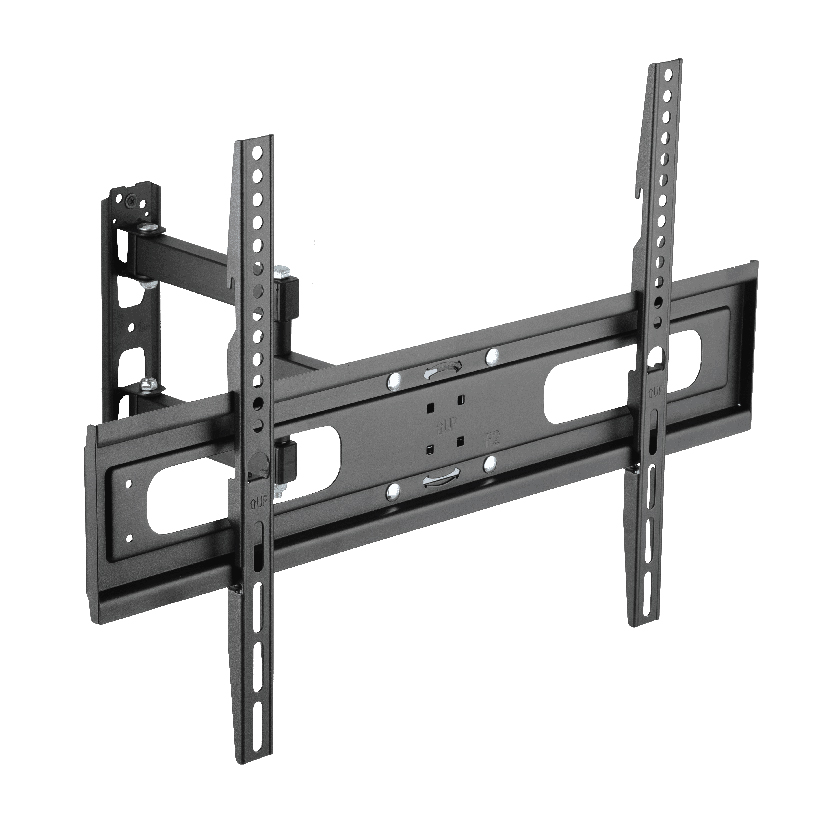
The corner is the spot in the living room that almost never gets used, and that is exactly why so many people want to hang a screen there. A tv mount corner bracket lets you tuck the TV into the angle where two walls meet, freeing up the flat walls for furniture, windows, and doors. The trouble is that a corner does not behave like a flat wall. The studs sit in odd places, the viewing angle is sharp, and a screen pressed into the corner points at no one. This guide covers why corner mounting works, where it gets hard, and how to choose hardware that pulls the screen out of the angle and turns it toward the room.
Why a corner is worth the extra effort
Corner placement solves real layout problems. It puts the screen in space you were not using anyway, which keeps the long walls open for shelving, art, or a sofa. It also keeps the TV away from windows, so glare during the day drops and you stop fighting backlight on a sunny afternoon. And from a corner, a properly angled screen can serve two seating areas at once, such as a sofa and a kitchen island, because the corner sits roughly between them.
The reason people still hesitate is sightlines. A screen that lies flat in the corner faces the diagonal of the room, which usually means it points at the opposite corner instead of at the couch. Learning how to mount a tv in a corner the right way is mostly about correcting that angle, and that correction is the whole job of the bracket.
Why a flat-wall mount does not work in a corner
A fixed or low-profile flat mount holds the screen parallel to the wall it bolts into. In a corner you do not have one wall behind the screen, you have two walls at ninety degrees, and the bracket has to bridge that angle. A flat mount bolted to a single wall leaves the TV pointing along the diagonal, not at the seating. That is why a tv mount corner bracket is built around motion rather than flatness.
There are two general approaches that handle the corner:
- Dedicated corner brackets. These are shaped to span the inside angle and sit against both walls or across the gap, holding the screen at a preset angle into the room. They look tidy but offer limited adjustment once installed.
- Full-motion (articulating) arms. A standard full-motion mount bolted into one wall of the corner can extend the arm and swivel the screen out of the angle and toward the couch. This is the most common and most flexible solution, and a corner tv wall mount full motion arm is what most installers actually reach for.
For a tv mount for corner of room use, the articulating arm wins on flexibility because you can dial the swivel by eye after the screen is up, instead of being locked into a fixed corner angle.
Inside corner versus outside corner
The shape of your corner changes the hardware completely, so name it before you shop.
- Inside corner. This is the common case, the concave angle where two walls form an L and you stand inside it. The screen tucks into the recess and swings out toward the room. Most corner mounting hardware and most full-motion arms are designed for this.
- Outside corner. This is the convex angle, like the edge of a half wall, a kitchen peninsula, or a column. The screen wraps around the outside of the angle. This is rarer and usually needs a specialty bracket or a sturdy single-stud full-motion mount placed on one face.
Most homeowners are working an inside corner, so the rest of this guide assumes that, while the weight and stud rules below apply to both.
Finding the stud, the part that decides everything
This is where corner installs get serious, and it is the step that separates a safe mount from one that pulls out of the wall. On a flat wall you usually have two studs to share the load. Inside a corner, the framing often gives you only one usable stud on each wall near the angle, and the corner stud itself can be a doubled or tripled stack that is hard to drill cleanly. That means your bracket may hang off a single stud, so the weight math matters more than on any flat wall.
Work through it in order before you drill:
- Find the studs with a stud finder, then confirm. Mark every stud within two feet of the corner on both walls. Confirm with a small finishing nail or a magnet on a screw head, because corner framing fools cheap detectors.
- Weigh your TV. Check the spec sheet for the screen weight, not the box weight. A 55 inch set runs roughly 30 to 40 lbs, a 65 inch around 50 to 60 lbs.
- Add the bracket and the swing-out load. A full-motion arm extended into the room multiplies the force on the lag bolts. Pick hardware rated well above the screen weight, not right at it.
- Lag into solid wood, never just drywall. Drywall anchors alone will not hold an extended arm. Hit a stud, or add a plywood backer behind the wall if the framing will not cooperate.
If only one stud is available, a single-stud full-motion mount with a wide plate is the safe path, and the swivel tv mount for corner setups sold for this purpose are built to carry an extended arm off one anchor line.
Comparing the corner mounting options
The choice comes down to a few measurable factors: how far the screen pulls out, how much it swivels, what it costs, and how many studs it needs. The table lines up the common paths.
| Mount type | Swivel range | Extends from wall | Studs needed | Typical price |
|---|---|---|---|---|
| Fixed flat mount in corner | 0 degrees | 1 to 2 inch | 1 to 2 | $20 to $40 |
| Dedicated corner bracket | preset angle | 2 to 4 inch | 1 to 2 | $40 to $80 |
| Single-arm full-motion | up to 90 degrees | 3 to 16 inch | 1 | $50 to $120 |
| Dual-arm full-motion | up to 180 degrees | 4 to 24 inch | 1 to 2 | $80 to $200 |
The read on this is simple. A fixed mount in a corner saves money but leaves the screen pointing at the wrong wall, so it rarely belongs in a corner at all. A dedicated corner bracket is clean but rigid. A full-motion arm costs more yet earns it by letting you aim the screen exactly where the seating is, which is the entire reason for going into the corner.
Where ThunderTech Pros fits a corner install
ThunderTech Pros manufactures its mounting hardware in its own ISO 9001:2015 certified factories, with 17 years of production experience across TV mounts, monitor arms, and AV mounting solutions. That production consistency matters most in a corner, where a single stud often carries an extended arm and the steel quality and bolt tolerances are what keep a loaded mount from creeping over the months after install.
For homeowners hunting the best corner tv bracket, a full-motion arm such as the ThunderTech Pros 340EX (rated to 77 lbs, VESA up to 400x400mm) bolts into one wall of the corner, extends the screen clear of the angle, and swivels it toward the couch. The brand also carries TÜV and UL certification and supplies through Walmart, Costco, Amazon, and Lowe’s, so the hardware clears retail safety review. You can match an arm to your screen size and corner depth on the ThunderTech Pros mount range before you commit to a tv mount corner bracket.
To be fair, ThunderTech Pros is one option among several. Sanus has broad retail reach, Mounting Dream is a strong value pick on Amazon, and VideoSecu covers the budget end. The right call depends on your screen weight, your stud layout, and how far you need the arm to reach.
Match the bracket to your corner and seating
A few common situations point straight to an answer:
- One usable stud, normal living room: a single-arm full-motion mount lagged into that stud, swiveled toward the sofa.
- Two seating areas to serve: a dual-arm mount with the widest swivel so one screen covers both.
- Window glare in the room: corner placement plus a swivel arm to angle away from the light.
- Half wall or column (outside corner): a single-stud full-motion mount on one face, or a specialty wrap bracket.
- Shallow corner, light screen: a dedicated corner bracket if you accept a fixed angle and want the cleanest look.
The deciding factor is almost always the swivel. If the screen cannot turn toward people, the corner install fails no matter how strong the bracket is. That is why a tv mount corner bracket built for motion beats a flat mount squeezed into the angle nearly every time.
Measure the corner, then aim the screen
Start by finding your studs and naming your corner as inside or outside, because that fixes which hardware can even work. Weigh the screen, add margin for the extended arm, and lag into solid wood rather than trusting anchors. Then pick a swivel arm sized to pull the TV out of the angle and turn it at the seating. Do that in order and a tv mount corner bracket converts the dead corner of the room into the best seat in the house, in about an hour of work instead of a weekend of guessing.