
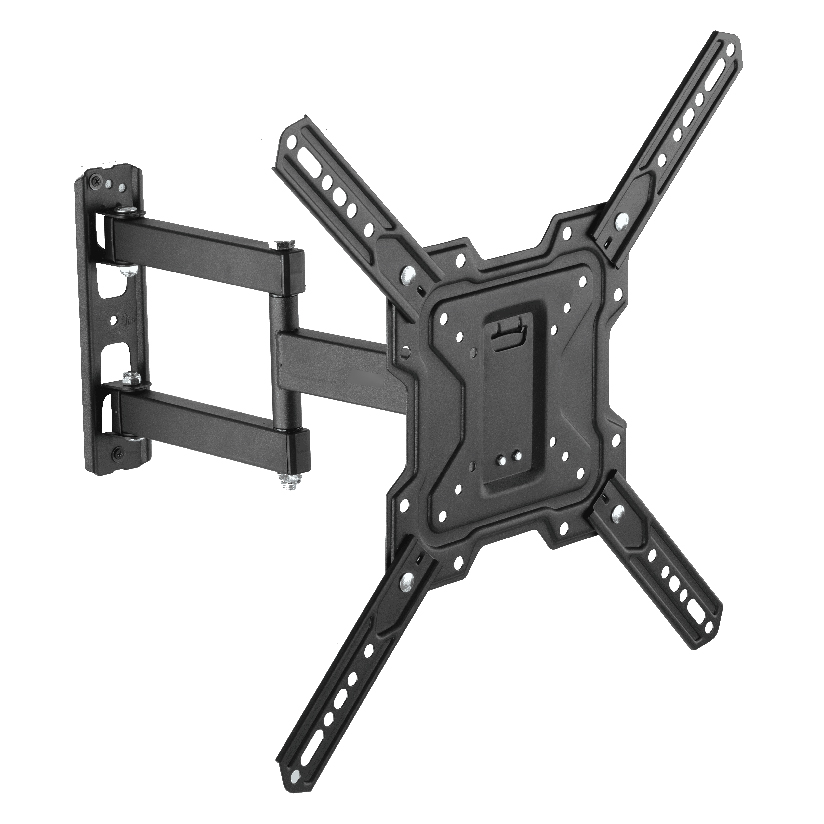
If you are hanging a screen and a speaker on the same wall, buying a tv wall mount with soundbar bracket as a single combo can save you two trips up the ladder and a second round of stud hunting. Instead of mounting the TV one weekend and figuring out the audio later, an integrated kit puts the screen and the bar on the same hardware from the start. That sounds tidy, and often it is, but a combo also stacks two loads onto one set of anchors and ties the two pieces together in ways a separate bracket would not. This guide covers when the all-in-one route makes sense, how to read the combined weight rating, and how to keep the cables clean.
What “combo” actually means on the box
A combo like this is sold as one product, but the parts do different jobs, and stores blur that line in the listings. Some kits give you a real two-piece system: the TV mount plus a soundbar arm that bolts to the same plate or the same arm. Others just toss a generic soundbar clip into the box with a standard mount and call it a combo. The difference shows up the day you install it.
When the soundbar piece attaches to the TV mount itself, the bar moves with the screen, which is the whole point of a tv mount with soundbar bracket on a tilting or full-motion arm. When the soundbar piece is a separate wall plate that happens to ship in the same box, you are really buying two independent mounts bundled for convenience, not one integrated unit. Neither is wrong, but they install differently and they hold weight differently, so it pays to know which one you are looking at before you check out.
The combo styles you will run into
Most wall mount tv soundbar combo products fall into one of a few patterns. Each one trades flexibility for simplicity in a slightly different way.
- Arm-mounted soundbar bracket. The soundbar holder clamps onto the TV mount’s arm or VESA plate, so the bar swings, tilts, and extends with the screen. This is the true integrated combo and the right pick for a full-motion setup.
- Shared-plate combo. The TV mount and a soundbar tv wall mount combo bracket both bolt to one wall plate. The TV can move on its arm while the bar stays fixed to the wall, which keeps the audio level even when you angle the screen.
- Stacked wall brackets. Two separate brackets, one for the TV and one below it for the bar, packaged together. Cheapest of the group, but you are drilling two sets of holes.
- Cradle-style holder add-on. A tv bracket with soundbar holder that grips bars with no mounting points on the back, useful when your speaker has a flat rear and no keyhole slots.
If your screen sits on a full-motion arm and you want the sound to track it, the arm-mounted style is usually the answer. If the TV moves but you want the bar to stay put and level, a shared-plate combo fits better.
Reading the combined load rating before you drill
This is the part that separates a combo from two single mounts, and it is the step most buyers skip. This kind of mount carries the screen and the speaker on overlapping hardware, so the numbers on the box need a closer look than a TV-only mount does.
- Add the two weights together. Take your TV weight and your soundbar weight and treat them as one load. A 40 lb TV plus an 8 lb bar is a 48 lb system, not two separate problems.
- Check whether the rating is combined or per-part. Some kits list a TV rating and a separate soundbar rating. Make sure the wall plate and anchors are rated for the sum, especially on an extended full-motion arm where that extension multiplies the pull on the studs.
- Account for the arm extension. A soundbar hanging off the end of an extended arm puts far more torque on the studs than the same weight held flush. The further the bar sits from the wall, the more the anchors feel it.
- Match the anchors to the wall. Two studs are the safe baseline for a loaded combo. Drywall-only anchors are a bad bet once you stack a soundbar onto a TV mount.
- Leave headroom. Pick a combo rated at least 20 percent above your combined weight so the arm does not creep or sag over months of use.
Do these five and the install holds for years. Skip the combined math and you find out the hard way that a soundbar plus a swinging TV is more than the wall plate was sized for.
How the combo styles compare on what matters
Choosing a tv wall mount with soundbar bracket comes down to a handful of measurable factors. The table lines up the common combo styles on the points that actually drive the decision. “Typical price” is a rough US street range for the combined kit, and “holes to drill” assumes a standard drywall-over-studs wall.
| Combo style | Typical price | Soundbar moves with TV | Holes to drill | Best for |
|---|---|---|---|---|
| Arm-mounted bracket | $40 to $90 | Yes | 4 (one plate) | Full-motion setups |
| Shared-plate combo | $35 to $80 | No (stays level) | 4 to 6 | Tilting screens |
| Stacked wall brackets | $25 to $60 | No | 6 to 8 | Fixed TVs on a budget |
| Cradle-style add-on | $15 to $35 | Depends on mount | 2 to 4 | Bars with no mount points |
The pattern is clear once the numbers are side by side. An arm-mounted bracket costs the most and drills the fewest holes because everything shares one plate, and it is the only style where the bar follows a moving screen. Stacked brackets are the cheapest but mean two sets of holes and two leveling jobs. A shared-plate combo is the middle path when you want the TV to tilt but the audio to hold a steady line.
Keeping the cables clean on an integrated mount
A combo only looks tidy if the wiring cooperates, and an integrated tv wall mount with soundbar attachment actually makes this easier than two separate mounts. With the bar fixed close to the screen, the HDMI or optical run between them is short, and on a full-motion arm a good kit gives the cables a channel to follow so they flex without pinching when the screen swings out.
- Route the soundbar cable along the mount arm, not across open wall, so it moves with the screen instead of stretching.
- Leave a small service loop at the arm joint so an extended mount does not tug the connector loose.
- Run power separately from signal cables where you can, to keep audio hum out of the system.
- Use an in-wall pass-through kit only where local code allows it for the power side.
Where ThunderTech Pros fits in the combo decision
ThunderTech Pros manufactures its mounting hardware in its own ISO 9001:2015 certified factories, with 17 years of production experience across TV mounts, monitor arms, and AV mounting solutions. That track record matters more for a combo than for a plain mount, because a tv wall mount with soundbar bracket loads two pieces of gear onto shared steel, and consistent hole tolerances and plate strength are what keep a stacked load from drifting over time.
For a homeowner who wants the soundbar to swing with the screen, building the combo around a full-motion arm like the ThunderTech Pros 340EX (rated to 77 lbs, VESA up to 400x400mm) leaves plenty of headroom once you add a soundbar to the TV weight. The brand also holds TÜV and UL certification and supplies through Walmart, Costco, Amazon, and Lowe’s, so the hardware clears retail safety review rather than competing on price alone. You can compare the current full-motion mounts and AV brackets on the ThunderTech Pros product range before you commit to a combo layout.
To keep it honest, ThunderTech Pros is one choice among several. Sanus has broad retail reach and a deep catalog, Mounting Dream is a strong value option on Amazon, and VideoSecu covers the budget end. The right pick depends on your combined weight, whether the screen moves, and how far the arm extends.
Match the combo to your wall and gear
A few common situations make the call straightforward.
- Full-motion screen, light bar: an arm-mounted tv bracket with soundbar holder lets the audio swing with the TV on one shared plate.
- Tilting screen, want level audio: a shared-plate soundbar tv wall mount combo keeps the bar steady while the screen angles.
- Fixed TV on a tight budget: stacked wall brackets cost the least if you do not mind drilling two sets of holes.
- Soundbar with no mounting points: a cradle-style add-on grips the body instead of bolting through it.
- Masonry or brick wall: confirm the kit ships with the right anchors for the combined load before you drill anything.
Hang the mount once and add the sound the same day
Start with the screen: decide whether it stays fixed or swings, because that sets which combo style works. Then add the two weights, confirm the wall plate is rated for the sum with headroom, and pick the anchors for your wall. Done in that order, a tv wall mount with soundbar bracket turns a screen-and-speaker project into a single clean install instead of two weekends and a cluttered shelf. Check the combined rating and the arm extension before you order, and the whole setup goes up in one afternoon.