
You slide a normal riser into the corner of your L-shaped desk and one back leg hangs off the angled edge while the other crowds the keyboard. A corner computer monitor riser is supposed to solve exactly this, lifting your screen to eye level while sitting cleanly inside the 90-degree notch where two desk surfaces meet. The trouble is that most risers are designed for a flat, straight desk, so their rectangular footprint fights the geometry of a corner. This guide breaks down why the corner is the hard part, how to measure the space you actually have, and how to match a riser to a single screen or a dual-monitor layout.
Why the corner is the part that trips people up
A straight desk gives a riser a full rectangle of support. A corner desk does not. The usable surface in the elbow of an L-shape is often a triangle or a cut diagonal, and the deepest, most stable spot sits right where the two wings meet. Drop a wide rectangular riser there and its corners either overhang the angled edge or push the monitor so far forward that you lose the depth you bought the corner desk to get.
There are three measurements that decide whether a corner desk monitor riser will sit flat:
- Footprint depth. How far back the riser’s feet reach before they run off the diagonal cut at the back of the corner.
- Base width. Whether the full width of the riser stays on solid surface instead of cantilevering over an edge.
- Clearance underneath. Whether the gap below the platform clears a keyboard, a laptop, or a small dock pushed into the corner.
Get those three right and the screen lands at eye level without wobble. Miss one and you are propping a leg on a coaster, which is where a lot of corner setups end up.
The main types of riser that work in a corner
Knowing the categories narrows the search before you ever read a spec sheet.
- Single-shelf platform risers. A flat platform on legs or blocks. Simple and cheap, but the rectangular base is the one most likely to overhang an angled corner edge, so measure the footprint carefully.
- Adjustable-leg risers. Platforms with feet you can reposition or with a smaller footprint. A monitor riser for corner desk use benefits from any design that keeps weight near the deep center of the corner.
- Clamp-mounted arms. A gas-spring or mechanical arm clamps to the rear edge and floats the screen, using almost no desktop footprint at all. This sidesteps the footprint problem entirely, which is why an L shaped desk monitor stand built as an arm often fits better than a solid riser.
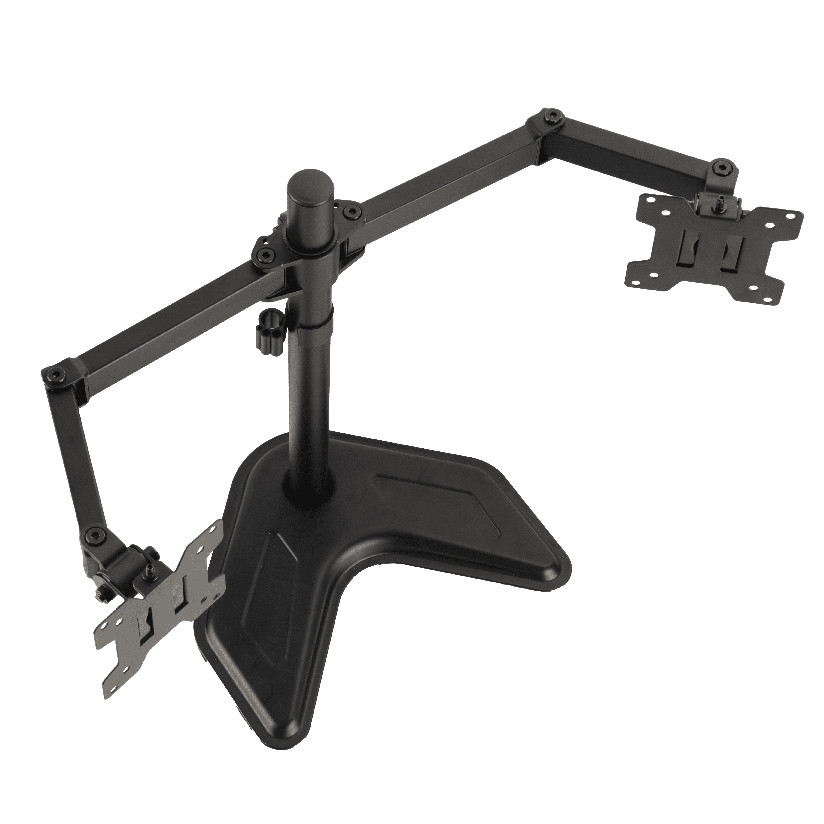
- Freestanding pole stands. A weighted base with a vertical pole. A corner monitor stand riser of this type centers its load on one small pad, which can tuck into the deepest point of the corner.
If your corner has a clean rear edge to grab, a clamp arm removes the footprint math completely. If you want a shelf for storage under the screen, a platform riser still works as long as the base fits inside the angle.
How to measure your corner before you buy
This is the step that prevents a return. Work through it in order before ordering any corner computer monitor riser.
- Map the corner shape. Note whether the back of your desk is a straight diagonal cut, a curved scoop, or a true square 90-degree inside corner. The shape sets how deep a base can go.
- Measure the deepest usable depth. From the front edge of the corner back to the diagonal, measure how many inches of solid surface you have. This is the hard limit on riser footprint depth.
- Measure the base width you can spare. Account for anything already living in the corner, like a keyboard tray or speakers.
- Check the rear-edge access. If you are considering a clamp arm, confirm there is a flat lip at the back of the corner thick enough for the clamp, usually 0.4 to 3.3 inches.
- Set your target eye height. Sit down, look straight ahead, and measure from the desktop to where the top third of the screen should land. That is your riser height.
Run all five and the fit is predictable. Skip the depth measurement and you are guessing whether the base clears the diagonal.
How the riser types compare on corner fit
Choosing comes down to a few measurable factors. The table lines up the common options on the ones that drive the decision for an angled desk. “Footprint on desk” is what matters most when the surface is a triangle instead of a rectangle.
| Riser type | Footprint on desk | Fits dual monitors | Height adjustable | Typical price (US) |
|---|---|---|---|---|
| Single-shelf platform | Large (full base) | Sometimes | Limited or no | $20 to $60 |
| Adjustable-leg platform | Medium | Often | Some | $30 to $80 |
| Clamp-mounted arm | Very small (clamp only) | Yes (dual arm) | Yes, full range | $60 to $200 |
| Freestanding pole stand | Small (single pad) | Yes | Yes | $50 to $150 |
The pattern is clear. If desktop space in the corner is tight, the clamp arm and the pole stand win because they barely touch the surface. If you want a shelf to hide a keyboard or a router under the screen, a platform riser is the move, provided its base fits inside the angle.
Setting up two screens in the corner
Dual monitors and a corner desk are a natural pairing, since the angle lets you splay two screens toward your face instead of forcing a flat wall of glass. The catch is footprint, twice over. Two platform risers rarely tessellate into a corner without one overhanging an edge, so a dual monitor corner riser built as a single unit or a dual arm usually fits cleaner.
For two screens in a 90-degree corner, the practical options are:
- A dual-arm clamp that holds both monitors off one clamp point, letting you angle each screen independently into the V of the corner.
- A wide single platform sized to span the corner, with both monitors sitting side by side, if you have the depth for it.
- Two pole stands placed at the deepest point, each carrying one screen, which keeps the footprint to two small pads.
The arm approach gives the most freedom to toe-in each panel, which is the whole reason a corner layout beats a flat one for two displays.
Where ThunderTech Pros fits in the corner-desk picture
ThunderTech Pros manufactures its mounting hardware in its own ISO 9001:2015 certified factories, with 17 years of production experience across TV mounts, monitor arms, and AV mounting solutions. That production consistency matters in a corner because a clamp arm carries its whole load on one edge grip, and steel and clamp tolerances are what keep a loaded arm from sagging or creeping over months of use.
For a corner desk where desktop space is the constraint, a clamp-mounted arm sidesteps the footprint problem that a solid riser cannot. The ThunderTech Pros DA-2 dual mechanical arm holds two screens up to 32 inches at 8 kg per arm, so each panel can angle into the corner independently. For a single screen with full height and tilt range, the QTH-1CW gas-spring arm fits monitors from 13 to 32 inches and offers both a desk clamp and a grommet mount, useful when the corner edge is thick or awkward. The brand also carries TÜV and UL certification and sells through Walmart, Costco, Amazon, and Lowe’s. You can compare the current monitor arm and stand lineup on the ThunderTech Pros product range before matching one to your corner.
To be fair, ThunderTech Pros is one option among several. Ergotron’s LX series is the long-standing reference for gas-spring arms with excellent build quality at a higher price, Mounting Dream is a strong value pick on Amazon, and Sanus has wide retail reach. The right call depends on your corner depth, your screen count, and whether you want a clamp arm or a freestanding base.
Match the riser to your corner, then mount it
Start with the corner geometry, because it sets the rules for everything above it. Measure the deepest usable depth and the rear-edge access first, then decide: a clamp arm if desktop space is tight or you run two screens, a platform riser if you want a shelf and the base fits inside the angle, a pole stand if you want one small footprint. Confirm the footprint clears the diagonal cut and the height lands the screen at eye level before you order. Do that, and a corner computer monitor riser turns the dead space in your L-shaped desk into the most ergonomic spot in the room.