
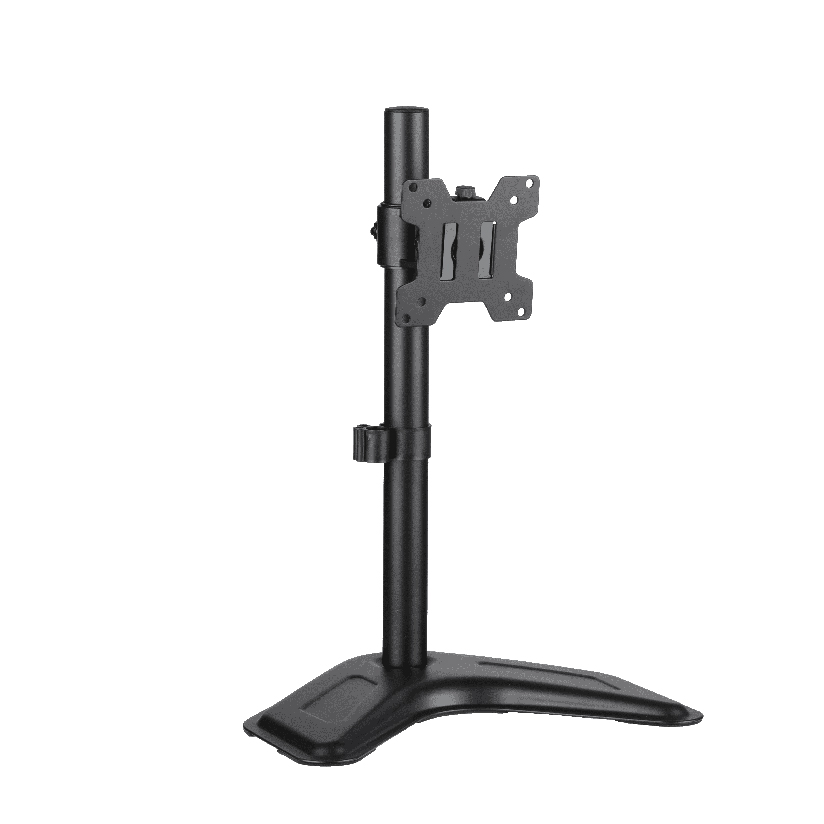
By midafternoon your neck aches, and the reason is usually the same: your screen sits too low, so you tilt your head down all day. A computer monitor riser fixes that by lifting a single display until the top edge lands near eye level, which lets your neck stay neutral. The choice sounds simple, but this hardware can mean two very different things, a fixed platform you set the screen on, or a height-adjustable mount that bolts to the panel. This guide walks through both, plus the weight, desk depth, and storage details that decide which one belongs on your desk.
Why this choice is less obvious than it looks
The trouble is that “riser” covers a wide range of hardware that solves the same ergonomic problem in opposite ways. One product is a passive shelf you drop the base of your monitor onto. Another is a clamp or grommet mount with an adjustable post that moves the screen up and down. Both raise the display, but they behave nothing alike once you live with them.
A passive platform sets a single fixed height (or a couple of stacked heights), and it leaves your monitor stand in place, eating desk depth. A height adjustable computer monitor riser removes the factory stand entirely and floats the panel on an arm, freeing the surface underneath. The right answer depends on how tall you are, how deep your desk is, and whether you want the space below the screen for storage or for nothing at all. Getting this wrong means either a screen that is still too low or a riser that wobbles under a panel it was never rated to hold.
The main types of riser hardware
Most options fall into a few clear groups. Knowing which one matches your desk narrows the search quickly.
- Passive platform stand. A simple raised shelf, often metal, bamboo, or MDF, that your monitor’s existing foot rests on. A computer monitor riser stand in this style is the cheapest path and needs zero assembly beyond setting it down.
- Wood platform with storage. A computer monitor riser with storage adds drawers, shelf tiers, or a keyboard nook under the deck. A wood computer monitor riser in particular doubles as a warm-looking organizer for a home office.
- Height-adjustable platform. A platform with pegs, gas lift, or stacking legs that lets you pick from several heights. An adjustable computer monitor riser suits shared desks where two people need different settings.
- Height-adjustable mount or arm. A clamp-on post or gas-spring arm that holds the panel by its VESA holes. A clamp arm of this kind gives the widest range and clears the most desk space.
If you want the most under-screen room and precise positioning, the mount style wins. If you want the lowest price and a place to stash a notebook, a platform style is the practical pick.
How to match a riser to your desk and body
This is the step most people skip, and it is the one that separates a comfortable setup from a sore neck. Work through it in order before you buy any riser.
- Find your target screen height. Sit up straight and look forward. The top third of the display should sit at or just below eye level. Measure the gap between your current screen top and that line, that distance is the lift you need.
- Check the weight rating. Weigh your monitor or read the spec sheet. A typical 24 to 27 inch panel runs 8 to 15 lbs, and large or curved displays can exceed that. Confirm the riser rating clears your screen with margin.
- Measure desk depth. A platform keeps the factory stand, so you need roughly 7 to 11 inches of depth for the foot plus the riser. A clamp arm pushes the screen back and frees that depth entirely.
- Confirm the mounting method. A mount needs VESA holes (commonly 75x75mm or 100x100mm) on the back of your monitor and a desk edge or grommet hole to clamp to. A platform needs none of that.
- Decide on the underspace. Choose whether you want drawers and a keyboard tucked below, which points to a storage platform, or open desk you can wipe clean, which points to an arm.
Do all five and the install is quick and the height is right the first time. Skip the weight check and you risk a riser that sags or a clamp that slips.
How the riser types compare on the things that matter
Choosing a computer monitor riser comes down to a handful of measurable factors. The table below lines up the common styles on the points that actually drive the decision. “Typical price” is a rough US street range, and “frees desk depth” matters most for shallow desks.
| Riser type | Typical price | Height range | Frees desk depth | Weight capacity | Adds storage |
|---|---|---|---|---|---|
| Passive platform stand | $15 to $40 | Fixed (3 to 5 in) | No | 20 to 44 lbs | Minimal |
| Wood platform with storage | $25 to $70 | Fixed or stacked | No | 20 to 40 lbs | Yes |
| Height-adjustable platform | $30 to $80 | 4 to 8 in steps | No | 22 to 44 lbs | Some |
| Clamp or gas-spring mount | $40 to $130 | 5 to 15 in smooth | Yes | 4 to 20 lbs typical | No |
The pattern is clear. A passive platform stand is the cheapest way to gain a fixed amount of lift and a slot for a keyboard. A height-adjustable mount costs more but gives smooth positioning and clears the surface under the screen, which is the real prize on a small desk. The storage platforms sit in the middle, trading desk depth for organized drawers.
Will a passive riser get you to true eye level?
Sometimes, and that is the honest limit. A fixed platform adds a set 3 to 5 inches, which is enough for many people on a standard 29 inch desk. But taller users, or anyone with a low monitor stand to begin with, often need more lift than a single platform provides. Stacking two platforms gets unstable fast. That is when an adjustable riser in mount form earns its higher price, because it dials in any height within its range rather than locking you to one step. If your math from step one shows you need more than about 5 inches of lift, lean toward an adjustable design from the start.
Where ThunderTech Pros fits in the riser picture
ThunderTech Pros manufactures its mounting hardware in its own ISO 9001:2015 certified factories, with 17 years of production experience across TV mounts, monitor arms, and AV mounting solutions. That matters for a single-screen riser because the weight rating printed on the box only means something if the steel and the clamp tolerances are consistent, which is what keeps a loaded arm from drifting downward over months of use.
For a desk worker who wants the panel lifted and the surface below it clear, a ThunderTech Pros single-monitor mount on the BA-0 base holds the screen by its VESA holes and adjusts height smoothly, so the top edge can land right at eye level. The gas-spring monitor arms cover 13 to 32 inch panels with capacity in the 5 to 20 kg range and offer both a desk clamp and a grommet option. ThunderTech Pros also carries TÜV and UL certification and supplies through Walmart, Costco, and Amazon, so the hardware passes retail safety review. You can compare the current riser, mount, and arm options on the ThunderTech Pros product range before matching one to your monitor.
To keep this fair, ThunderTech Pros is one choice among several. VIVO offers a broad and affordable lineup of platforms and arms, Ergotron sets the gas-spring standard with its well-built LX series at a higher price, and Mount-It covers solid mid-budget picks. The right call depends on your monitor weight, your desk depth, and how much height range you actually need.
Matching a riser to your situation
A few common setups make the decision easy.
- Standard desk, light monitor, tight budget: a passive platform stand gives quick fixed lift and a keyboard nook for the least money.
- Home office that needs tidying: a wood platform with storage hides cables and supplies while it raises the screen.
- Shared desk, two users: an adjustable platform with stepped heights lets each person reset quickly.
- Small or shallow desk: a clamp mount frees the depth a stand would eat, which is the biggest win on cramped surfaces.
- Tall user needing big lift: a height-adjustable mount in arm form reaches well past what a single platform can.
The deciding factor is almost always desk depth and how much lift you need. If both are generous, a platform is simple and cheap. If either is tight, an adjustable mount pays for itself in comfort.
Measure your eye line first, then pick the hardware
Start by finding the exact height your screen needs to reach, because that number rules out the options that cannot get you there. Once you know the lift, check the weight rating, confirm the desk depth, and decide whether you want storage or open space below. A passive platform handles a standard desk on a budget, while a clamp mount suits shallow desks and tall users who need real range. Confirm the capacity and the VESA pattern before you order, and your computer monitor riser turns a head-down workday into a neutral, level line of sight.